
Your permissions need to work everywhere your application does
A sales manager should be able to review their team’s work. That does not mean they should see every contract in the company. And giving an assistant permission to help them should not quietly change either rule.
These are ordinary expectations in a business application. Keeping them true across screens, API calls, attachments and AI tools takes considerably more work than adding a login page.
This is one of the reasons I built Wildo around shared application mechanisms. Corporate policy needs an explicit place in the system. It cannot depend on someone remembering where a permission check was hidden among a million lines of code.
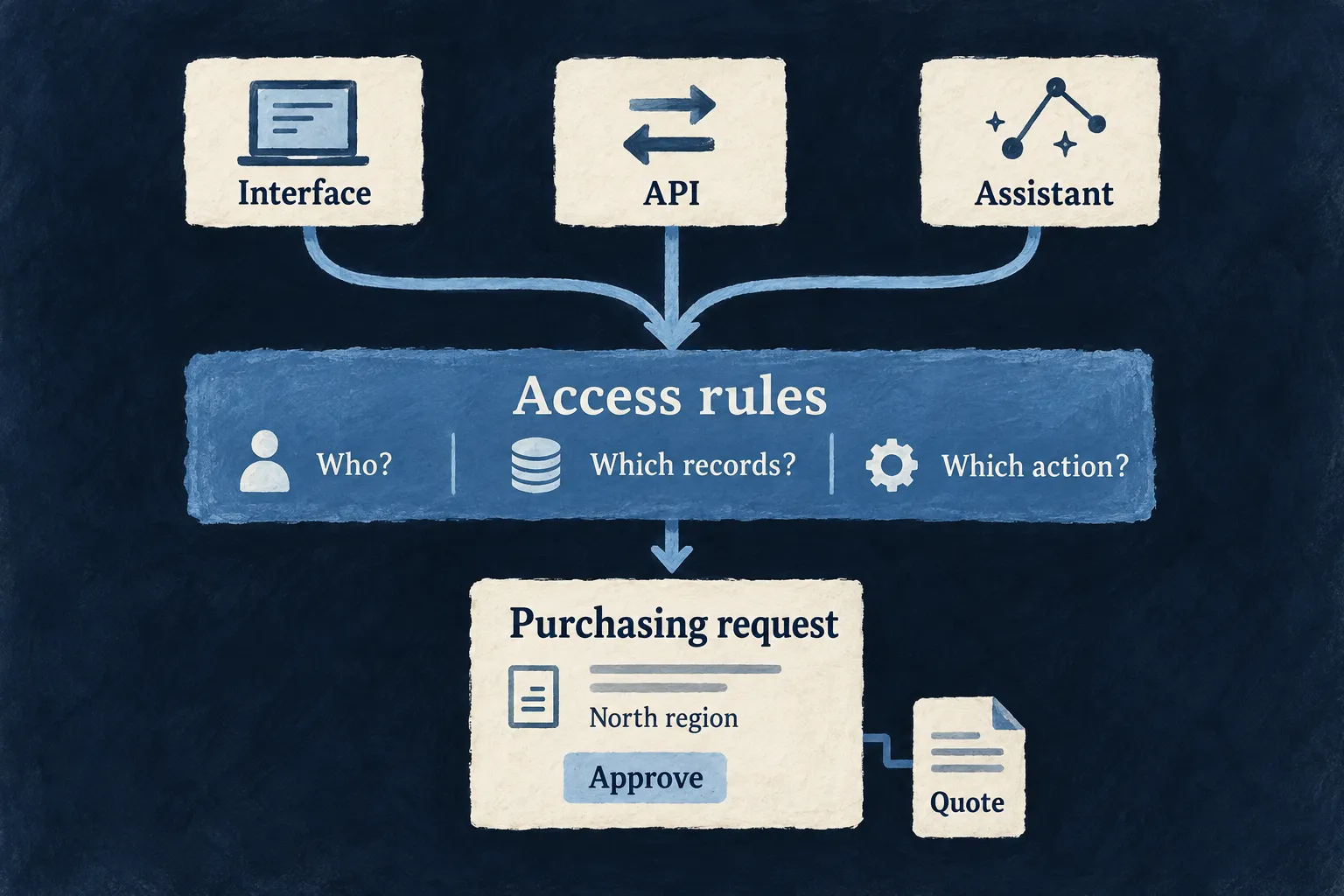
“Who are you?” is only the first question
Signing in establishes an identity. Authorization decides what that identity may do, in which organization, and on which records.
A person might administer one customer account and be an ordinary member of another. Inside an organization, they might manage Sales without having authority over Legal. A service connecting through an API needs its own responsibilities, too.
Wildo combines organization-scoped resources, roles and role inheritance, and organization units to express those distinctions. The application declares the roles required by its operations. A role’s authority belongs to its scope; being an administrator somewhere does not make someone an administrator everywhere.
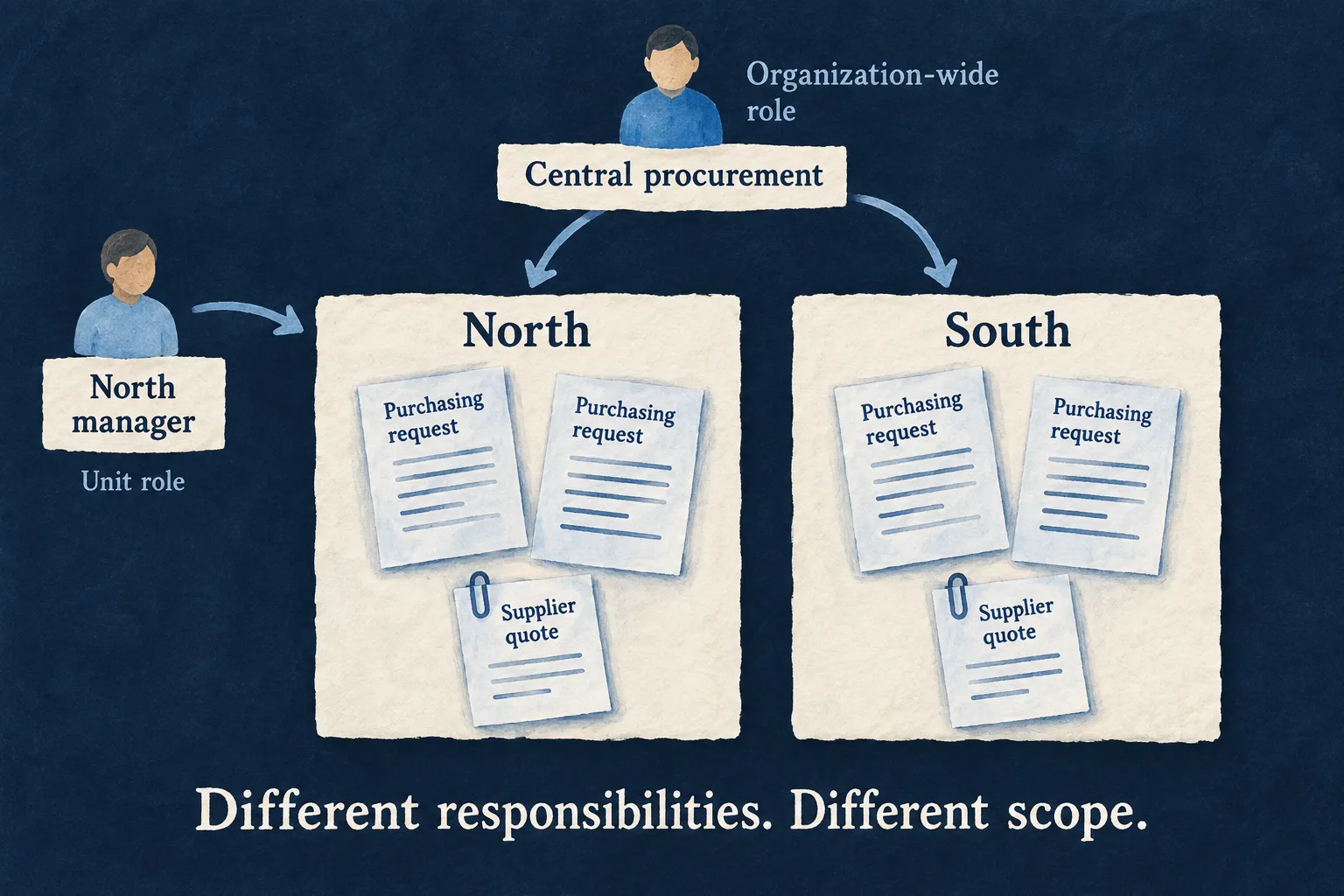
For resources configured to use unit-scoped access, a qualifying team role can grant access to that team’s records. A broader organization role can still authorize work across teams. The distinction is deliberate: membership, responsibility and the records you can reach are related, but they are not interchangeable.
Example: a regional purchasing team
Imagine an application where regional managers review purchasing requests from their own unit, while central procurement works across the organization. A manager in the North region should not gain access to South’s requests simply by changing an identifier in an API call.
This is an illustrative application policy. The application must declare which resources use unit access and which operations each role may perform.
A hidden button is not a security boundary
The interface should help people understand what they can do. It should not offer an action that will predictably be refused. But the server must still decide whether the action is allowed when the request arrives.
Someone can call an endpoint without using your screen. A background integration can make the same request. Tomorrow, an assistant may do it through a tool.
In Wildo, roles are part of the resource’s operation declaration. Shared role information supports interface decisions, while backend authorization checks the caller and scope. Custom interfaces still need to use those contracts; hiding a control never replaces the server check.
It also matters what the action means. “Approve a request” deserves its own inputs, permissions and business behavior, rather than becoming an unrestricted edit of a status field. Custom resource operations provide that place.
| Question | Where the answer belongs |
|---|---|
| May this person approve requests? | The operation’s required roles and the caller’s authority. |
| Which requests may they act on? | Organization, record context and configured unit restrictions. |
| May this particular request be approved now? | The application’s business rules: its state, amount or required reviews. |
| Which values may leave the server? | The operation’s response contract and field declarations. |
A spending threshold or a rule against approving your own request remains application logic. The framework supplies the common access mechanisms around it, so that logic has a clear home instead of being copied into every screen and endpoint.
Field declarations address another part of the problem: values that should remain server-only, secrets that can be entered but return masked, and fields excluded from updates. Those choices are distinct from permission to read the record itself.
An attachment belongs to something
Files make authorization easy to underestimate. Uploading a document is one task. Deciding who may retrieve it later is another.
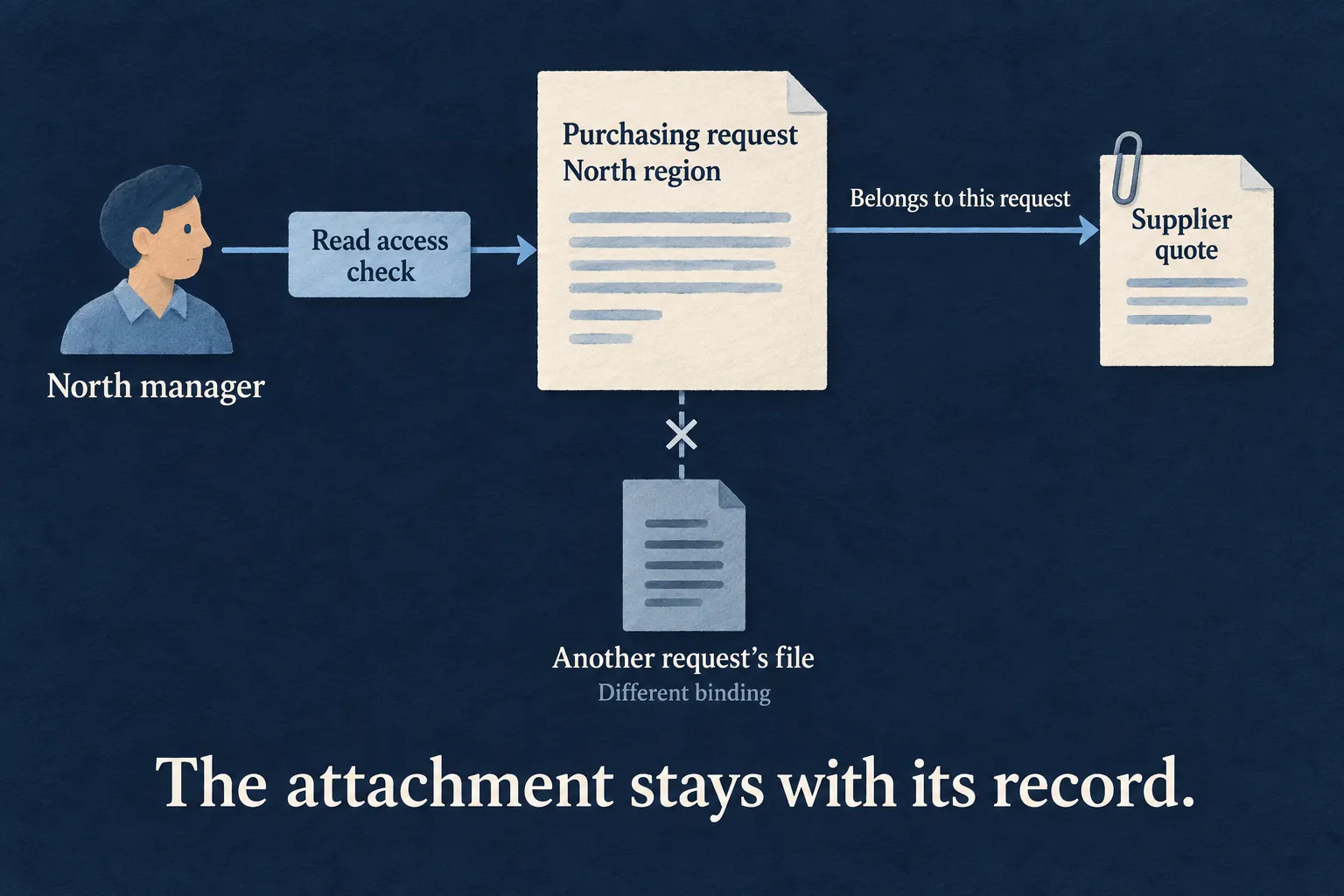
A supplier quote belongs to a purchasing request. Its storage location or file identifier should not be mistaken for permission to read it.
Wildo’s resource file route checks the owning record’s read authorization, verifies that the file belongs to that exact record and field, and applies the file’s own scope checks. This gives a record’s attachment view a concrete connection to the record’s permissions.
Example: opening a supplier quote
A regional manager opens a quote through its purchasing request’s file route. The route checks access to the request as well as the attachment binding. Substituting a file identifier from a different request does not satisfy those checks.
The other ways to reach a file answer different questions, and it helps to keep them apart. Wildo’s general file download and metadata routes also require read access to the record an attached file belongs to; an upload not yet attached to any record is available only to whoever uploaded it. A public share link is different by design: someone who can read the record mints it for a field that allows sharing, and the link then works for whoever holds it, while the file stays attached to that record. A confidential-document policy decides which fields may be shared at all.
The same separation helps with uploads from agents. As I explained in Files and MCP, a consumable token can authorize a specific upload without moving the file’s bytes through the conversation. Permission to upload is still separate from permission to attach that file through the final record operation.
An assistant is another caller
Adding an AI assistant should not mean giving it a master key.
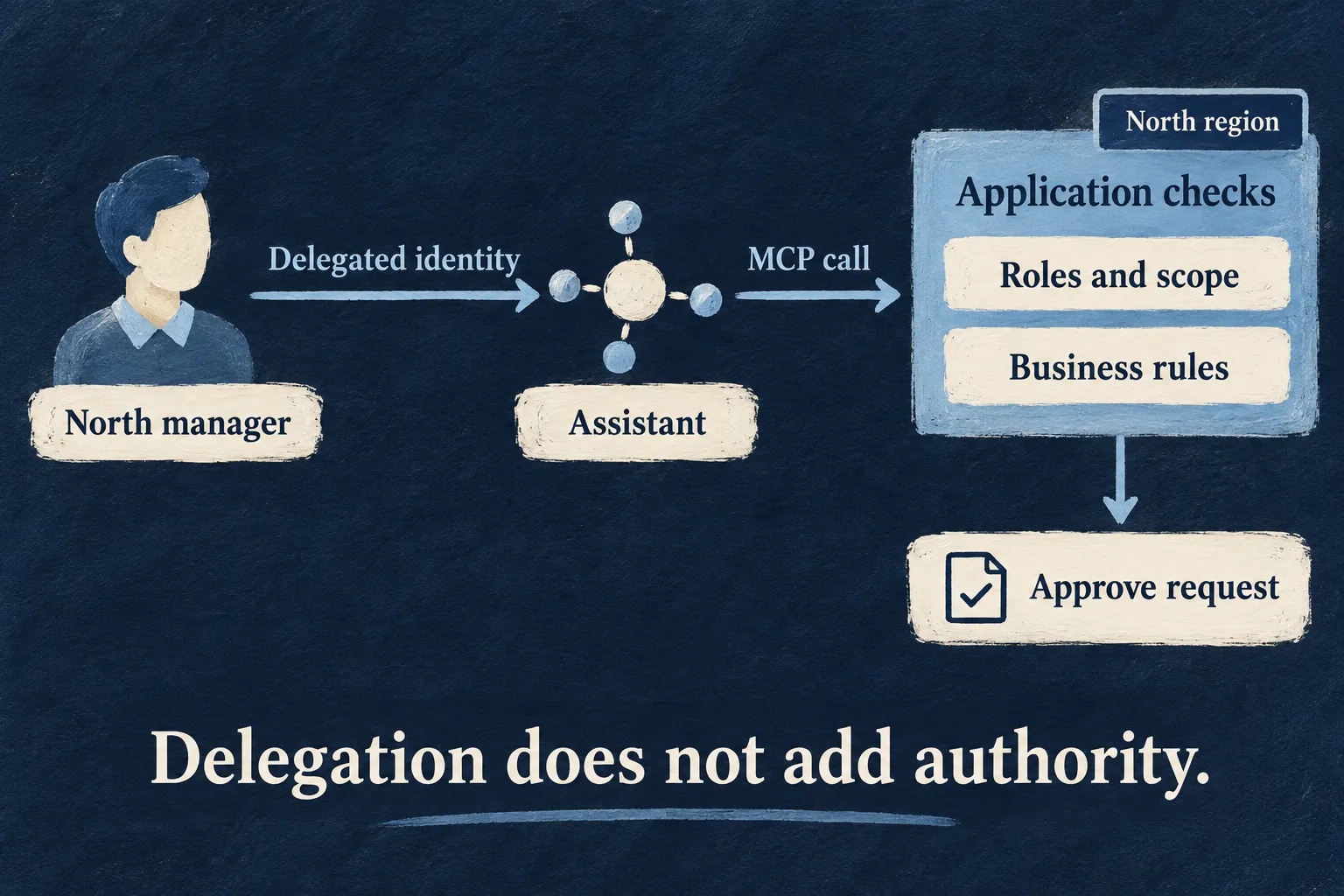
Wildo can expose selected resource operations as MCP tools. When a tool is called, the backend binds the requested operation to the caller’s context and runs authorization before executing it. Appearing in a tool catalogue is not itself permission to execute.
With delegated access, a person authorizes a connected tool for a particular agent endpoint. The delegation retains the person’s identity and the client’s attribution. Their current business roles still matter; permission to connect does not grant permission to approve a purchasing request.
Example: “Approve this for me”
An assistant acting for a regional manager may call an exposed approval operation only if that manager’s authority permits it. The operation must then apply the application’s approval rules. Rephrasing the request in a chat does not change the manager’s responsibilities.
Search results need permissions, too
An assistant can reveal information without downloading a file. Quoting a confidential paragraph in an answer is already a disclosure.
That is why retrieval-augmented generation, or RAG, needs more than a relevant search result. It needs to know whether this caller may read the source.
Wildo lets the application select which document fields contribute to its retrieval corpus. Its resource retrieval service uses the caller’s execution context, narrows the search by scope and checks matched records through authorized reads before returning their passages.
Example: “Summarize our supplier proposals”
A purchasing assistant retrieves from the selected proposal documents under the requesting person’s authority. A document being indexed does not make it available to every employee. Private attachments can also remain outside the corpus entirely.

The important check happens before the passage reaches the model. Asking an assistant to keep a secret is not a substitute for controlling which sources it receives.
Make the policy something you can govern
A useful authorization system must also let people change responsibilities and understand what happened. Who granted a role? Which organization did it affect? Why was an action refused?
Wildo provides auditable changes to organizational authority and authorization-denial events. These records make access administration and investigation part of the application, rather than a separate exercise in reconstructing scattered decisions.
That is the point of bringing these mechanisms together. Your business defines the responsibilities, boundaries and exceptions. Wildo gives those decisions named places in the application and shared mechanisms that enforce them across its declared surfaces.
As interfaces, integrations and agents multiply, the policy needs to remain understandable. You should be able to find it, explain it and test it—without reading the whole application to discover what somebody is allowed to do.