Wildo.ai Coming soon

Operate several applications

Use shared platform services to support applications with their own configuration, identity and customer access.

Application registration · shared scheduling · separate application runtimes

> Shared operating services > Application-specific identity and configuration > Explicit customer-access boundaries

A Wildo platform environment can support several applications through shared registration, configuration, scheduling and module services. Each application remains a separately identified product with its own runtimes and customer organizations.

Reuse the operating foundation while keeping clear who can configure an application, execute its work and administer its customers.

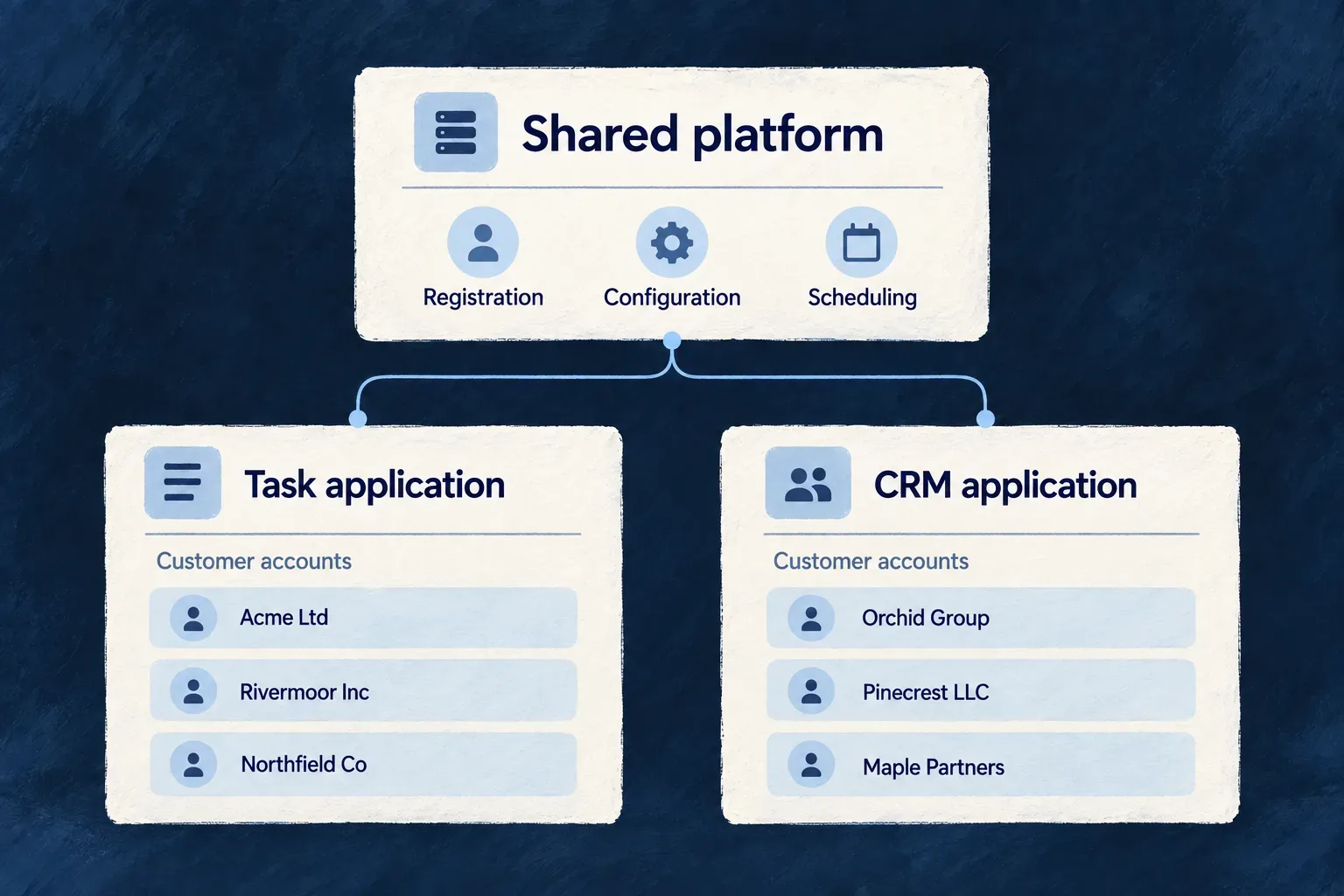
A shared platform serves a task application and a CRM application, each with its own customer accounts.

Share the foundation, preserve the context

Reuse operating services

Adding an application uses the same registration and bootstrap mechanisms. Its configuration and schedules join the shared platform through authenticated, application-specific contracts.

Carry the application’s identity

Runtime configuration and scheduled instructions name the application they belong to. A shared manager or scheduler does not turn different products into one application.

Keep customer authority separate

Each product has its own administrative roles and customer memberships. Support actions use explicit admission and temporary access, with evidence that makes the crossing understandable.

Example: Operate a task product and a CRM

A team runs both products on the same platform environment. They share operating services, while each application has its own registration and startup configuration. A CRM customer’s administrator manages its CRM account; that membership provides no authority in the task product.

For engineers

Each application keeps its own wildo.saas.config.ts and environment configuration. Register it under its own identity rather than treating another customer’s organization as another hosted application. An organization is a tenancy boundary inside a product; adding a product is an application lifecycle operation.

For example, Wonder Todos and Wonder CRM author different slugs and data-service prefixes. These selected fields come from their separate wildo.saas.config.ts files; surrounding declarations are omitted. They illustrate naming, not complete configurations to paste into another product.

// Wonder Todos — selected application configuration fields
slug: 'wonder-todos',
dataServices: {
  mongodb: { databasePrefix: 'wonder-todos' },
  postgresql: { databasePrefix: 'wonder-todos' },
  redis: { keyPrefix: 'wonder-todos:' },
},

// Wonder CRM — selected fields from its separate configuration
slug: 'wonder-crm',
dataServices: {
  mongodb: { databasePrefix: 'wonder-crm' },
  postgresql: { databasePrefix: 'wonder-crm' },
  redis: { keyPrefix: 'wonder-crm:' },
},

The service declaration connects that identity to actual application directories. For example, Wonder CRM declares these selected services alongside its slug; other services and configuration are omitted:

slug: 'wonder-crm',
services: {
  backendApi: {
    path: './backend-api',
    serviceName: 'wonder-crm-backend-api',
    defaultPort: 4251,
  },
  app: {
    path: './frontend',
    serviceName: 'wonder-crm-app',
    defaultPort: 4252,
    frontendType: AppFrontendType.SAAS_APP,
  },
},

Select the existing local environment through the CLI’s environment configuration; the application declaration does not create another platform environment. Registration resolves the selected slug in that environment, obtains its manager-assigned APPLICATION_ID, and projects identity and connections into these declared runtime targets. The backend path also identifies the backend-authored configuration used to validate bootstrap user types.

ValueWhat can be sharedWhat belongs to each product
Platform destinationBoth can select the same operating environment and its manager/scheduler servicesEach registration is still resolved for its own application
Application slugA naming conventionA separately authored slug, such as the two above
Data-service namesBacking-service infrastructure where configuredDatabase and Redis prefixes authored for each application
Runtime topologyRuntime patterns and container-internal port conventionsEach product’s services, paths and exposed addresses; local host listeners must not collide
APPLICATION_IDNothing to copy from another productThe manager-assigned identity, persisted by environment and application slug
First administratorThe bootstrap mechanismThat application’s user types and initialization credentials

Prefixes express naming choices, not authorization policies. The environment selects the database engine and service connections; showing both database naming branches does not request both persistence engines. Separate containers may reuse internal ports even when published host addresses must differ.

Do not invent an APPLICATION_ID from the slug or copy it from the first application. The bootstrap workflow obtains it from the application manager and carries it into that application’s runtime projections.

The registration workflow derives runtime configuration from a shared prepared application snapshot. The backend, companion, workers and minions are consumers of that application’s setup, not independent products registered by guesswork.

Distinguish the identities before granting access

QuestionRelevant identity
Which application is fetching its managed configuration?Registered application and bootstrap credential
Which service may administer the shared scheduler?Authorized platform-service identity
Which background runtime is reading its own schedule?Application-owned runtime principal
Who may operate this product’s administrative resources?Application-scope role inside that product
Who may act for this customer?Customer membership or explicitly admitted temporary access

These identities have different issuers, scopes and consumers. The shared platform’s credentials do not replace the hosted application’s role hierarchy. Likewise, a product administrator’s role does not confer administrative access to every other application in the environment.

Bring another application into an existing local platform

With the application declaration in place, its active environment set to local, setup credentials present and the platform running, the local registration-only workflow prepares the application without converging the shared substrate:

wildo local init --register-only

This command does not deploy a remote workload. The registration guide below explains preparation, migrations, seeding and runtime projection as separate outcomes. After setup, check the application’s authenticated startup and the services it actually uses.

Prepare a separate approving administrator when the product uses grant-controlled application-wide reads. The registration guide distinguishes local development convenience from an explicitly supplied non-local identity.

Follow work and changes to their own evidence

A signed scheduled tick identifies its application and work target; the receiving application verifies and executes it. Review dispatch and the resulting application effect separately.

Within the product, a support crossing names its target customer and grant. A membership change retains the authority before and after the mutation. Those are application audit concerns, not a global customer-access right created by sharing infrastructure.

Coordinate operation. Keep authority explicit.

Shared platform services prepare applications, supply startup configuration and coordinate scheduled work. Each application keeps its own identity and the responsibilities of its runtimes.

Inside an application, product administrators and customer organizations have separate authority. Support access crosses a customer boundary through declared actions and usable grants, with records explaining the access and authority changes.

Shared platform services coordinate applications; customer access remains scoped inside each application.

Follow the responsibility from setup to support

Prepare once, start with the right configuration

Register each application with its own identity and service declarations. Its runtimes receive the configuration intended for them; managed-setting changes are consumed on their next start.

Share the clock, keep execution with the application

The platform dispatches scheduled work to the intended application or minion. The receiving runtime performs it, so dispatch and business completion remain separate outcomes.

Keep customer authority inside each product

Shared hosting does not grant access to another product’s customers. Support uses declared actions and usable grants, with crossing and authority-change evidence explaining the work.

Example: Add a product, then support one of its customers

A team registers a CRM beside its existing task product. Both use shared operational services. Later, a CRM product administrator obtains appropriate customer access and reactivates a suspended CRM account. The action and authority remain within the CRM; shared hosting does not grant access to the task product’s customers.

For engineers
LayerIdentity or scopeWhat it controls
Platform environmentExplicit environment identifierThe shared operating context
Registered applicationCanonical application ID and managed recordConfiguration, provisioning and scheduled-work routing
RuntimeApplication-owned service or runtime principalThe process’s connections and permitted work
Product administrationApplication-scope role within one productThat application’s administrative operations
Customer accountOrganization membership and unit assignmentsWork within the customer’s scope
Temporary support accessTenant or application-wide grantA specifically admitted crossing or read

The operational application manager is not the application-wide super-administrator role. One is a service in Wildo’s platform; the other is authority resolved inside a hosted application’s resource system.

Carry setup through to startup

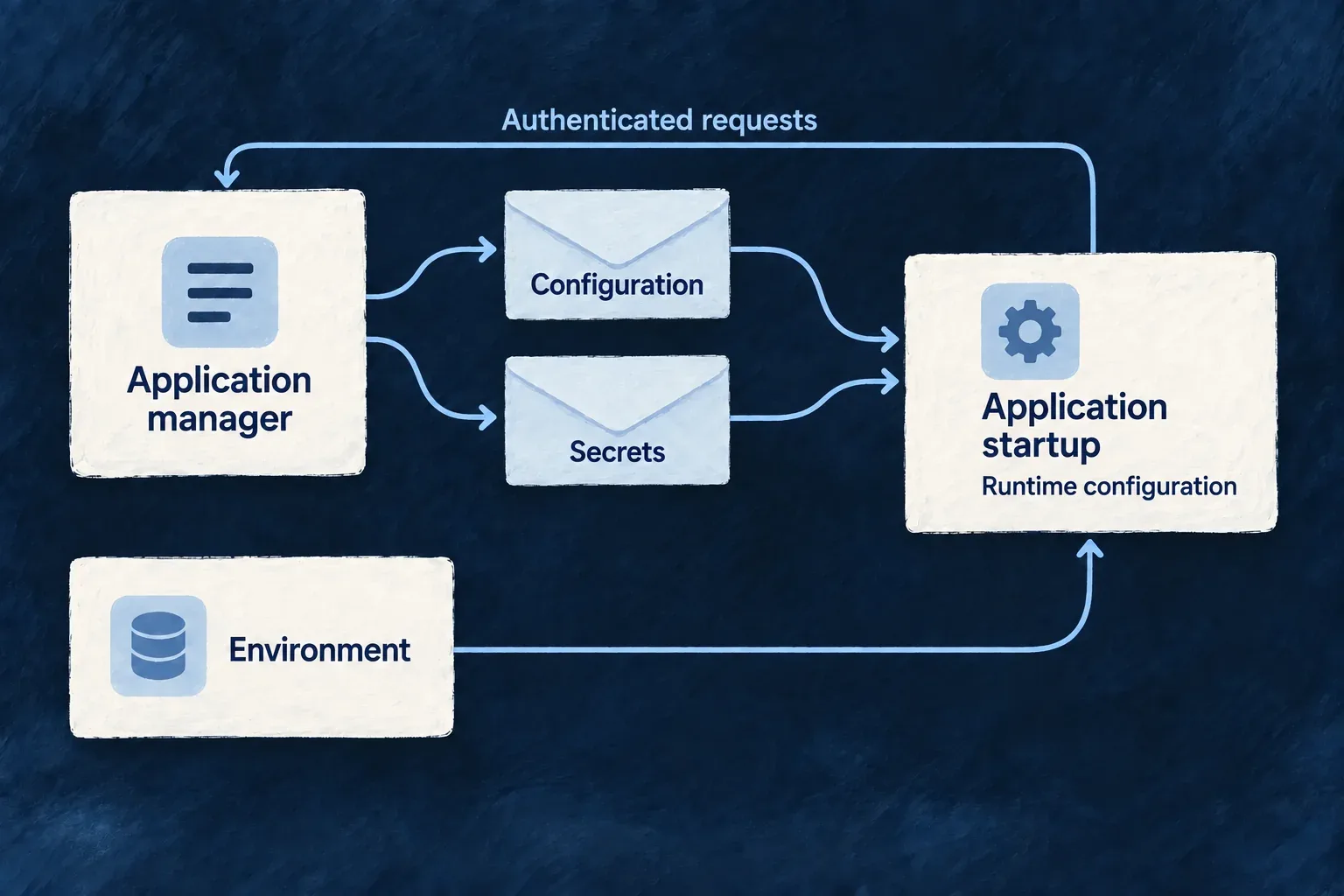
Register the application before asking its runtimes to load managed configuration. The registration workflow prepares one application snapshot and derives its runtime projections. The loader starts with environment-owned identity and connections, then authenticates separate configuration and secret requests.

The CLI coordinates application migrations and seeding where required. Check the explicit seeding result and actual bootstrap exchange; neither the existence of a platform record nor a generated environment file establishes that the workload is deployed.

Application-wide read approval also needs a different application super-administrator. Prepare that identity through the registration workflow; a first administrator alone does not make that approval path usable.

Keep shared scheduling attributable

An application’s startup synchronizes its declared scheduled work. The shared scheduler delivers signed ticks to the intended application’s queues, with a distinct route for minions. Scheduler replicas coordinate through a lease; the application owns execution and idempotency. A PUBLISHED record establishes dispatch, not business completion.

Evaluate support access before interpreting its evidence

An admitted operation combines the caller’s role, operation declaration and usable grant. Tenant and application-wide grants have different scopes. The admission flag is not a grant, and the crossing observation is not the authorization decision.

For an ownership-repair example, follow declared support actions. For a review of who changed membership, follow authority-change evidence. Both use existing engine mechanisms; application authors should preserve those contracts when adding their own administrative behavior.

Best-effort observation does not make the audit store and business transaction atomic. Keep the destination and loss diagnostics operational, and examine the grant lifecycle alongside the recorded action.

Prepare and operate applications

Share the services around your applications Guarantee

Applications can share the services that register them, coordinate scheduled work and distribute reusable modules. Each application keeps its own identity and configuration while using the same operational foundation.

Wildo packages these services for the supported deployment workflows, with initialization and health checks built into their startup.

Example: Operate a task product and a CRM together

Both applications use the application manager and scheduler. Each registers its own configuration and jobs; shared module infrastructure supports reuse. Operating these common services does not merge the applications’ customer accounts or grant universal access to their records.
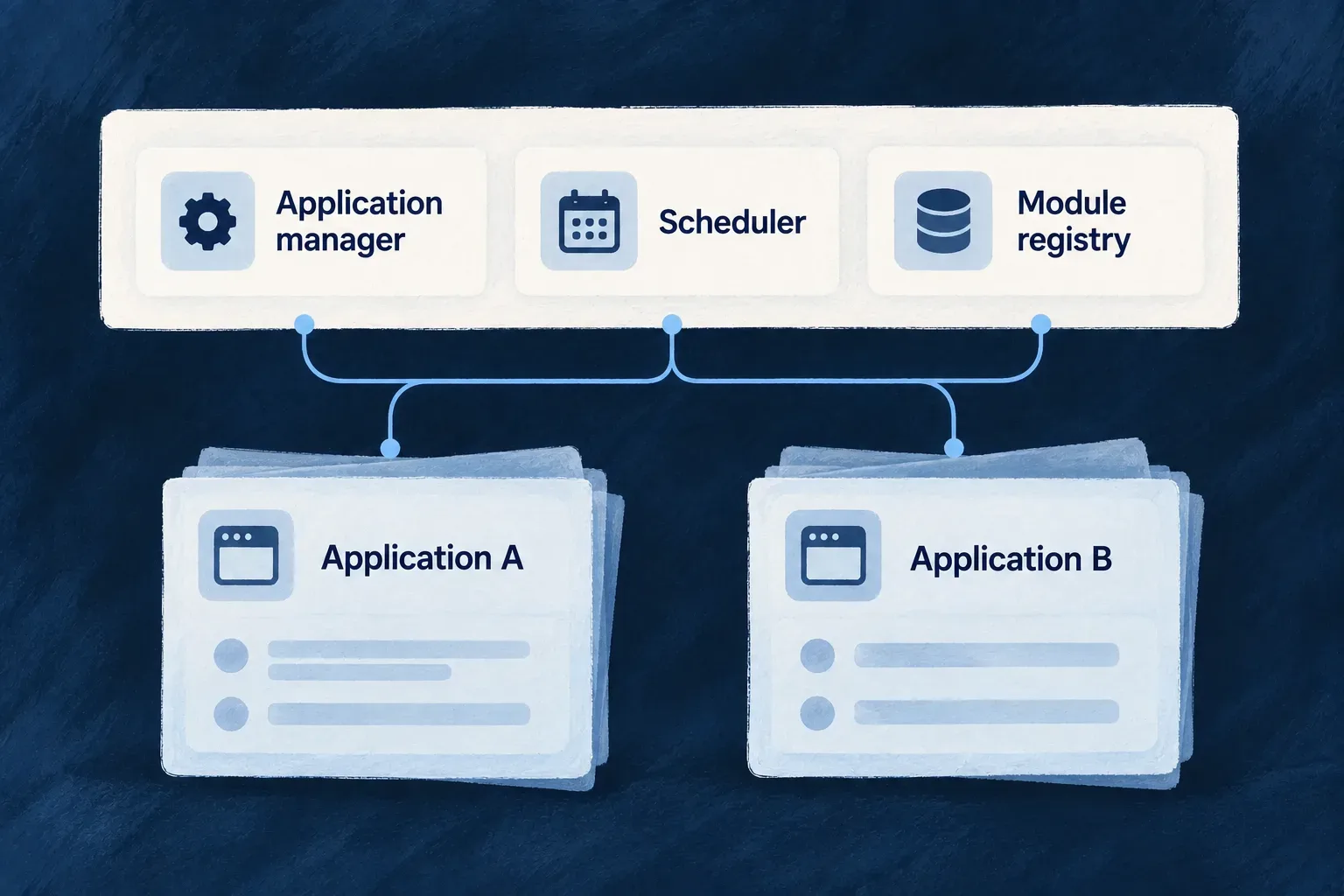
Registration, configuration and scheduling services serve two distinct applications.
For engineers
ServiceOwnsDoes not replace
Application managerApplication registration, managed configuration and credential provisioningApplication deployment and business logic
Crontabs and batches managerSchedule records and signed dispatchThe application’s job execution and outcome
Module registryShared module publication and retrieval infrastructureApplication-specific composition and behavior
Initialization jobOne-time platform setup for the environmentA continuously running application service

The deployment templates use a shared platform image with a runtime service discriminator. Compose and Kubernetes describe the platform services and their initialization dependencies. In framework development, services can run from source. These are execution choices around the same named responsibilities.

Platform services use the engine’s repositories and runtime mechanisms, with service-specific startup sequences. The application manager and module registry extend the common startup; the schedule manager uses its own two-phase sequence. A common engine does not mean their readiness dependencies or initialization order can be ignored.

Match the caller to the door

Sharing a service does not mean sharing one credential or one permission model for all its endpoints.

DoorCallerPurpose
Scheduler administrationApplication-manager service identityInspect or manage scheduler state
Application job synchronizationAuthenticated applicationSynchronize that application’s jobs
Runtime’s own scheduleAuthorized runtime principalRead its own schedule and history

This selected middleware from crontabs-scheduler.crontab.controller.ts protects the administrative scheduler routes. Comments and later route registration are omitted; the excerpt stops inside setupRoutes.

protected setupRoutes(): void {
  this.router.use((req, res, next) => {
    const middleware = this.authMiddleware.create({
      allowPlatformServices: true,
      allowApplications: false,
      expectedAudience:
        PlatformApplicationType.PLATFORM_CRONTABS_BATCHES_MANAGER,
    });
    return middleware(req, res, next);
  });

  this.router.use((req, res, next) =>
    this.authzMiddleware.requireAppsManager()(req, res, next),
  );

The first layer authenticates an appropriate service token and audience. The second requires the application manager’s identity. The application synchronization and runtime self-read endpoints deliberately use other contracts; do not apply this administrative example to all scheduler traffic.

Separate operational control from customer authority

A platform environment hosts registered applications. Each application can then have its own application-wide administrators and customer organizations. Those application roles govern its resource operations; they are not the credentials the application manager uses to operate the shared platform.

Provision the shared services and their access before bootstrapping applications. Inspect each readiness endpoint and the specific authenticated exchange needed by the caller. A generated service definition establishes the intended deployment, not a running multi-region service or a guarantee of uninterrupted operation.
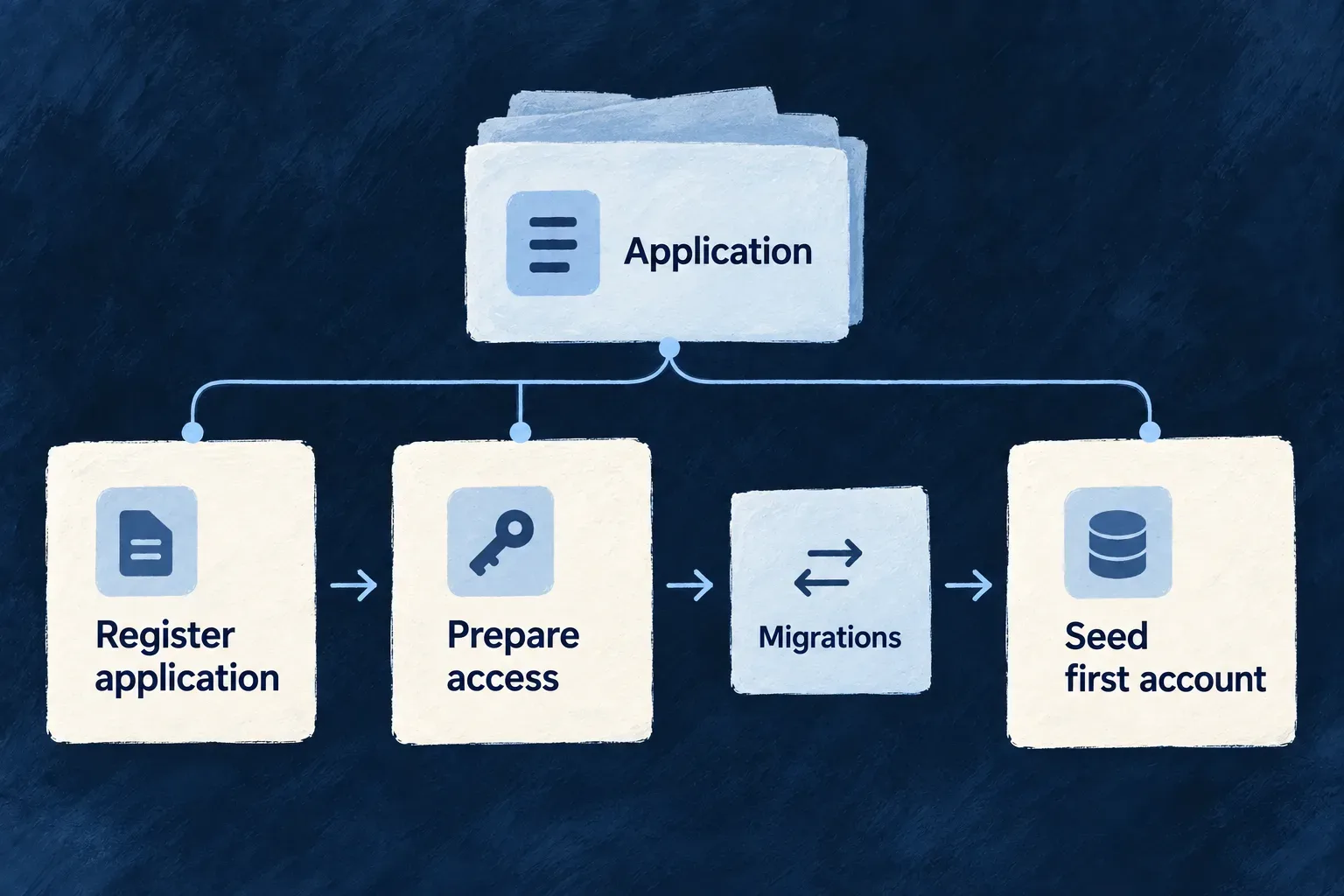
Prepare another application for its first start Mechanism

Register an application with its own identity and service declarations. Wildo prepares its platform records, service access and first application records, then derives the configuration its runtimes need.

The local workflow can add an application to a running platform without restarting its shared services. Deployment remains a separate step.

Example: Add a CRM beside an existing task application

The task application already uses the local platform. Registering the CRM prepares its own records and runtime configuration while keeping the shared platform running. The CRM’s users and customer organizations belong to the CRM, not to the task application.

Application registration prepares access before migrations and initial account seeding.
For engineers

From the application root, with its wildo.saas.config.ts and selected environment configured, use the registration-only local path when the platform is already running:

wildo local init --register-only

The active environment must be local, with the operator credentials established by wildo setup; this command rejects remote environments. The platform must already be reachable and healthy. This path skips shared cleanup, platform initialization and substrate convergence. Full local initialization has a different effect and refuses when an active development session owns the platform. The registration-only path lets another application join without taking ownership of that shared lifecycle.

Author the application’s bootstrap policy and service requirements first. Operator credentials and generated key material are not application source literals. The first administrator’s application user types belong in the authored bootstrap settings; their actual login material comes through the initialization workflow.

Match the first administrator to a declared user type

For example, Wonder CRM declares this bootstrap selection in wildo.saas.config.ts (selected fields):

bootstrap: {
  firstAdmin: {
    userTypes: ['member'],
  },
},

The authoritative backend’s src/saas-config.backend.ts must declare the matching userTypes.member entry and its authentication policy. Registration rejects an empty selection, a missing authoritative backend or configuration file, and user types absent from that backend. A user type identifies a category of user; it is not an administrator password or role declaration.

The initialization workflow can also receive a distinct approving administrator. That identity is optional for bootstrap, but application-wide access grants require another administrator to approve the request. Creating one administrator does not by itself make that two-person workflow operable.

Prepare the administrator who can approve wider reads

Some application-wide directory and audit reads need a temporary application-wide access grant. That request always starts pending and must be approved by a different application super-administrator. This is not a requirement for every application-scoped operation; the declared read admission determines when it applies. See product and customer authority for the two grant scopes.

The approving identity belongs in the selected environment’s authored secrets.json, in the approver block with email, firstName, lastName and password. Keep it outside application source and version control.

Starting pointHow the approving identity reaches registration
Fresh local application created by wildo initWith no existing secrets file, the CLI accepts all four WILDO_INIT_APPROVER_* inputs or derives a separate local identity from the first administrator
Existing environment or setup-created secretsPreserve the current secrets and author the complete approver block. Setup reconfiguration can fill an absent identity using its local or non-local policy; completed setup and generic additive secret provisioning leave it unchanged
Non-local environmentSupply the named approving administrator and their own password in the environment’s secrets; local identity derivation is not a remote provisioning policy

The four explicit inputs are WILDO_INIT_APPROVER_EMAIL, WILDO_INIT_APPROVER_FIRSTNAME, WILDO_INIT_APPROVER_LASTNAME and WILDO_INIT_APPROVER_PASSWORD. The local fallback replaces an email’s sub-address with +approver and shares the development password. It creates a different identity so a developer can exercise both decisions; it does not prove that two people participated.

For an existing local application on a running platform, add the block and run wildo local init --register-only. Registration forwards the identity to the application-manager seeding phase. Repeated seeding preserves an existing approver’s password instead of resetting it. Check the seeding outcome and sign in as the intended approving account before relying on the workflow. Remote environments use their provisioning workflow, not this local command. Older secrets without an approver remain readable; successful registration alone does not establish that application-wide approval is usable.

Derive every runtime from the same registration

The following framework implementation excerpt comes from application-runtime-bootstrap.service.ts; explanatory comments are omitted. Application authors do not call these helpers individually. They show why the backend, companion, workers and minions receive projections of the same prepared target.

const prepared = await AppBootstrapService.prepareApplicationEnvTargets(registeredTargetInput);
if (!prepared) {
  throw new Error(
    'Application bootstrap resolved no application target. Check wildo.saas.config.ts and the selected application slug.',
  );
}
const projectionInput = { ...registeredTargetInput, prepared };

const applicationBackends = await AppBootstrapService.buildApplicationBackendTargets(
  projectionInput,
);
const companionApis = await AppBootstrapService.buildApplicationCompanionTargets(
  projectionInput,
);
const applicationWorkers = await AppBootstrapService.buildApplicationWorkerTargets(
  projectionInput,
);
const applicationMinions = await AppBootstrapService.buildApplicationMinionTargets(
  projectionInput,
);

The workflow synchronizes the projections, then performs a signed platform-to-platform configuration read as the application manager, naming the target application slug. It checks that the returned slug matches and that the frontend-services projection is nonempty. This probe does not authenticate using the application’s backend primary secret.

A declaration-reapply dry run then compares the stored configuration with wildo.saas.config.ts: an empty updatedFields result establishes declaration coherence; any proposed change fails verification. Preparing once avoids mixing separately obtained registration or credential snapshots between runtime files.

These checks establish the selected application’s managed configuration, not its first login or every runtime’s health. Check the running application through its health and readiness endpoints, then verify its required services and first login independently.

Keep provisioning, migrations and seeding distinct
StageWhat it establishesOwner
RegistrationPlatform-side application, owner and configuration recordsApplication manager
Service preparationRequested database/broker/storage access and key materialConfigured provisioning services
Application migrationsTables and schema required before relational writesCLI bootstrap’s migration step
First recordsInitial application organization, administrator and credentialsApplication-manager seeding phase
Workload deploymentProcesses running in the target environmentDeployment workflow

The lifecycle service supports provisioning before seeding. The CLI can apply application migrations and register again with seeding required. Its appDatabaseSeeding report distinguishes DEFERRED, SEEDED and NO_PERSISTENCE_TARGET; it is not a per-service readiness report.

Registration uses upserts so a repeated attempt can continue existing setup. It is not an all-or-nothing infrastructure transaction. Some provisioning branches log and continue when their administrative service is unavailable; inspect the actual selected services, seeding outcome and runtime bootstrap verification. Explicit override paths can replace material, so routine registration and destructive reinitialization remain different operations.

Each call belongs to one explicitly identified platform environment. The application manager does not publish application workloads, and successful registration alone does not establish that an application is serving traffic.

Give each application its own startup configuration Mechanism

Each application resolves configuration for its own identity. Wildo combines environment connections with platform-managed metadata and credentials, then applies the application’s authored behavior.

Operators can update managed settings without rebuilding the application image. Running processes pick them up on their next start.

Example: Change an application's managed settings

An operator updates a registered application’s managed token policy. Its next startup receives that policy through the application manager. Another application’s configuration remains separately identified, and processes already running do not receive an automatic live update.

Application startup requests configuration and secrets from the application manager, then combines those responses with its environment settings.
For engineers
SourceHoldsConsumed when
Runtime environmentApplication/service identity, platform URL and backing-service connectionsProcess startup
Platform metadataApplication identity, declared runtimes/providers/capabilities, public keys and token policyBootstrap fetch
Platform secret responseCredential material allowed for the calling identitySeparate authenticated fetch
Application sourceApplication-specific behavior and configurationConfiguration resolution

Generate runtime files from the authored application and environment inputs. Do not maintain a second hand-written copy of platform metadata in each process. Bootstrap still requires environment material: the application has to know who it is, where the manager is and how to authenticate before it can ask for anything.

Author behavior in its owning file
Authoring surfaceWhat to declareWhat stays elsewhere
wildo.saas.config.tsApplication identity, services, modules, capabilities and providersRuntime credentials and resolved database endpoints
backend-api/src/saas-config.backend.tsUser-type authentication policy, passkey relying party, email sender, frontend login exposure and storage ceilingsPlatform-managed JWT, runtime and database branches
Selected infrastructure environmentOperating environment and backing-service connectionsApplication-specific authentication policy

For example, these selected fields from Wonder CRM’s backend-authored configuration describe its local passkey identity. The surrounding authentication settings remain required:

auth: {
  passkeyConfig: {
    rpName: 'Wonder CRM',
    rpId: 'localhost',
    maxPasskeysPerUser: 10,
  },
},

Use the deployed application’s real relying-party domain outside local development. The final configuration requires the user-type auth posture, passkey configuration and email.from; unresolved placeholders are rejected at startup. For a login request naming both a frontend service and user type, a missing or disabled frontendServices.<service>.usersManagement.<userType>.auth entry causes refusal. That check is scoped to requests carrying both values, not a claim that every authentication route behaves identically.

The backend configuration merger rejects changes to protected platform/runtime fields and validates the resolved configuration. These are enforced ownership boundaries, not simply file-organizing conventions. See passkey configuration for the authentication contract.

Authenticate the bootstrap before assembling configuration

This selected implementation from app-configuration-loader.backend.service.ts shows the application’s identity on the request and the separate data sources. Comments are omitted; these are loader internals, not application setup code to copy into a backend.

this.applicationEnvConfig = this.loadPlatformEnvironmentConfig();
this.serviceName = this.applicationEnvConfig.SERVICE_NAME;

this.axiosInstance = axios.create({
  baseURL: this.applicationEnvConfig.PLATFORM_APPS_MANAGER_URL,
  timeout: APPS_MANAGER_REQUEST_TIMEOUT_MS,
  headers: {
    [WildoHeaderKeys.CONTENT_TYPE]: 'application/json',
    [WildoHeaderKeys.SERVICE_ID]: this.serviceName,
    [WildoHeaderKeys.PLATFORM_SECRET]:
      this.applicationEnvConfig.PLATFORM_APPLICATION_PRIMARY_SECRET,
    [WildoHeaderKeys.APPLICATION_ID]:
      this.applicationEnvConfig.APPLICATION_ID,
  },
});

const appConfig = this.buildConfigFromEnv();

const appSecrets = await this.loadPlatformManagedSecrets();

const { appSlug } =
  await this.fetchAndMergeBootstrapConfigMetadata(appConfig);

Identity headers select and authenticate the caller; they are not a requested application switch. The bootstrap secret is credential material, never a value to paste into public examples. The timeout bounds each request.

The loader fetches reduced bootstrap metadata, not the entire application configuration. It validates responses against the managed contracts before merging their fields. Backing-service connection settings remain environment-owned. Application behavior is resolved from its authored source, while operator-owned service-auth token lifetimes retain their authority at signing.

Keep application-managed and platform-managed material separate

The stored configuration uses appManaged and platformManaged branches. Materialization combines the appropriate branches for the consumer rather than persisting a complete process-specific runtime object. The application-facing channel rejects attempts to mutate protected platform-managed secret branches.

Configuration and secrets travel through separate authenticated responses. A process cannot bootstrap simply because an HTTP response returned 200: required identity and key metadata must also parse correctly. Development retries are bounded; they accommodate startup ordering but do not establish a usable configuration when the final request still fails.

Derive different access from the same registration
RuntimeBacking-service access derived from its declaration
Application backendThe application’s provisioned set
MinionIts declared access; absent resourceAccess excludes data capabilities
WorkerNo backing-service capabilities through this runtime-access resolver

A present empty resourceAccess object differs from an absent declaration: it enters the minion data-capability branch. That topology allowance is not an unrestricted resource grant. Resource operations and credential minting still apply their own declaration checks.

Secret delivery removes shared principal identity lists. For non-backend callers it strips provider-derived credential paths before overlaying only that principal’s minted section, including when the section is absent. The backend exception is based on principal kind. One prepared registration therefore does not mean every process receives the same credentials. See per-runtime credentials.

Choose the bootstrap exchange the runtime needs
ExchangeCaller and purposeResult
Worker bootstrapAuthenticated request for a worker declared on the applicationWorker metadata and public verification keys, including rotation material; not a signing private key
Storage sessionVerified application/runtime caller within its allowed application or subresource scopeShort-lived, prefix-confined storage credentials; root storage credentials remain with the manager
Platform attestationA minion principal with recognized stored platformAccess scopes, naming an allowed platform audienceA signed identity and scope statement limited to that audience; workers cannot request minion authority

These exchanges are separate from ordinary configuration and secret loading. A worker does not need every exchange merely because they share a manager. Follow scoped storage sessions and per-runtime credentials for the detailed boundaries.

Publish token policy before restarting

For an existing local application, author both token lifetimes in its selected wildo.infra.local.config.ts. The values below are an example policy, not a recommendation for every application:

// Within the selected infrastructure configuration:
serviceAuth: {
  accessTokenExpirationMinutes: 22,
  refreshTokenExpirationDays: 9,
},

From that application’s workspace, refresh the selected environment snapshot, then register it:

wildo config sync --env local --domain config
wildo local init --register-only

The config sync step reloads the authored infrastructure file into config.json; registration-only reads that snapshot. Config sync also refreshes related deployment artifacts and can prepare or register application targets. Registration sends serviceAuth to the application manager. After finding or creating the application’s managed record, initialization reconciles those two JWT lifetimes even when no other configuration changed. This policy reconciliation preserves the other stored settings and does not require broad initialization override. Registration can also reconcile other supplied declarations; it is not a token-policy-only command.

StepWhat to verify
AuthorThe selected infrastructure environment contains the intended serviceAuth values
RegisterInitialization completes for the intended application; its stored platformManaged.jwt contains both values
Start the affected runtimeBootstrap retrieves the policy into jwt.accessTokenExpirationMinutes and jwt.refreshTokenExpirationDays

Omitting the entire serviceAuth block preserves an existing policy during ordinary registration. A present block applies schema defaults to omitted members, so author both values when you intend a complete explicit policy. First registration uses defaults when no policy is supplied. Broad override retains its wider reset behavior and is unnecessary for this change.

Already-running processes keep their current snapshot. Restart or redeploy the affected runtime through its normal lifecycle after the registration succeeds. This does not migrate data, restart services automatically, or retroactively change the expiration claim of tokens already issued.

Share the clock, keep each application's work separate Mechanism

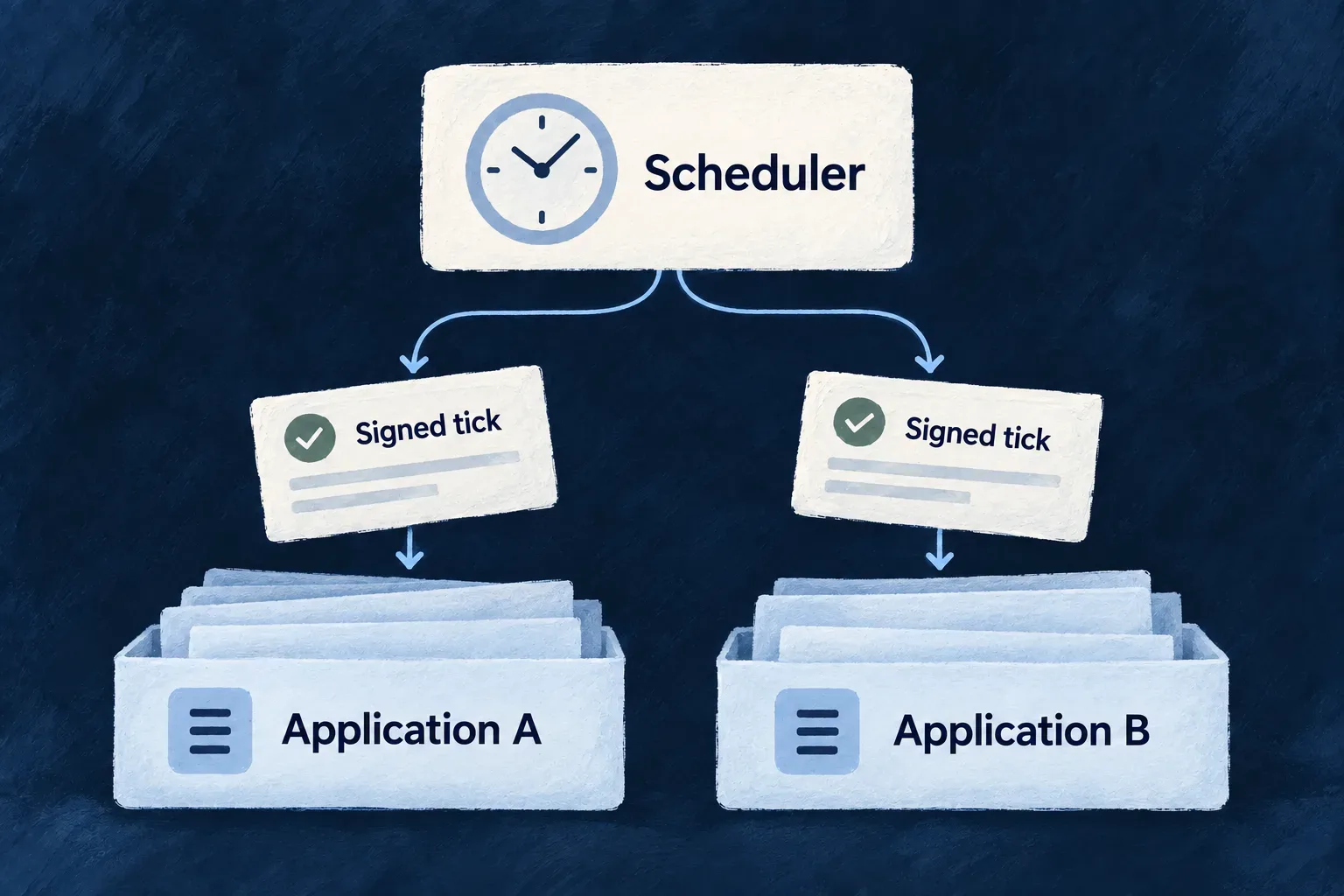
Applications declare recurring work without giving every running copy its own independent timer. A shared platform scheduler holds the schedules and dispatches each tick to the intended application’s queue.

The receiving runtime verifies the signed instruction and performs the work. Scheduling, delivery and business completion remain separate stages that an operator can inspect.

Example: Schedule two products without mixing their jobs

A customer portal creates a daily export while an operations tool refreshes external records. Both use the platform’s clock, but each dispatch names its own application and reaches its own configured queue and runtime.

A shared scheduler sends signed ticks to separate application queues.
For engineers

Wonder Todos declares a cron-mode minion in minions/marketing-scrapper/wildo.minion.config.ts. This selected configuration omits display metadata and comments:

import { defineMinionConfig } from '@wildo-ai/platform-config-lib';

export default defineMinionConfig({
  version: 1,
  name: 'marketing-scrapper',
  runtime: { type: 'docker', language: 'typescript' },
  mode: 'cron',
  schedule: '0 */6 * * *',
  reinstantiation: {
    policy: 'kill_previous',
  },
  resources: { cpu: '500m', memory: '512Mi' },
});

The minion must also be declared in wildo.saas.config.ts, with its path and resource/platform access. Its work implementation belongs to that runtime. Synchronization brings the declaration into managed configuration; startup schedule synchronization registers the application’s jobs with the scheduler.

mode and schedule select recurring delivery. reinstantiation.policy controls replacement during deployment: the Kubernetes generator maps kill_previous to Recreate and let_run to RollingUpdate. It does not make successive cron handlers mutually exclusive. If overlapping ticks could duplicate an export or an external API charge, the application handler must coordinate that work and make its effects idempotent.

Follow the application identity through dispatch

The authenticated jobs-sync endpoint derives applicationId and the advertised broker virtual host from the application’s identity, not a target application supplied in the request body. A full sync creates or updates jobs and removes jobs no longer declared by that application.

The automatic resource-cron, custom-batch and minion extractors register their expressions in UTC, including the minion shown above. These declarations do not supply a timezone field. The lower-level application jobs-sync API accepts an explicit timezone, which the scheduler preserves; its stored-job default is UTC. Do not read that lower-level support as local-time or daylight-saving behavior for the illustrated declaration.

The scheduler validates expressions and refreshes its active job set. A dispatch names exactly one operation, custom batch or minion. The publisher selects its queue accordingly:

const queueName = input.minionName
  ? QueueNamingUtils.buildMinionTickQueueName(input.applicationId, input.minionName)
  : QueueNamingUtils.buildQueueName(input.applicationId, 'scheduled');

That selected implementation keeps a minion tick out of the backend’s ordinary scheduled-work queue. Both are still inside the application’s configured virtual host. The token signer names the target and work; the receiver verifies the scheduler’s signature before interpreting the instruction.

Bring up the queue owner before publishing

The receiving runtime declares its queue: the application backend owns the scheduled-work queue, and each minion owns its named tick queue. The scheduler checks that the destination already exists and refuses publication if it is absent; it does not create a replacement queue with guessed settings.

Repair the receiving runtime, queue topology or broker permissions before requesting fresh work. Queue existence alone does not prove a consumer is healthy, and a message retained by the broker can outlive its signed authorization.

Distinguish the stages when operating it
StageWhat its evidence establishes
Schedule synchronizationThe platform accepted the application’s declared jobs
Tick publicationThe scheduler submitted the signed dispatch to the broker
Runtime executionThe appropriate backend or minion received and handled the work
Business resultThe intended record, export or other effect actually exists

A published tick is not a completed business job. Inspect the receiving runtime and resulting effect when diagnosing a missed export. A broker-refused virtual host enters bounded retry quarantine; it needs provisioning or permission repair, not repeated immediate attempts.

Know which failures retry
Failure stageInherited behaviorWhat to inspect or supply
Configured schedule synchronization failsApplication startup continues; synchronization retries after 1 second with exponential backoff capped at 5 minutes, until success or shutdownCheck sync logs and manager connectivity. A running application does not prove that its schedules were accepted
Sync service is uninitialized or its manager is unconfiguredSynchronization is skipped without scheduling that retryCorrect initialization or manager configuration; waiting alone does not register jobs
Broker refuses a virtual hostConnection attempts for that host are quarantined with increasing delays, from 1 minute up to 30 minutesRepair the host or publishing permission. This backoff is separate from application-job retry
A minion handler throws, or its tick fails verificationThe consumer negatively acknowledges that delivery without requeueing itInspect the minion failure and resulting business state; the next scheduled tick is fresh work, not automatic replay of the failed transaction

Successful minion handling acknowledges the tick. The no-requeue rule above describes the consumer’s explicit failure handling; it does not promise that broker or connection failures can never cause redelivery. The application owns recovery of an incomplete business effect, including deciding whether and how it is safe to replay it.

Scheduler replicas coordinate through a shared lease: the leader arms schedules and rechecks ownership before each scheduled tick; standbys disarm their tasks. A lease check is not end-to-end deduplication: a stalled publisher can race with takeover after passing the check. Application-declared schedules are reconciled through startup sync; administrative scheduler operations are a separate control surface. Keep handler retry/idempotency policy and recovery of interrupted work explicit.

When a runtime misses a tick

A signed tick has a five-minute token lifetime. The verifier allows 30 seconds of clock tolerance; a queued message is not an indefinitely reusable authorization to run the work.

What happensWhat the operator should expect
A runtime receives a tick after its accepted lifetimeVerification refuses the expired instruction before executing its work
Scheduled backend execution or verification failsThe consumer rejects without requeue; its scheduled dead-letter copy supports inspection
Minion tick processing failsThe consumer also rejects without requeue; it does not automatically retry that tick
A later scheduled occurrence arrivesThe scheduler creates a fresh signed tick, not a replay of the missed business operation

After an outage, inspect the receiving runtime and the business result before deciding what to recover. Reusing an expired token does not repair missed work. A catch-up action must deliberately select the missing work and avoid duplicating completed effects; the next cron occurrence alone does not establish that recovery happened.

Define administrative reach

Separate product administration from customer administration Guarantee

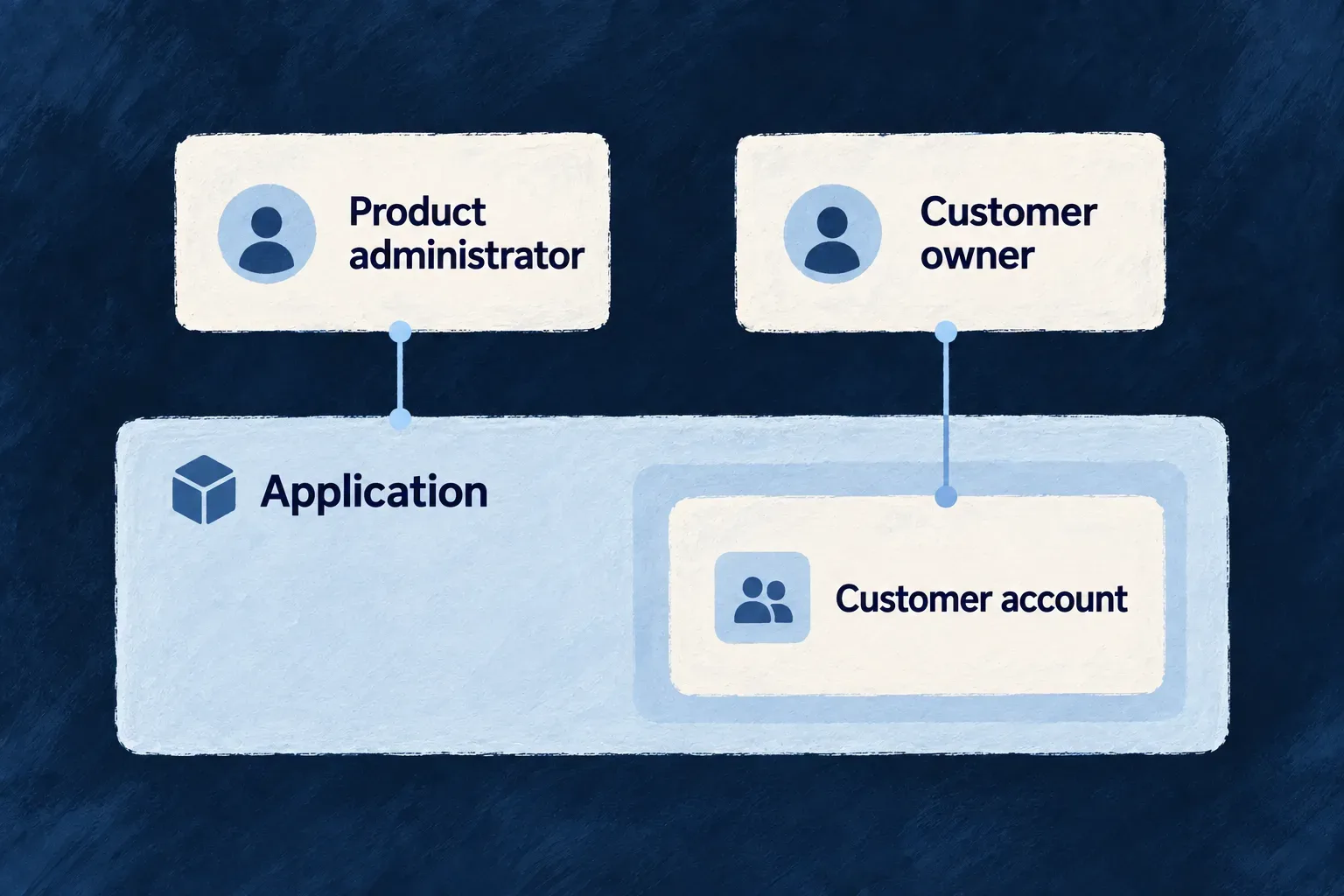
Each application has its own product-wide roles and customer-organization roles. Managing one customer account does not make someone an administrator of the whole product.

That distinction lets a product support its customers while keeping customer membership, administrative responsibility and temporary support access separate.

Example: Let a customer manage its team

A customer owner invites colleagues and manages their account. A product administrator operates the wider application. The owner’s organization role does not become a product-wide role, and the product administrator still needs the appropriate declared access to cross into customer records.

Product administration and customer-account administration have distinct scopes.
For engineers

ResourcePrimaryScope.APPLICATION means the scope of one hosted application. It is distinct from ResourcePrimaryScope.ORGANIZATIONS, which describes its customer organizations. It does not mean the Wildo application-manager service or authority over other hosted applications.

These selected entries from roles.shared.defaults.ts show the separate default role tables. They are fragments of two declarations, not one complete configuration object.

[CORE_APP_ROLES.APP_ADMIN_SUPER_ADMIN]: {
  role: CORE_APP_ROLES.APP_ADMIN_SUPER_ADMIN,
  inheritFrom: CORE_APP_ROLES.APP_ADMIN_BILLING_MANAGER,
  isSystemRole: true,
  relatedPrimaryScope: ResourcePrimaryScope.APPLICATION
}

// Separately, in DEFAULT_ORGANIZATION_ROLES:
[CORE_ORG_ROLES.ORG_OWNER]: {
  role: CORE_ORG_ROLES.ORG_OWNER,
  inheritFrom: CORE_ORG_ROLES.ORG_ADMIN,
  isSystemRole: true,
  relatedPrimaryScope: ResourcePrimaryScope.ORGANIZATIONS
}

A role is resolved in the table for its scope, including that table’s inheritance chain. Writing the name of an application role into an organization membership does not create application authority. Organization-unit roles are narrower still; a unit assignment is not an organization-wide membership.

Declare the operation and the reach it needs
Intended actionAuthority to consider
Manage one customer’s membersOrganization membership, operation roles and grant ceiling
Operate application-wide resourcesApplication-role table and the resource’s operation contract
Support a particular customer from outside its membershipDeclared cross-tenant variant plus usable tenant access grant
Enumerate permitted application-wide directory dataDeclared read surface plus usable application-wide grant
Read application audit dataAdministrator permissions; a usable application-wide grant is also required when auditTrail.applicationReadAccess is independent-approval

Application authority is necessary for product administration, but it is not blanket permission to read or edit every customer’s records. The authorization layer separately evaluates the operation’s admission and the applicable grant. Customer-specific and application-wide grants have different scopes; an empty customer identifier is not a substitute for the latter.

Match the approval to the grant’s scope
GrantApproval and lifecycle
Customer-specific accessBound to one organization. With a usable owner and approval required, it starts pending; tenant authority approves or denies it. When approval is disabled or no usable owner exists, the request can become active immediately.
Application-wide read accessBound to one application, not one customer. Requests always start pending; approval requires a different application super-administrator. There is no tenant-policy or ownerless auto-approval branch.

An active grant must still be usable for the requested access, including its expiry and revocation state. Neither grant replaces the operation’s role and admission checks. The registration workflow explains how to provision the second identity, including the deliberate single-developer local convenience.

Keep recovery authority explicit

The framework’s administrative floors protect against writes that would remove the last usable administrator. A startup report also detects states introduced outside those write paths, such as a restore or direct database edit.

Within the application’s role hierarchy, an organization may have a higher application-level recovery path; the application super-administrator floor has no still-higher role in that hierarchy. Recovery from an externally introduced zero-administrator state is an operator procedure. Sharing Wildo’s infrastructure does not silently create a cross-application customer-support identity.

Open specific support actions, not blanket access Mechanism

Support access is attached to a particular action. Wildo checks whether that operation permits an application operator to cross an organization boundary and whether the operator has a usable grant for the target organization.

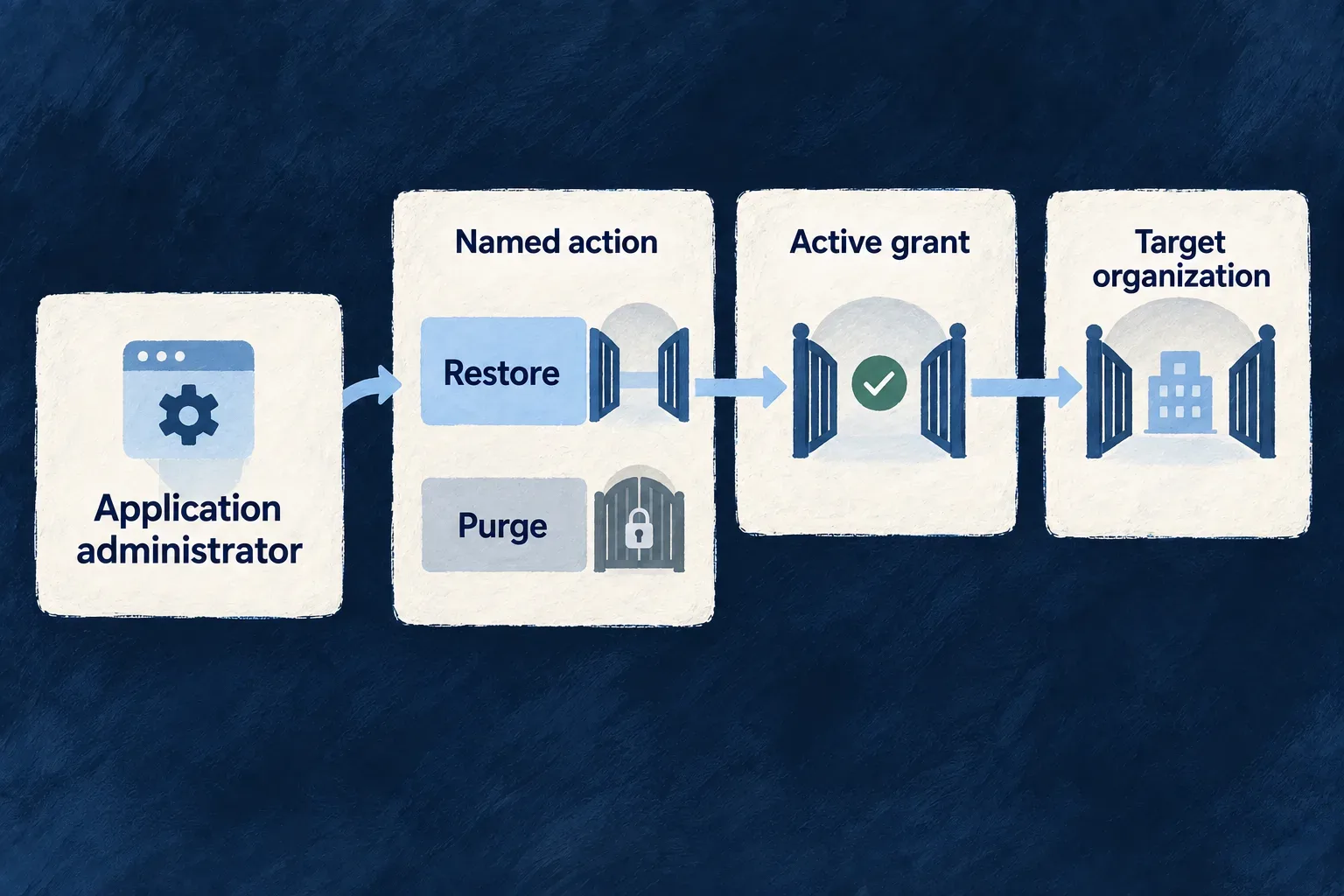
Restoring an account or repairing ownership can have a deliberate path without opening general editing or immediate permanent deletion across customer accounts.

Example: Restore an organization's ability to administer itself

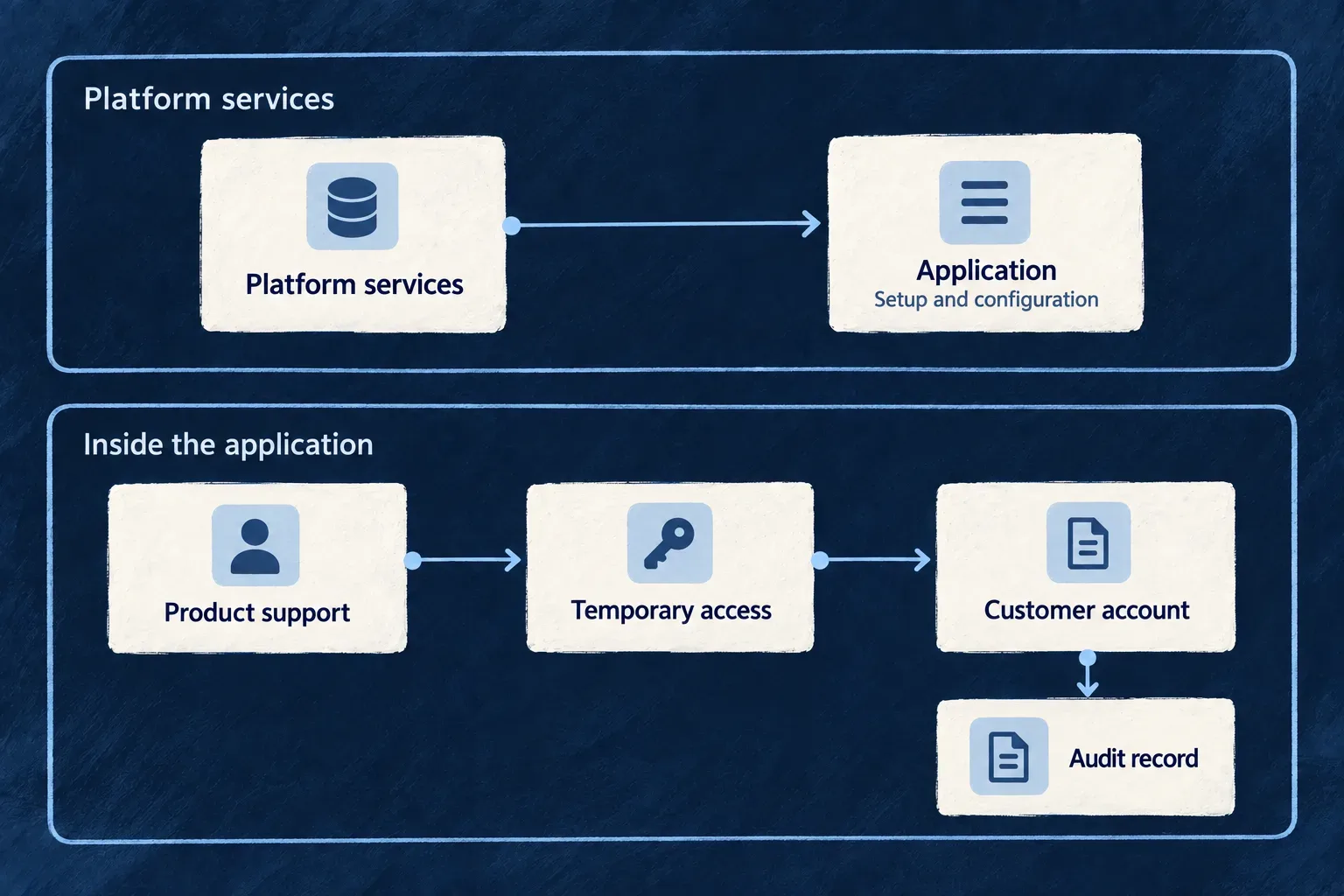
An operator obtains access for a stranded organization, then uses the ownership-repair action to promote an active member whose linked user is also active. The action does not create a new member or allow arbitrary changes to the organization’s records.

When no usable owner remains, the grant service checks that condition and can automatically approve recovery access; the operator cannot simply assert it. The grant approval policy explains when customer approval is required.

The illustration shows another specific support action: restoring an organization awaiting deletion during its retention window. Ownership repair follows the same principle, with its own operation and inputs.

A declared restoration action uses an active grant for its target organization; irreversible purge remains closed.
For engineers

The ownership-repair operation on organizationMembers is a concrete example. This selected fragment removes comments and the neighboring notification declaration; it belongs inside the resource’s operation configuration:

[OrganizationMembers_Operations.GRANT_OWNERSHIP]: {
  variants: [
    {
      variantType: ResourceOperationVariantType.API_CALL,
      isDefault: true,
      roles: [CORE_APP_ROLES.APP_ADMIN_SUPER_ADMIN],
      riskLevel: ResourceOperationRiskLevel.CRITICAL,
      resourceOperationLike: CoreResourceOperation.UPDATE,
      admitsCrossTenantPlatformAdministration: true,
      requestDto: z.object({
        justification: z.string().min(1).max(1000),
      }),
    },
  ],
},

The role gate and admitsCrossTenantPlatformAdministration do different work: one checks authority, the other opts this variant into crossing. The implementation supplies the narrow ownership change; the declaration alone does not implement a business action. Its required justification belongs to the request, while grant approval follows the separate access-grant lifecycle.

Establish access before invoking the action

Request a temporary platform access grant for the target organization and follow its approval policy. The authorizer looks for a usable grant for this operator and organization within its time window. A lookup failure refuses access. The request-access operation has a narrow bootstrap exception because requiring an existing grant to request one would make the flow unreachable.

Membership is established from authenticated role entries, not an organization ID supplied in the URL. Unit-scoped authority is not treated as organization-wide membership. Admission is checked in the role/collection path and the fetched-record path so that opening one route does not silently open another.

Repair ownership without replacing existing permissions

The target must be an active membership linked to an active user. An invited or suspended member, or a disabled user, cannot restore usable administration; the action refuses that target instead of reporting a cosmetic repair.

The implementation makes roles server-authoritative and includes the linked-user read in the membership transaction. A caller cannot inject its own role set through a lower-level service call. The following selected implementation preserves existing roles and makes an already-owner retry succeed:

const currentRoles = normalizeRoleArray(currentObject!.roles);

if (rolesConferOrganizationOwner(currentRoles, organizationOwnerConferralResolver())) {
  return { roles: currentRoles };
}

// Add ownership without removing the member's other roles.
return { roles: [...currentRoles, CORE_ORG_ROLES.ORG_OWNER] };
Target or inputResult
Active member and active linked userAdds ownership while preserving existing roles
Member already has an owner-conferring roleKeeps the current roles; retry is idempotent
Invited or suspended membership, or unusable linked userRefuses the repair; resolve that lifecycle state first
Caller supplies a different role setThe implementation’s authoritative role result takes precedence
Keep the operation’s purpose narrow
Existing actionWhat makes the crossing deliberate
Activate or restore an organizationA named lifecycle transition with a recovery purpose
Request deletion with a windowA declared transition that retains a restore path
Grant ownershipPromotes an eligible active member; does not become a general membership editor
Immediate purgeNo cross-tenant admission in the default declaration

The crossing flag is an authoring decision, not a client header or runtime switch. Review it with the resource specification and the implementation’s actual writes. Reversibility is a design choice in these default operations, not a type-system rule preventing an application author from declaring an unsafe custom action.

At a fetched-record tenant denial, the response conceals existence with not-found semantics. Other earlier authorization failures can be refused before a record is fetched. Access evidence records the applicable observation; it does not establish that the action later completed successfully.

Understand access and authority changes

Make access across customer boundaries visible Guarantee

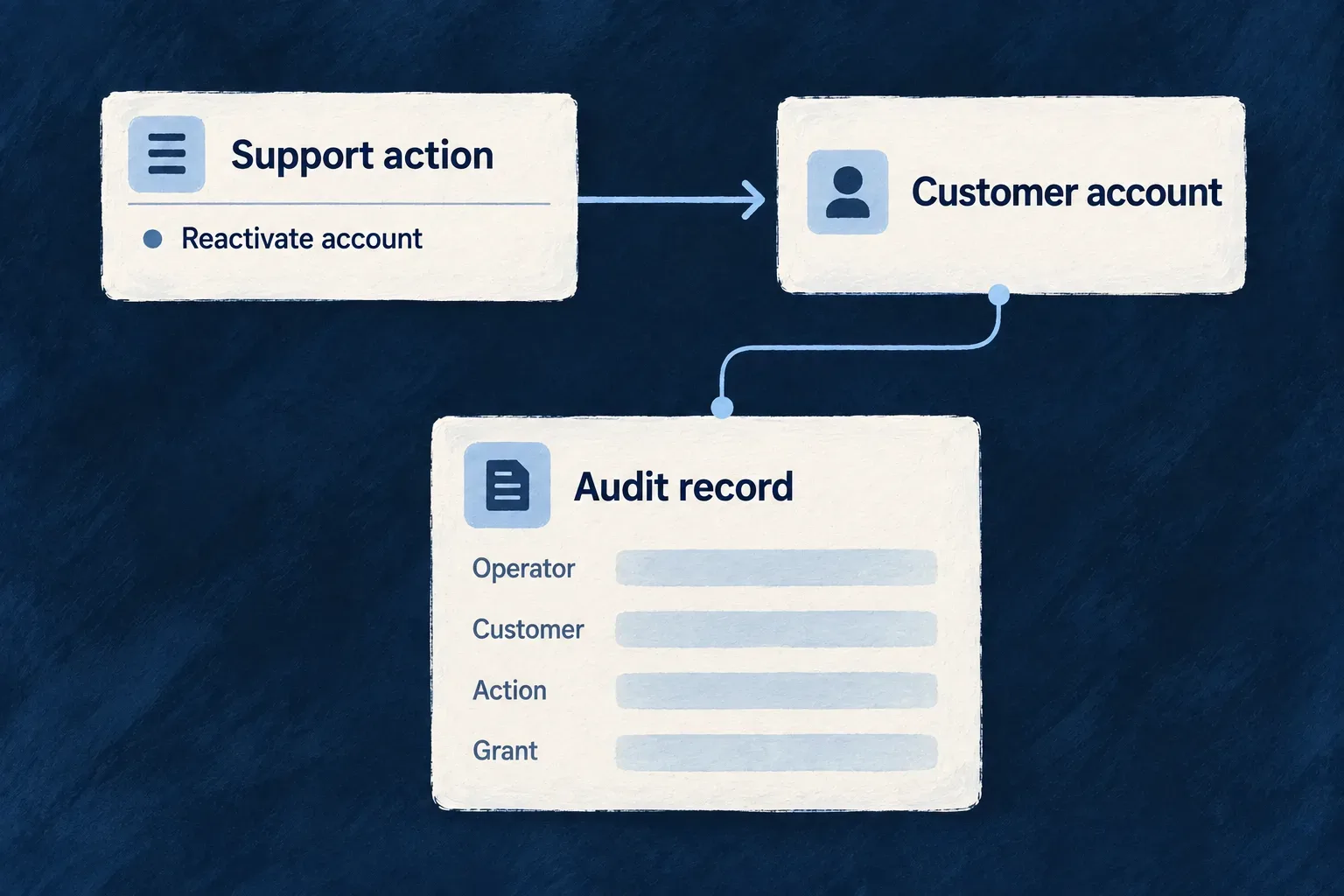
A support action outside the operator’s organization memberships deserves a recognizable record. Wildo’s authorization layer produces a dedicated observation with the operator, target organization, operation and the grant resolved for that crossing.

The crossing record belongs to the reached customer organization. People authorized to read that organization’s audit history can inspect it through the audit-log access surface. It is not only an operator-side trace.

This helps distinguish approved support work from unexpected reach. It complements the access decision; it does not replace the permission checks or prove that the business action completed.

Example: Explain why support restored an account

An investigator connects an organization-restoration attempt to its operator and temporary access grant. The grant lifecycle provides the justification and approval history, while the business operation’s evidence shows what changed.

An audit record identifies the actor, customer account, action and access grant.
For engineers

This selected payload comes from recordCrossTenantAdministrativeAccess in AuthorizationsBackendService. It is framework emission code, not an event an application should re-emit from every handler:

auditLogsService.logCrossTenantAdministrativeAccess({
  operatorUserId: executionContext.initiatorIds?.userId,
  targetOrganizationId: rowOrganizationId,
  resourceType: resourceIdentifier,
  operationIdentifier: String(operation.operationIdentifier ?? ''),
  variantType: operation.variantType as ResourceOperationVariantType,
  variantKey: operation.variantKey,
  targetResourceIds: resourceObject?._id ? [String(resourceObject._id)] : undefined,
  authorizingGrantId: (executionContext as { authorizingPlatformAccessGrantId?: string }).authorizingPlatformAccessGrantId,
  authorizingGrantScope: (executionContext as { authorizingPlatformAccessGrantId?: string }).authorizingPlatformAccessGrantId
    ? PlatformAccessGrantScope.TENANT
    : undefined,
  admissionDeclared: operation.admitsCrossTenantPlatformAdministration === true,
  initiatorRoles: initiatorRoles.flatMap(roleInfo => roleInfo.roles ?? []),
  executionType: executionContext.executionType,
})

authorizingGrantId connects this use of access to the grant’s own lifecycle. For a row crossing, authorizingGrantScope identifies the tenant-grant collection; both are absent when no tenant grant was resolved. An application-wide read grant does not substitute for row admission. admissionDeclared states whether the operation opted into crossing. Neither field alone is a business-success result: a declared operation can still lack a usable grant or fail later.

Read the sequence correctly

The fetched row identifies the organization. Organization-wide role entries determine whether the caller belongs to it. For a crossing, admission resolves the usable grant, the observation is emitted, and the tenant-boundary decision then permits or refuses the request.

This ordering includes permitted crossings and refusals reaching that observation point. It is not a record of every rejected HTTP request: a request rejected before a target row is known follows its own authentication or authorization evidence path.

EvidenceQuestion it answers
Grant lifecycleWho requested, approved, revoked or timed out the access?
Cross-tenant observationWhich operation reached across the boundary, under which resolved grant?
Operation/change evidenceWhat did the business action actually change?
Application-wide read evidenceWhich broader read occurred without a single target organization?
Example: investigate a support crossing

Use the customer’s audit inspection API with an authenticated session authorized for that organization. This illustrative query selects crossing observations; the same route’s access rules still apply:

GET /organizations/{organizationId}/audit-logs?eventType=cross_tenant_administrative_access

Inspect the returned data records for the operator, eventData.targetOrganizationId, operation and target resource IDs. Resolve eventData.authorizingGrantId in the collection named by eventData.authorizingGrantScope to find the justification and approval history. A missing grant is not enough to determine the access decision: application audit reads use administrator permissions by default, while the optional independent-approval policy requires a grant. Other grant-controlled operations still require their grants. Then inspect the business change separately: observing a crossing does not prove that restoration or another action succeeded.

Preserve the scope when a read reaches several customers

Declared cross-tenant reads outside organization-scoped resources use a second observer for READ, LIST and SEARCH. Enrollment follows the executed operation variant. The observer groups the foreign organizations actually returned, with their target record IDs; a single-record read is included, while an empty result or records belonging only to the caller’s organizations produces no crossing.

Organization-scoped resources already observed during authorization are excluded from this second path to avoid double counting. Internally initiated requests and webhook callbacks are also excluded. COUNT returns no attributable records and is not enrolled.

Each resulting crossing is stored under its target organizationId, so it participates in that customer’s authorized audit access. This attribution does not grant audit-reading permission or guarantee delivery.

For application audit reads, auditTrail.applicationReadAccess defaults to role-based; independent-approval adds a time-bound grant approved by another administrator. Both retain the read observations. This policy does not change other application-wide or tenant-support access.

When a grant is recorded, interpret authorizingGrantId together with authorizingGrantScope. Tenant and application-wide grants live in different collections, so the ID alone does not identify where to resolve the authorization. If both grants are present, the observation names the narrower tenant grant.

Recorded scopeGrant to resolve
TENANTThe temporary grant for the customer organization
APPLICATION_WIDEThe grant authorizing the broader application read

An application-wide directory read has its own observation, including the returned count and application-wide grant. It does not invent a target customer for a read spanning the directory.

Monitor evidence delivery as well as access

emitAuditObservation keeps audit delivery from changing the request’s authorization result. If the service is unavailable or emission fails, the observation seam reports the loss through diagnostics and metrics rather than silently converting the business request into an audit-store failure.

Delivery remains best effort. Do not interpret an absent event as proof that no access occurred, or a crossing event as proof of a successful modification. The application must retain and route evidence according to its operating policy and investigate delivery-loss signals.

Application-wide reads use their own scope classification and access-grant policy. A directory listing with no single target organization cannot be represented faithfully as a row-specific customer crossing.

Explain who changed customer permissions Guarantee

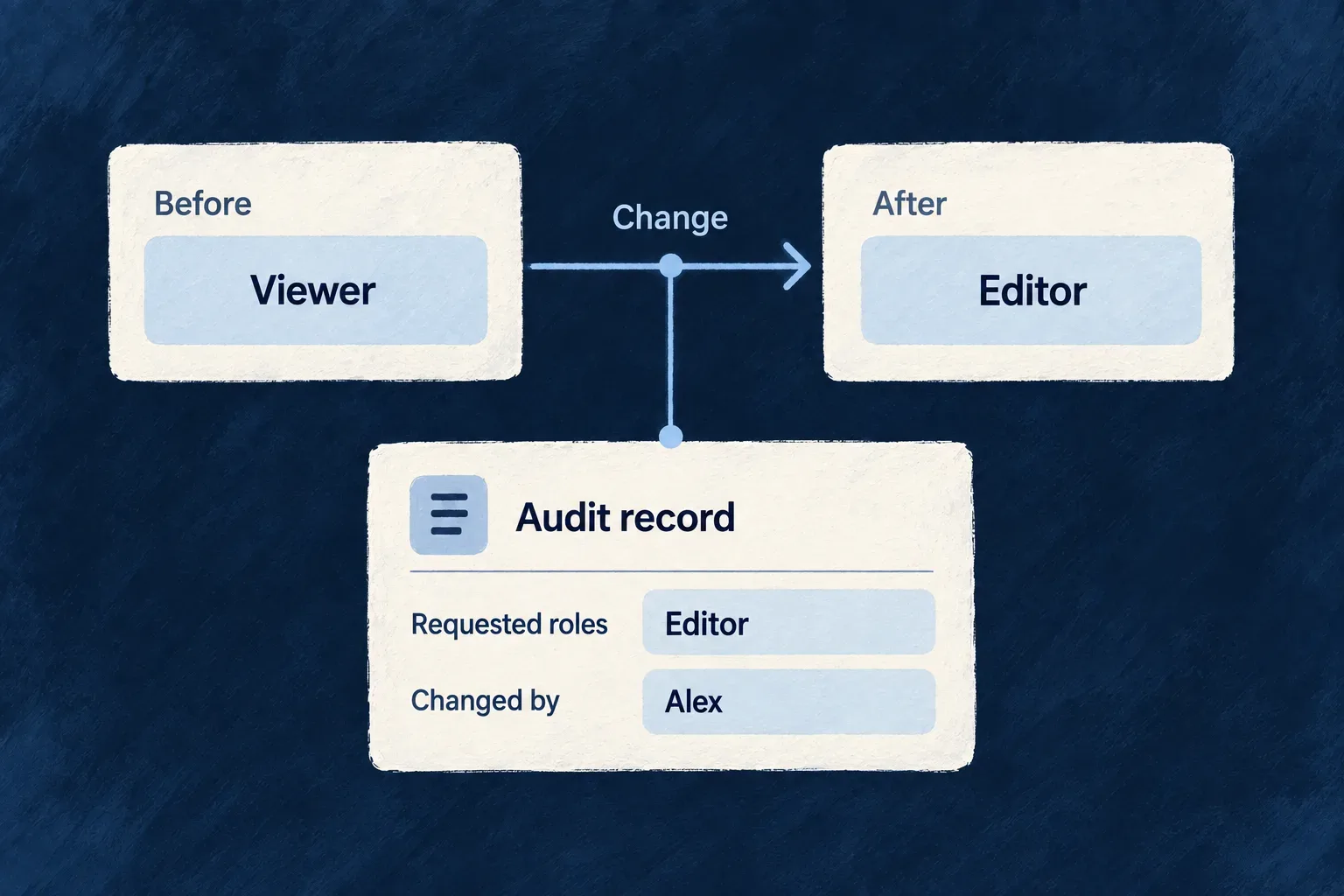
Changing a person’s roles changes what they can do. Wildo records that change as an authority event, identifying the actor and the previous, requested and resulting roles where applicable.

Organization-wide memberships and assignments inside one unit remain distinct. The evidence can explain both broad customer administration and a narrower team-level grant.

Example: Understand how a member became a manager

A customer administrator changes a member’s role. The evidence keeps the before-and-after roles and the requested set, while a separate unit assignment shows that another permission applies only inside one team.

An authority-change record explains who changed a role and whose authority changed.
For engineers

Declare and invoke roles through the resource’s membership operations and their registered custom implementations. Their role-ceiling and administrative-continuity checks still apply. Direct database edits bypass this operation lifecycle and cannot be expected to produce its semantic evidence.

The following selected emission from organization-member-custom-implementation.backend.service.ts shows why authority evidence contains more than the final row:

await emitAuthorityChangeAuditWhenDurable({
  serviceOptions: utils.serviceOptions,
  effectKey: ['organization-member-roles-changed', memberId, pending.operation].join(':'),
  logger: utils.logger,
  failureContext: { operation: pending.operation, memberId, organizationId },
  emit: async () => {
    const auditLogsService = container.get<AuditLogsBackendService>(SAAS_SERVICE_TYPES.AuditLogsService);
    await auditLogsService.logOrganizationMemberRolesChanged({
      organizationId,
      memberId,
      userId,
      previousRoles: pending.previousRoles,
      newRoles: pending.newRoles,
      requestedRoles: pending.requestedRoles,
      operation: pending.operation,
      changedBy: resolveAuditActorId(executionContext),
    }, executionContext);
  },
});

The operation stages its inputs before persistence, then emits through the durability helper. requestedRoles preserves what the caller authored; newRoles describes the resulting set. This matters when defaults, validation or grant ceilings distinguish the request from the stored authority.

Keep the scope visible in the event
ChangeEvent familyEvidence to inspect
Ordinary organization membership role changeORGANIZATION_MEMBER_ROLE_CHANGEDpreviousRoles, newRoles, requestedRoles, member and organization
Membership removal or invitation revocationORGANIZATION_MEMBER_REMOVEDRoles, previousStatus and revokedUnitAssignments, captured before deletion
Unit role assignmentORGANIZATION_UNIT_MEMBER_ROLE_CHANGEDpreviousRole, newRole, requestedRole, assignment and unit
Direct unit assignment removalORGANIZATION_UNIT_MEMBER_REMOVEDThe removed assignment and its revokedRole, captured before deletion
Named ownership repair (GRANT_OWNERSHIP)RESOURCE_OPERATION_PERFORMEDOperation identity, affected member, changedFields and role sets in fieldEvidence when changed
Application rolesSeparate application-scope authority eventsThe affected principal’s application authority, not customer membership
Include ownership repair in an authority review

The ownership-repair action uses update-like persistence, but its custom implementation is registered under its own operation identity. It does not inherit the ordinary UPDATE hook that emits ORGANIZATION_MEMBER_ROLE_CHANGED. Its critical risk instead triggers automatic RESOURCE_OPERATION_PERFORMED evidence; the roles field is marked for before-and-after evidence.

A query restricted to ORGANIZATION_MEMBER_ROLE_CHANGED can therefore miss ownership repair. Query the automatic RESOURCE_OPERATION_PERFORMED event family, then inspect the returned eventData.resourceType and eventData.operationIdentifier for the membership resource and GRANT_OWNERSHIP operation. Those nested fields are not LIST query filters. Inspect fieldEvidence for the role change; do not expect the specialized event’s requestedRoles field in this payload. An idempotent repair can leave the roles unchanged.

Correlate the operation evidence with the crossing observation by actor, operation, affected record and request context. Resolve the observation’s grant ID together with its grant scope to inspect the grant lifecycle. These are complementary records, not identical payloads or an atomic evidence bundle.

A unit assignment holds one role per assignment record. Treating it as an organization-wide role array would erase the scope that limits its authority. The audit subject identifies the acting principal; the affected user/member and assignment remain explicit event data.

Removing a membership also removes the record that explained its access. Capturing its status distinguishes a revoked invitation from an active membership removal; retaining the unit assignments explains the narrower authority removed with it.

Example: investigate a membership role change

After a role change, query the customer’s audit resource using an authenticated session authorized for that organization. This illustrative request uses the declared event-type filter; replace the organization placeholder and use the application’s API base URL:

GET /organizations/{organizationId}/audit-logs?eventType=organization_member_role_changed

The default LIST variant declares organization member, organization administrator and application super-administrator roles. The route and authorization context still constrain access: a role name or an organization ID in a URL does not grant access to another customer’s trail. See the audit inspection and export API for the full read/filter contract.

Read the returned data records as follows:

FieldHow to interpret the result
userId on the audit record, and eventData.changedByThe actor who made the change; the userId query filter selects this actor
eventData.userId and eventData.memberIdThe affected user and membership, not necessarily the actor
eventData.previousRolesAuthority before the mutation
eventData.requestedRolesThe submitted role set, when supplied
eventData.newRolesAuthority resulting from the operation

For example, if an administrator changes another member’s roles, the actor filter finds the administrator’s action while the event data identifies the member affected. Compare requested and resulting roles rather than assuming they are identical. A repeated unchanged role set emits no new role-change event; an empty result alone also cannot establish that audit delivery was healthy.

Record durable changes, not rolled-back intentions

The helper emits after the relevant write is durable and defers to an outer transaction’s post-commit lane when necessary. A rollback must not leave an event claiming a grant that never took effect. Repeating the same role set produces no role-change event.

Cascade removal follows the parent lifecycle’s evidence rather than fabricating an individual revocation for every child assignment. Audit routing also uses authenticated context; a system provisioning action can reach the shared audit store without an authenticated customer routing context.

These events explain changes made through the framework lifecycle. Preserve the supplied registrations and transaction context when extending that lifecycle, and monitor audit-delivery diagnostics rather than treating the event stream as an infallible transactional replica.

Shared operation should make responsibility clearer.

Wildo gives applications a common operating foundation while carrying their identities through setup, configuration and scheduled work.

Each product keeps its customer model and administrative boundaries. Reuse the mechanisms, with explicit authority where the work crosses a boundary.

Building a B2B product or an internal tool?

Wildo is not self-service yet. Tell us what you have in mind and we will say plainly whether it fits, and what happens next.