Wildo.ai Coming soon

Queues, schedules & background jobs

Execute application operations asynchronously and trigger recurring work in the appropriate service.

Queued operations · recurring schedules · signed triggers

> Continue work after a request > Run recurring work on time > Give specialized services their own process

Background work carries out application behavior outside the immediate screen interaction: sending updates, preparing records or maintaining stored history.

Wildo provides the delivery, scheduling and runtime connections. Your application owns what each action does, the access it needs and what counts as success.

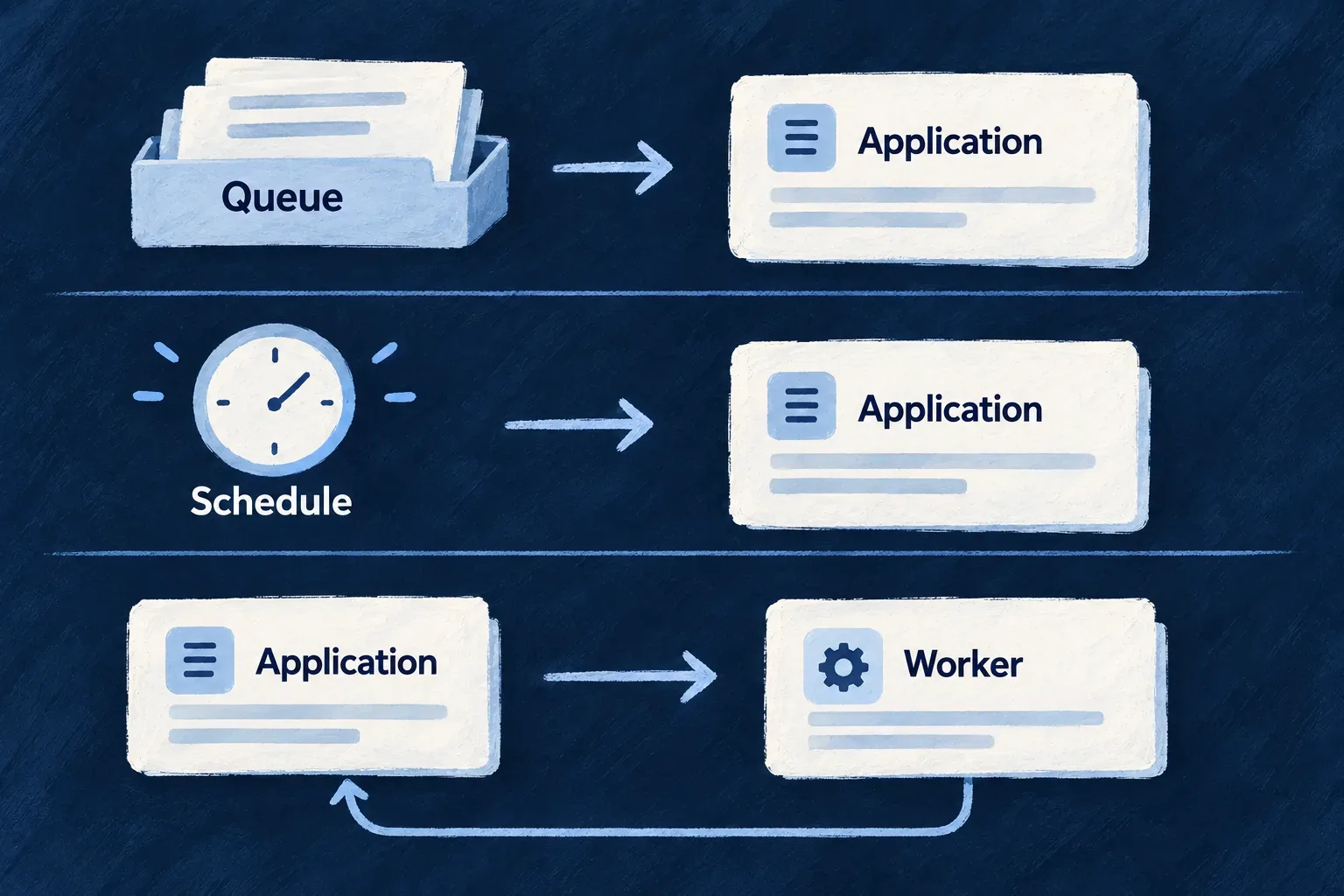
Queued work and scheduled triggers enter the application; a separate worker receives a call and returns its result.

Shared infrastructure, application-owned behavior

Keep business rules with the product

A queued operation reaches the application’s service layer with its inputs and execution context. Moving work off the request path does not require moving its business implementation into an unrelated script.

Coordinate across applications

The platform maintains shared scheduling infrastructure and routes signed triggers to their intended application or service. Each receiving runtime resolves and executes its own declared work.

Make success an application decision

A delivered message is a starting point. Your implementation establishes the business outcome; execution records and runtime diagnostics help explain how it got there.

Example: Send an update after a record changes

An application queues a delivery when a record changes. Wildo carries the work to the application’s handler; that handler contacts the destination and records the outcome. If an attempt repeats, the application uses a stable delivery identity to avoid sending the same update twice.

For engineers

Distinguish acceptance, execution and business completion

Queue publication, scheduler dispatch and an HTTP worker response answer different operational questions. None should be substituted for the others when diagnosing a run.

BoundaryWhat it establishesWhat to verify next
Application authoringAn operation, batch or separate service has a declared contractIts implementation and registration are present
Queue publicationWork was handed to the brokerA consumer received it and reached the intended handler
Schedule synchronizationDesired recurring work was submitted to the platformThe schedule is registered and its destination is correct
Scheduler dispatchA due trigger was publishedThe receiving runtime verified and executed it
Execution completionThe selected execution path finished or returned a responseThe intended business change or external delivery occurred

For ordinary queued operations, authorization precedes publication. The consumer reconstructs the execution context and dispatches through the application service layer. The queue guide below shows the supported declaration and invocation paths; the ordinary queue producers create an execution record before publication, whether the caller waits for a reply or returns immediately. Scheduled messages create their application execution record after the signed trigger is verified, and retain defined results through the payload store.

Follow one recurring invocation through the platform

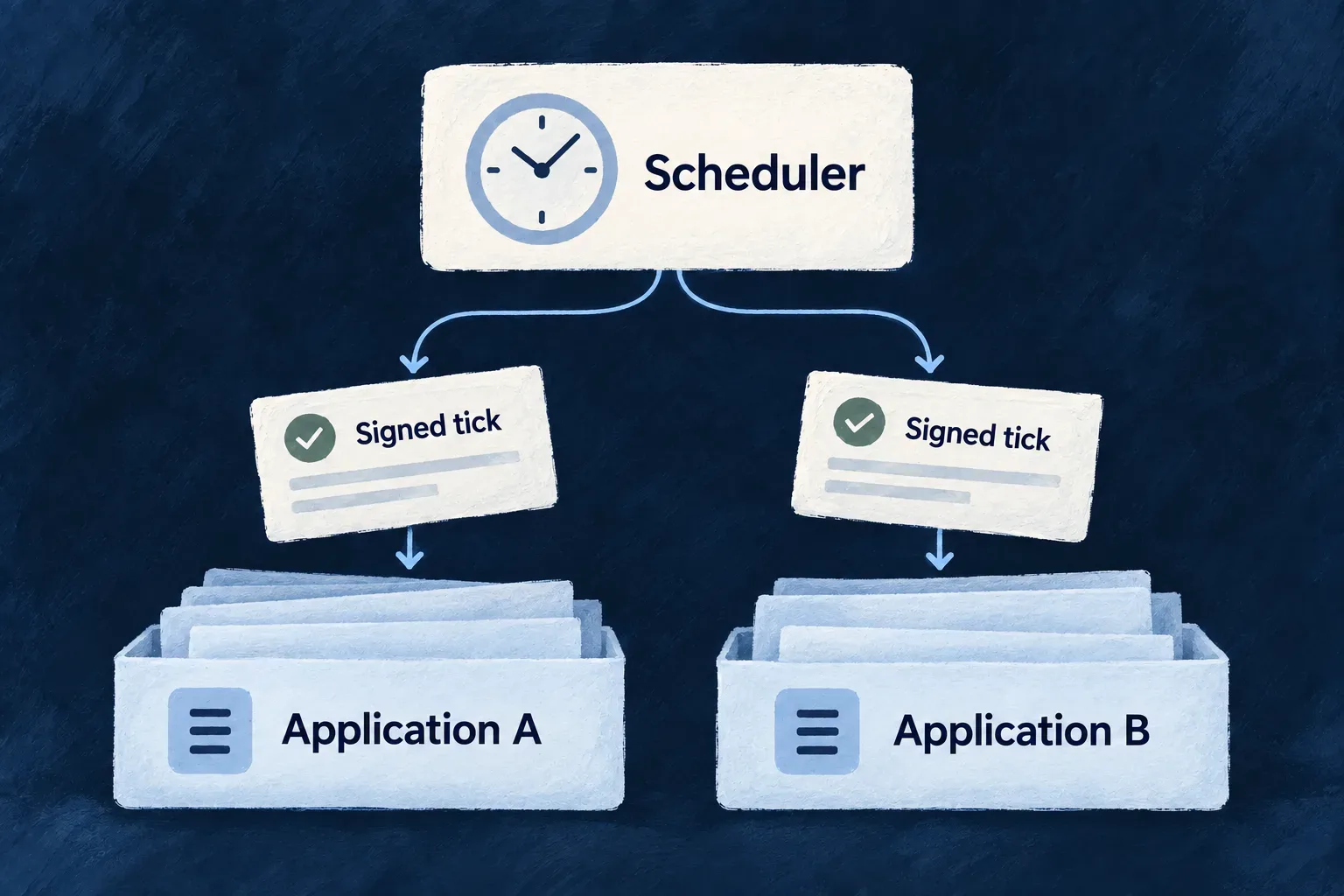
Application startup reconciles its desired schedules with the shared scheduler. The scheduler derives the destination from the authenticated application identity and signs the trigger. The receiving runtime verifies it before dispatching the operation or batch.

Synchronization may retry after startup. When recurring work appears inactive, inspect registration first, then dispatch, receiver execution and the business outcome. A healthy backend alone does not prove that its schedules were registered. Likewise, a registered schedule does not prove that a particular invocation completed.

Keep recovery with the boundary that failed

A missed registration needs schedule reconciliation. A message waiting in a queue needs an available consumer. An execution failure needs the handler’s diagnostics. A missing business outcome may require checking an external service or application transaction even when dispatch succeeded.

Ordinary job retry and a later scheduled recurrence are separate mechanisms. A scheduler lease coordinates scheduling replicas; it does not make the application’s business effects exactly once. Use stable business identifiers, conditional writes or recorded progress where another attempt can revisit the same work.

Give separate runtimes separate authority

A declared HTTP worker receives authenticated calls and executes its specialized handler; it does not drain the application’s operations queue. A minion is a separate service whose resource permissions and platform permissions are declared independently. Access to its own schedule does not imply access to application records.

Choose the concrete authoring contract in the capability guides below. This page describes the boundaries they share; those guides own configuration examples, invocation details and the evidence available from each path.

Choose how the work starts and where it runs.

Start with the trigger: a request hands off work, a clock starts recurring work, or a caller needs a separate service. These choices determine who executes the action and what the caller can observe.

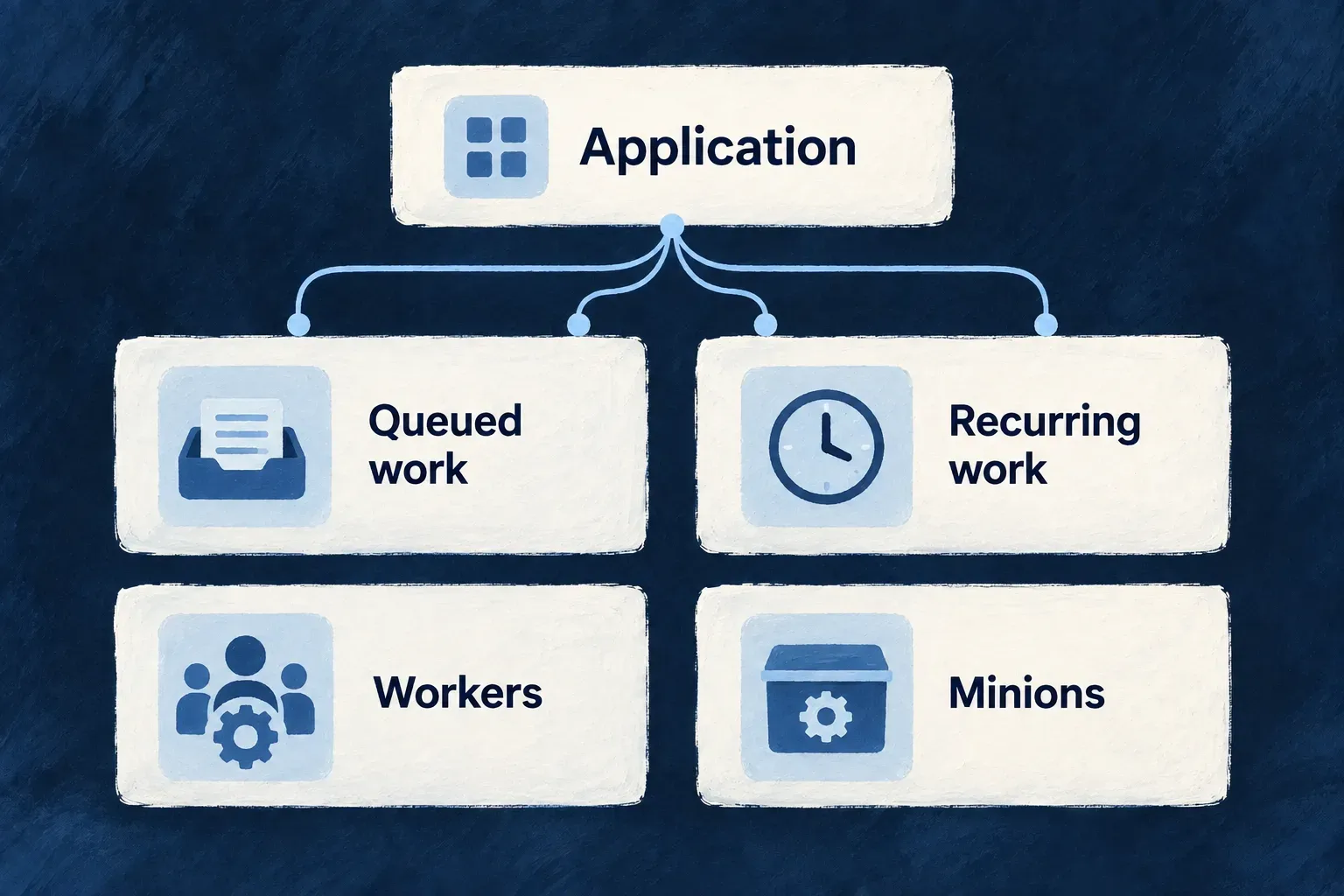
A queue delivers work to an application consumer. A schedule decides when to trigger work. A separate process gives a service its own runtime. They can be combined, but they serve different purposes.

Queued work, recurring work, workers and minions are distinct background-work mechanisms around an application.

Match the mechanism to the work

Hand off an action

Use a queue when an application operation should run through a consumer. The caller may receive a job identity or wait for a bounded reply, depending on the invocation path. Inspect the delivery and any execution record that path creates.

Repeat an action

Use a schedule to invoke an operation or a registered maintenance task, called a batch. The application executes the work; the platform supplies the clock and signed trigger. Inspect the actual outcome, such as updated records, seed-run history or written archive files.

Run a separate service

Use an HTTP worker for specialized computation called by the application. Use a minion for a supporting service with selected data access, running continuously or triggered on a schedule. Inspect the worker response or the minion’s activity; neither is extra capacity for the application’s job queue.

Example: Choose the trigger before adding a process

An hourly record refresh can stay in the application as a scheduled operation. If one part needs specialized computation, that operation can call an HTTP worker and use its response before writing records. The schedule answers when to start; the worker answers where that computation runs.

For engineers
NeedTrigger and execution ownerObservable outcome
Defer a resource operationA caller publishes work; an application consumer dispatches itPublication identity or bounded reply, plus tracking when that path creates a record
Repeat a resource operationA cron variant is synchronized; the application receives its signed triggerHandler execution and the business changes it makes
Run maintenanceA registered batch runs in the applicationBatch-specific output and effects; a returned value is not automatically retained history
Call specialized computationAn authenticated HTTP call reaches a declared workerThe worker’s response or call failure
Run a supporting serviceA minion runs continuously or receives its own scheduled tickService activity under its declared resource and platform permissions
Apply setup dataThe seeding dispatcher selects work by mode, version and scopeSeed-run records and the resulting data
Archive audit historyThe archive batch runs with storage accessArchive metadata and the actual objects written to storage

A minion’s tick queue addresses that minion; it is not a subscription to general application jobs. A worker’s HTTP contract is separate from both queue contracts. These distinctions determine credentials, deployment and failure handling.

Select the evidence that matches the question

To ask whether a job started, inspect its execution record when the producer creates one. To ask whether an external delivery happened, inspect the destination or the application’s recorded delivery outcome. To ask whether an archive exists, verify its stored objects rather than stopping at scheduler dispatch.

Job history records the latest tracked lifecycle state, not an immutable ledger of every attempt. Seed-run history instead describes versioned, scoped setup work. These records complement the broker’s current delivery state; they do not replace it.

Design repeated work deliberately

Retryable ordinary jobs and recurring scheduled invocations have different recovery paths. A later recurrence is a new trigger, not proof that an earlier failure was retried successfully. Make the implementation safe to revisit the same business records, and distinguish an execution failure from a successful run that produced no changes.

The capability guides below provide the declarations, implementations and diagnostics for each mechanism. Keep deployment decisions downstream of these contracts: adding a process does not by itself supply a handler, a schedule or permission to use application data.

Queue work and inspect execution

Let background work run beyond the request Mechanism

Send work to a queue when it should continue outside an immediate interaction. Wildo carries the operation and its context to a consumer, applies retry decisions and retains messages that cannot complete.

The same application service layer does the work. Queue delivery, tracking and shutdown are connected, while your application defines the operation and how repeated attempts affect its business data.

Example: Deliver an update when the receiving service is busy

An outbound delivery can wait in the broker instead of holding a person’s interaction open. A retryable failure returns after a delay; a permanently failed message stays available for operational investigation.
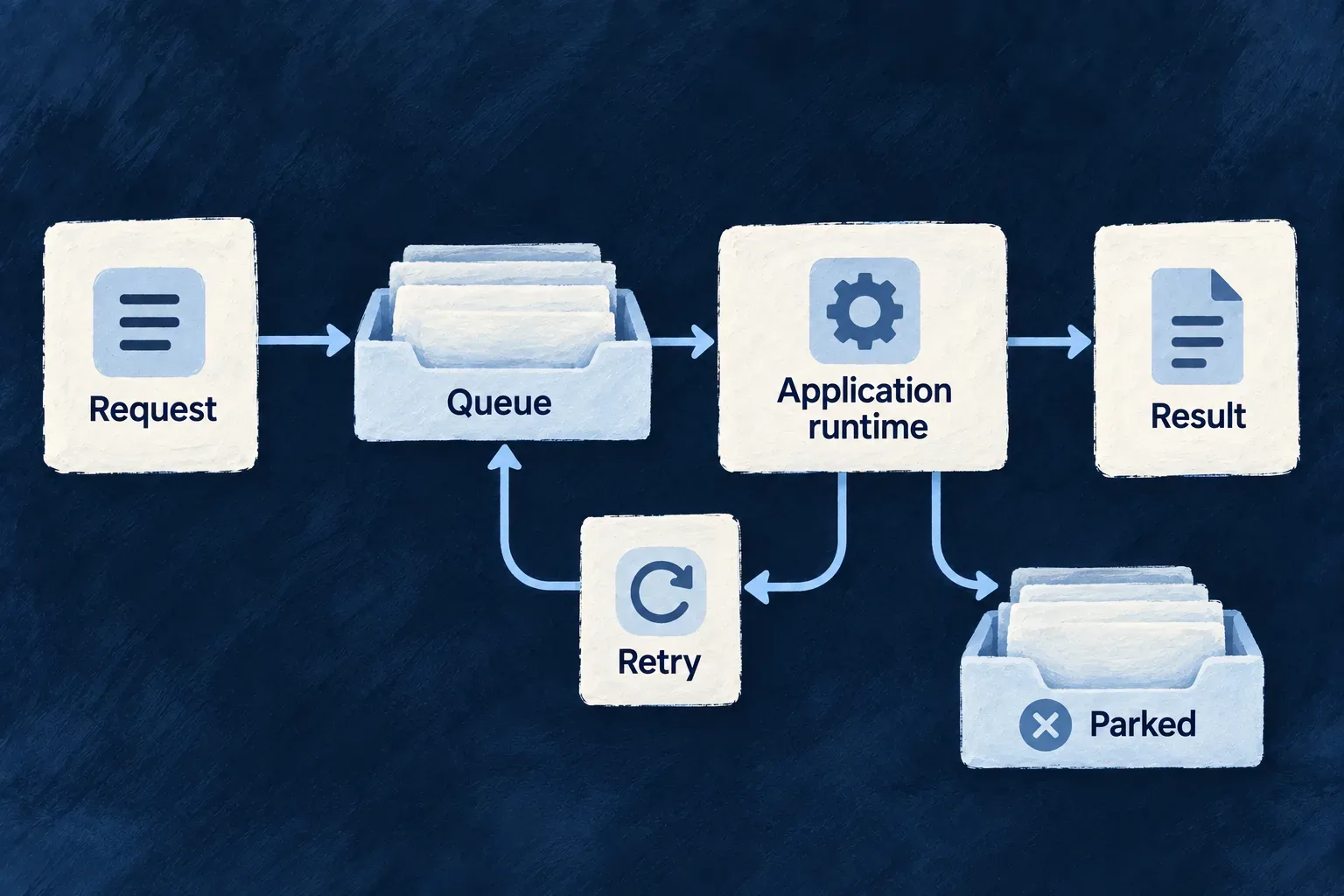
A Request card sends a Work card into a Queue tray; an Application runtime card takes work from the tray and produces a Result.
For engineers
Declare the caller’s contract on the operation

Set serviceRuntimeMode on the resource operation. This decides whether the caller receives the operation’s result or a job receipt; it is separate from the separately deployed HTTP-worker feature.

Operation modeWhat the service caller receives
INLINEThe operation result from the current process; the default
QUEUEDThe operation result after a consumer replies; the caller still waits
QUEUED_NOT_AWAITABLE{ jobId, status: 'queued' } after enqueueing, not the operation’s result
BACKGROUND_JOB{ jobId, status: 'processing', message } after enqueueing with completion handling; the receipt does not prove processing has started

These are the inline baseline and broker-backed choices, not an inventory of every runtime mode. A job-receipt mode needs an application interaction that understands receipts and later outcomes; changing the mode does not build that interface.

Wonder Todos’ knowledge-document ask operation uses QUEUED. Its provider-backed retrieval can run through the consumer while the question still receives a response. These are selected properties of that real operation declaration; the enclosing resource and other operations are omitted:

serviceRuntimeMode: ResourceOperation_ServiceRuntimeMode.QUEUED,
queueConfig: { timeoutMs: 30000 },
variants: [{
  variantType: ResourceOperationVariantType.API_CALL,
  isDefault: true,
  roles: [CORE_ORG_ROLES.ORG_MEMBER],
  riskLevel: ResourceOperationRiskLevel.LOW,
  resourceOperationLike: CoreResourceOperation.CREATE,
  requestDto: AskKnowledgeBaseDto,
  customResponseDto: AskKnowledgeBaseResponseDto,
  customServiceImplementationModes: [ResourceOperation_CustomServiceImplementationMode.OVERRIDE_ALL],
}],

The following HTTP example adapts the application’s retrieval test. apiBaseUrl includes the API prefix (for example, https://your-app.example/api/v1); orgId and token come from the already authenticated caller; AskKnowledgeBaseResponseDto is the application’s exported response schema. The request body requires a question of 3–1,000 characters, with optional retrieval and context-budget limits.

const response = await fetch(
  `${apiBaseUrl}/organizations/${orgId}/knowledge-documents/ask`,
  {
    method: 'POST',
    headers: { Authorization: `Bearer ${token}`, 'Content-Type': 'application/json' },
    body: JSON.stringify({ question: 'What is the supplier review cadence?' }),
  },
);
if (!response.ok) throw new Error(`Retrieval failed: ${response.status}`);
const body = await response.json();
const answer = AskKnowledgeBaseResponseDto.parse(body.data ?? body);
const sources = answer.sources;

The response contains retrieval sources and diagnostic counters such as unreadable rows and read failures. It is not a job receipt or a generated prose answer. QUEUED waits for this result through the reply queue; losing the reply can exhaust the caller’s wait even if work has run. Queue infrastructure and initialized consumers are prerequisites.

Start with the operation and its execution context

The queue carries a resource operation path, serialized inputs and execution context. The enqueue boundary checks authorization before publishing. A consumer reconstructs the call and dispatches through JobExecutorBackendService; it does not replace the application’s service implementation with another copy.

These are the three enqueue methods on QueueBackendService. The queued operation runtime uses the wait-for-result form; framework features also enqueue work directly. A queue requires a configured RabbitMQ connection and initialized consumers.

MethodCaller behavior
enqueueOperationReceive the job ID and queue name after publishing
enqueueAndWaitWait for a reply through a temporary reply queue, bounded by a timeout
enqueueWithCallbackReceive the job ID after publishing; registered completion handlers match operation or batch context

Completion handlers are registered through JobCompletionRegistryBackendService with filters such as operation identity or batch reference. The enqueue method does not take a callback URL or handler argument.

For the ordinary operations consumer, handlers receive successful results and terminal failures: exhausted attempts, non-retryable errors, or failures with retry disabled. Both returned failures and thrown errors reach failureOnly handlers. An intermediate failure being handed back for retry is not completion. A failed result reports FAILED; its tracking row can already be marked dead-lettered because delivery state and execution outcome serve different purposes.

Registration lives in the current backend process. Register handlers in every consumer process that needs them; restarting a process removes its registrations. Individual handler errors are logged and other matching handlers continue; they do not retry the original business operation. Once the outcome is final, tracking, reply and settlement errors cannot turn it into a new local retry or a contradictory callback. A lost channel can still cause broker redelivery, so callbacks must tolerate repetition. This is not a durable callback ledger or an exactly-once delivery guarantee. Use separately persisted follow-up work and idempotent processing when the follow-up must survive a crash, and define how it is recovered if the callback never runs. Domain and dedicated scheduled consumers do not acquire these callbacks merely by using the same broker.

A reply deadline does not cancel the work

enqueueAndWait limits how long the caller waits for a result. Its timer starts immediately before publication, so time spent waiting in the broker also counts. Authorization, payload preparation and creation of the execution record happen before that timer starts.

When the deadline expires, the caller receives a timeout and its pending reply is removed. The worker continues: it can still save data, send a message or finish successfully. A late reply is ignored. Treat the outcome as unknown; inspect the resulting business state before resubmitting an action that could repeat a side effect.

The job’s timeoutMs is not a per-attempt execution limit. Expiry does not trigger a retry or release the worker’s in-flight slot. Retry decisions follow the actual execution failure; graceful shutdown continues to wait for running work under its separate grace period. Application-specific cancellation needs cooperation from the operation and the services it calls.

Queueing alone does not make an HTTP call immediate: the wait-for-result form still waits. Choose the interaction contract before choosing the execution location.

Follow the authorization and publication boundary

This selected implementation excerpt from QueueBackendService.enqueueOperation shows the sequence. Debug logging is omitted; executionContext, inputData and optional inputId are the method’s inputs.

await this.authorizationsService.authorizeInController(inputId, executionContext);
const job = await this.buildJobPayload(executionContext, inputData, inputId);
const queueName = this.getOperationsQueueName(job.priority);

await this.jobStatusTracking.createJobRecord(job, queueName);
await this.adapter.publish(queueName, job);

return { jobId: job.jobId, queueName };

Declare queueConfig on the operation, beside serviceRuntimeMode, to tune its reply deadline, initial priority lane and failure retry policy. The factory validates values and fills omitted defaults; generated variants inherit the same policy. High and critical priorities select the priority queue for initial publication. Retries use the ordinary operations queue, so this is not a permanent ordering guarantee. The payload also preserves the origin correlation ID for tracing.

SettingMeaningDefault
timeoutMsCaller reply deadline, from 1,000 to 2,147,483,647 milliseconds; does not cancel execution300,000 ms
priorityInitial queue lane selected with JobPriorityNORMAL
maxRetriesAdditional attempts after an actual failure; zero disables those retries, not broker redelivery3
retryConfigbaseDelayMs, maxDelayMs and retryPolicy control broker-delayed backoff1,000 ms base, 60,000 ms cap, exponential

Large inputs are stored separately through JobPayloadStorageBackendService; the broker message then carries the payload reference. This moves part of execution’s availability requirement to the payload store as well as the broker.

Let the broker hold retry delays

The following selected consumer excerpt shows a successful retry handoff. Surrounding failure handling, logging and tracking updates are omitted.

const retryJob: JobPayload = {
  ...job,
  retryCount: currentRetry + 1,
};

await this.adapter.scheduleDelayedRetry(operationsQueue, retryJob, delay, {
  replyTo,
  correlationId,
});
channel.ack(msg);

The RabbitMQ adapter uses durable delay queues, persistent messages and a dead-letter route back to the operations queue. If handoff throws, the consumer requeues the original message instead of acknowledging it. Retry eligibility combines the error strategy with the remaining attempt budget.

OutcomeOperations consumer behavior
SuccessRecord completion and acknowledge the message
Retryable failure with budgetPublish a delayed attempt, then acknowledge the original
Retry handoff failureRequeue the original
Non-retryable or exhausted failureReject without requeue to the configured dead-letter queue

Scheduled jobs use a different consumer path: a failed invocation is not retried through the operations queue. Subsequent schedule ticks are separate executions.

Design the operation for repeated delivery

Broker acknowledgement and application side effects are separate steps. Give externally visible actions an appropriate idempotency strategy; a retry or process interruption can cause another attempt. The tracking record is useful evidence but is not an atomic receipt for both the database and broker.

Consumers normally run inside each application backend instance. Headless runtimes can skip initialization, and a separately declared HTTP worker is a different mechanism. During shutdown, consumers stop intake and join the bounded job-drain sequence. Inspect or replay parked messages through the broker’s operational tooling.
Keep a history of background work Mechanism

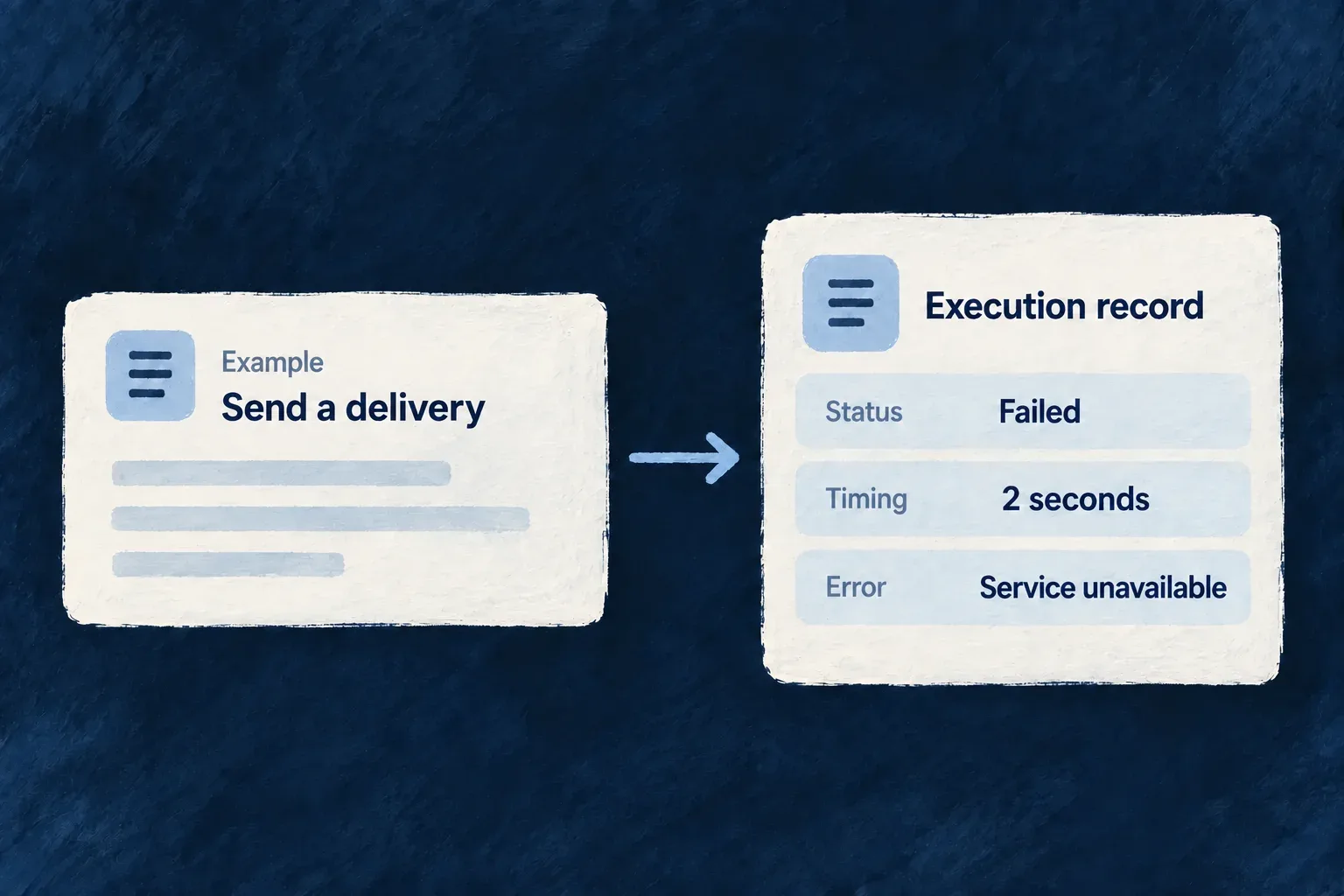
A job execution record brings together what was requested, where it ran and what happened. Identity, timing and error details can be queried together instead of reconstructed from scattered log messages.

Wildo keeps these records through its resource and repository system. They support operational investigation; access to them belongs in trusted backend tooling.

Example: Investigate a delivery that did not finish

Use the job ID to find the recorded start time, processing host and error. Compare that history with the broker’s current message state to decide whether the delivery is still waiting, executing or parked.

Example failed delivery: its execution record shows Failed, a two-second duration and the error Service unavailable.
For engineers
Use the tracking service from trusted backend code

JobStatusTrackingBackendService maintains the JOB_EXECUTIONS resource. The enqueueOperation, enqueueAndWait, enqueueWithCallback and enqueueCustomBatch paths create a record before publication; the consumer updates that record when processing starts and completes. For scheduled jobs, the application creates or reuses the record after verifying the signed trigger and its target application, before execution. Each signed run has its own job ID; receiving it again does not reset history. The record’s lifecycle and the broker’s settlement remain separate concerns.

Resolve the public tracker from the initialized backend container, then call getByJobId. This adapted trusted-tooling function uses exported types and the registered service token. The enclosing tool must authorize its operator before calling it; a caller-supplied job ID is not an access grant.

import {
  SAAS_SERVICE_TYPES,
  type InversifyContainer,
  type JobStatusTrackingBackendService,
} from '@wildo-ai/saas-backend-lib';

async function readRecordedJobStatus(container: InversifyContainer, jobId: string) {
  // The enclosing backend tool has already authorized its operator.
  const tracker = container.get<JobStatusTrackingBackendService>(
    SAAS_SERVICE_TYPES.JobStatusTrackingService,
  );
  const execution = await tracker.getByJobId(jobId);

  if (execution === null) {
    return null;
  }
  return { jobId, status: execution.status, startedAt: execution.startedAt };
}

A null result means no retained record was found, not that the job succeeded or never existed. It may have expired or come through a path that does not create a row. Let a repository failure surface separately; do not convert it into “not found.” Choose the output fields for the authorized audience instead of returning the entire internal record.

The tracker creates an internal repository context and uses the configured storage adapter. This is not a public job-history endpoint: resource operations are REPOSITORY_ONLY, so an administrative screen or API needs its own authorized application surface. Optional repository options belong to the second getByJobId argument; they do not replace that application access boundary.

Know what the record can explain

The following selected schema fields retain their current declarations; unrelated identity, context and lifecycle fields are omitted.

status: z.enum(JobExecutionStatusValues).isDBIndexed(),
queueName: z.string().isDBIndexed(),
priority: z.enum(JobPriorityValues),
retryCount: z.number().int().min(0).default(0),

startedAt: z.date().optional(),
completedAt: z.date().isDBIndexed().optional(),
durationMs: z.number().int().optional(),
error: WildoError_BackendSchema.optional(),

The identity fields connect a record to its application, operation or batch. Organization and user IDs are extracted when carried by the execution context. Worker identity and hostname identify the processing host; they do not refer to the separately declared HTTP-worker feature.

InformationOperational question
Job ID, operation path, batch referenceWhich requested action is this?
Queue, priority and recorded stateWhere was it sent and what state was last written?
Start, completion and durationDid processing start, and how long did the recorded attempt take?
Retry count and structured errorWhat failure information did the tracking path retain?
Input payload referenceWas the queued input stored separately from the broker message?
Optional output payload referenceScheduled jobs retain defined JSON results through the payload store and link them here, including small counter objects. Ordinary queue consumers do not automatically retain their returned results.
Interpret history together with delivery state

The record stores the latest lifecycle state, not a separate immutable row for every attempt. markStarted records the delivered attempt and replaces its start time; duration is calculated from that start. A confirmed retry records the next payload’s retry count. Terminal failure keeps the current count. The tracker records the consumer’s chosen outcome instead of calculating retry eligibility from its stored budget. Attempt guards prevent late writes from overwriting a newer attempt. Named statuses make records queryable, but the broker and consumer determine actual delivery and retry behavior.

The tracking write and broker action are not one transaction. Creation happens before publish. A failed start-state write can prevent execution. Once an ordinary, scheduled or domain job has succeeded or reached terminal failure, tracking errors do not retry that finished work. Ordinary-job callbacks and replies are also isolated. Retry tracking is best effort after confirmed broker handoff; a failed handoff requeues the original delivery without advancing its retry count. Do not use the presence of a row alone as proof of publication, or a status alone as proof of an external side effect.

For investigation, use the job ID to correlate the record, queue state and execution logs. Preserve enough application-level evidence to recognize a repeated business action independently of the queue’s tracking row.

Account for retention and sensitive detail

The execution schema declares a 30-day retention period; separately stored payloads use a 24-hour period. Framework-owned cleanup batches participate in removing expired records. An old history row may outlive its stored input or scheduled result. Output storage is separate from execution: if saving a result fails, the failure is logged without replaying completed business work.

Errors can contain backend context and stack details, and payloads can contain application data. Restrict operational access accordingly. Build any user-facing status view from the fields that audience needs rather than exposing the internal record wholesale.

Declare recurring work

Run recurring work on a declared schedule Mechanism

Recurring work keeps an application current: prepare upcoming records, sweep expired items or deliver accumulated messages. Declare the schedule with the operation or batch it runs; Wildo publishes that schedule to the platform and routes each trigger back to the application.

The application supplies the work and its input and output contracts. The platform supplies the clock. Updating the registered schedule set also removes schedules the application no longer declares.

Example: Prepare the next recurring tasks

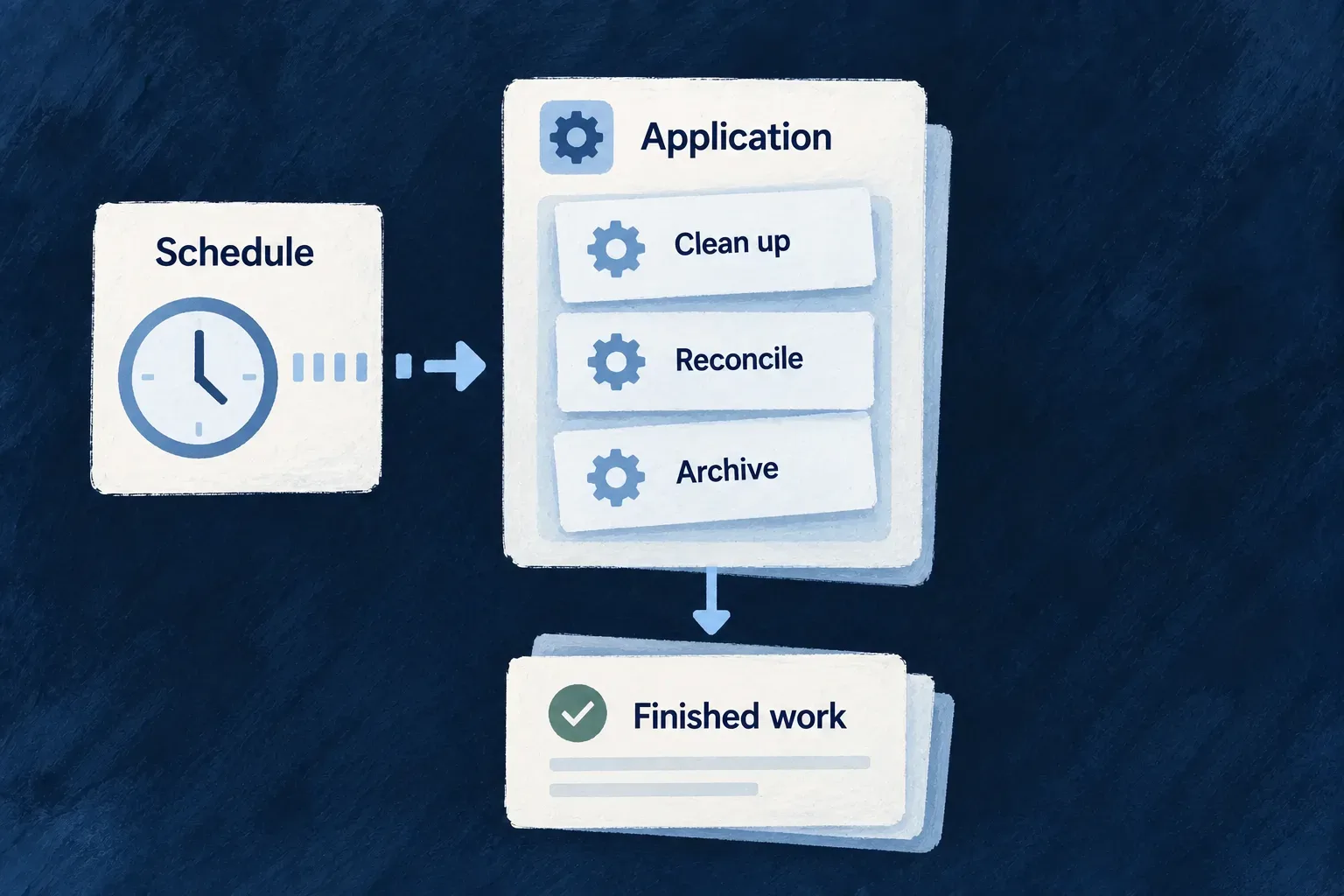
An hourly operation finds recurring tasks and creates their due occurrences. Its result contract distinguishes scanned, created and skipped work.

A Schedule clock sends a tick to an Application card holding three job slips labelled Clean up, Reconcile, Archive.
For engineers
ShapeUse it forDeclaration
Scheduled resource operationWork with a named resource operation contractCRON_JOB variant with cronExpression
Custom batchMaintenance anchored to a resource or scopeRegistered batch execution service and optional cron expression
Minion tickA separate background process with declared accessThe minion’s own configuration and tick handler

These share schedule publication, but their execution contracts differ. An on-demand BATCH_JOB variant is not automatically a recurring operation.

Give the scheduled operation its own request and result

Wonder Todos declares this hourly operation on recurring occurrences. These are selected declarations from its resource configuration; imports and sibling operations are omitted.

export const RunRecurringGenerationResponseDto = z.object({
  scannedRecurringTodos: z.number().int().nonnegative(),
  generated: z.number().int().nonnegative(),
  skipped: z.number().int().nonnegative(),
  generatedAt: z.date(),
});

[TodoRecurringOccurrence_Operations.RUN_RECURRING_GENERATION]: {
  variants: [
    {
      variantType: ResourceOperationVariantType.CRON_JOB,
      cronExpression: '0 * * * *',
      roles: [CORE_ORG_ROLES.ORG_MEMBER],
      riskLevel: ResourceOperationRiskLevel.LOW,
      resourceOperationLike: CoreResourceOperation.UPDATE,
      requestDto: z.void(),
      customResponseDto: RunRecurringGenerationResponseDto,
      customServiceImplementationModes: [ResourceOperation_CustomServiceImplementationMode.OVERRIDE_ALL],
    },
  ],
},

The roles array describes the declared operation; it does not supply the scheduled caller’s identity. The resource batch executor creates an internal execution context with initiatorIds: null and initiatorRoles: []. This example’s cross-organization work explicitly uses the system-access service: the occurrence resource permits system list and create, and the other target resources must permit their corresponding operations. The schedule grants no tenant membership.

The clock supplies no occurrence-shaped request body, hence z.void(). The response is a run summary, not an updated occurrence. Both contracts matter: request parsing runs before the custom implementation and response parsing runs after it.

Identify the matching implementation

The application’s todo-recurring-occurrences.run-recurring-generation.operation.ts resolves those same schemas using this operation path:

const operationPath = {
  resourceIdentifier: TasksManager_ResourceType.TODOS_RECURRING_OCCURRENCES,
  operationIdentifier: TodoRecurringOccurrence_Operations.RUN_RECURRING_GENERATION,
  variantType: ResourceOperationVariantType.CRON_JOB,
  isOperationDefault: true,
};
const requestDtoSchema = resourcesRegistryService.getRequestDtoFromPath(operationPath);
const responseDtoSchema = resourcesRegistryService.getResponseDtoFromPath(operationPath);

This selected implementation fragment identifies the sole cron variant as the default, matching the runtime lookup key. The factory supplies an overrideAll handler and is registered with the application’s operations. In this example, the handler uses systemAccessService for cross-organization reads and creates; its target resources must allow those system operations. A scheduled identity does not create an arbitrary tenant membership.

Follow a custom batch into the runtime registry

The engine’s auditLogsArchiveBatchService is a real custom batch created with createCustomBatchExecutionService. Its input is AuditLogsArchiveBatchInputSchema (optional horizon, look-back and probe overrides); its output is AuditLogsArchiveBatchOutputSchema (enabled/storage flags, window and record counters, truncation and error). The factory also receives dependency resolution and the archival doHandle implementation.

These are the selected schema and anchor properties passed to that factory. This is an excerpt of its configuration object; the dependency resolver and handler are omitted here:

input: AuditLogsArchiveBatchInputSchema,
output: AuditLogsArchiveBatchOutputSchema,
batchCronjob_Context: {
  kind: ENGINE_AUDIT_LOGS_ARCHIVE_BATCH_MANIFEST.kind,
  operationIdentifier: ENGINE_AUDIT_LOGS_ARCHIVE_BATCH_MANIFEST.operationIdentifier,
  primaryScope: ENGINE_AUDIT_LOGS_ARCHIVE_BATCH_MANIFEST.primaryScope,
  cronJobExpression: ENGINE_AUDIT_LOGS_ARCHIVE_BATCH_MANIFEST.cronExpression,
},

Its manifest supplies a scope-anchored application operation and the cron expression. It supplies metadata, not an executable handler. Backend startup makes the implementation reachable by registering the actual service instance, then passes the assembled map to the executor. These selected lines come from the same initialization method; other batch registrations between them are omitted:

customBatches.set(AUDIT_LOGS_ARCHIVE_BATCH_REF, auditLogsArchiveBatchService);

await this.batchesExecutor.initialize(customBatches);

The executor resolves incoming batchRef values against that map and creates the batch’s internal context before calling its execute method. Schedule synchronization asks the same registry for cron-bearing batches. A manifest without this executable registration cannot make a batch run.

Supply scheduled input when the schema requires it

The archive batch’s input fields are optional, so its omitted cronJobInput becomes {} and passes validation. For a custom batch requiring a value, supply a matching cronJobInput in its batchCronjob_Context. This illustrative pair shows the requirement and its value; it is not part of the archive batch’s actual configuration:

const input = z.object({
  retentionDays: z.number().int().min(1),
});

// Inside this custom batch's otherwise complete batchCronjob_Context:
cronJobInput: {
  retentionDays: 30,
},

The factory’s input schema and configured value must agree. getCronJobInputData() parses cronJobInput ?? {} and requires the result to be a record. A missing required value fails schedule extraction; it is not replaced with a guessed value. The registry includes this validated record as inputData in the synchronized schedule. Valid input still does not guarantee successful business execution.

Publish the work that actually exists

Startup collects resource cron variants, cron-bearing custom batches that actually registered, and minion ticks. The full desired set is reconciled with the scheduler, including an empty set when all schedules have been removed. A capability-disabled batch contributes no registered schedule.

Custom batches use createCustomBatchExecutionService and declare their anchor and input schema. Required scheduled inputs must validate before schedule publication. For application batches, connect the factory to runtime registration as well as any descriptive manifest; a manifest alone does not execute work.

Inspect a completed run

After verifying a trigger, the application creates its execution record before running the batch. The signed job ID joins that record to the scheduled dispatch. Defined JSON results, including counters, are retained through the payload store for its 24-hour retention period; failures retain their error details in job history. A duplicate delivery of a recorded terminal run does not reset its history or execute it again. Concurrent deliveries and interrupted execution still require business-level idempotency.

Plan for the next trigger

The scheduler and broker must be configured and running. Schedule synchronization retries failures with capped backoff without failing application startup; this does not mean the schedules are already active.

Scheduled failures do not use ordinary job retry semantics: the next recurrence is the next opportunity to run. If the task needs an earlier retry, make the batch enqueue ordinary retryable work. Design repeated work around stable keys or explicit progress so a later run can safely revisit it. The platform’s manual-trigger surface is an operator control-plane path, not a new public application operation.

Share the clock, keep each application's work separate Mechanism

Applications declare recurring work without giving every running copy its own independent timer. A shared platform scheduler holds the schedules and dispatches each tick to the intended application’s queue.

The receiving runtime verifies the signed instruction and performs the work. Scheduling, delivery and business completion remain separate stages that an operator can inspect.

Example: Schedule two products without mixing their jobs

A customer portal creates a daily export while an operations tool refreshes external records. Both use the platform’s clock, but each dispatch names its own application and reaches its own configured queue and runtime.

A shared scheduler sends signed ticks to separate application queues.
For engineers

Wonder Todos declares a cron-mode minion in minions/marketing-scrapper/wildo.minion.config.ts. This selected configuration omits display metadata and comments:

import { defineMinionConfig } from '@wildo-ai/platform-config-lib';

export default defineMinionConfig({
  version: 1,
  name: 'marketing-scrapper',
  runtime: { type: 'docker', language: 'typescript' },
  mode: 'cron',
  schedule: '0 */6 * * *',
  reinstantiation: {
    policy: 'kill_previous',
  },
  resources: { cpu: '500m', memory: '512Mi' },
});

The minion must also be declared in wildo.saas.config.ts, with its path and resource/platform access. Its work implementation belongs to that runtime. Synchronization brings the declaration into managed configuration; startup schedule synchronization registers the application’s jobs with the scheduler.

mode and schedule select recurring delivery. reinstantiation.policy controls replacement during deployment: the Kubernetes generator maps kill_previous to Recreate and let_run to RollingUpdate. It does not make successive cron handlers mutually exclusive. If overlapping ticks could duplicate an export or an external API charge, the application handler must coordinate that work and make its effects idempotent.

Follow the application identity through dispatch

The authenticated jobs-sync endpoint derives applicationId and the advertised broker virtual host from the application’s identity, not a target application supplied in the request body. A full sync creates or updates jobs and removes jobs no longer declared by that application.

The automatic resource-cron, custom-batch and minion extractors register their expressions in UTC, including the minion shown above. These declarations do not supply a timezone field. The lower-level application jobs-sync API accepts an explicit timezone, which the scheduler preserves; its stored-job default is UTC. Do not read that lower-level support as local-time or daylight-saving behavior for the illustrated declaration.

The scheduler validates expressions and refreshes its active job set. A dispatch names exactly one operation, custom batch or minion. The publisher selects its queue accordingly:

const queueName = input.minionName
  ? QueueNamingUtils.buildMinionTickQueueName(input.applicationId, input.minionName)
  : QueueNamingUtils.buildQueueName(input.applicationId, 'scheduled');

That selected implementation keeps a minion tick out of the backend’s ordinary scheduled-work queue. Both are still inside the application’s configured virtual host. The token signer names the target and work; the receiver verifies the scheduler’s signature before interpreting the instruction.

Bring up the queue owner before publishing

The receiving runtime declares its queue: the application backend owns the scheduled-work queue, and each minion owns its named tick queue. The scheduler checks that the destination already exists and refuses publication if it is absent; it does not create a replacement queue with guessed settings.

Repair the receiving runtime, queue topology or broker permissions before requesting fresh work. Queue existence alone does not prove a consumer is healthy, and a message retained by the broker can outlive its signed authorization.

Distinguish the stages when operating it
StageWhat its evidence establishes
Schedule synchronizationThe platform accepted the application’s declared jobs
Tick publicationThe scheduler submitted the signed dispatch to the broker
Runtime executionThe appropriate backend or minion received and handled the work
Business resultThe intended record, export or other effect actually exists

A published tick is not a completed business job. Inspect the receiving runtime and resulting effect when diagnosing a missed export. A broker-refused virtual host enters bounded retry quarantine; it needs provisioning or permission repair, not repeated immediate attempts.

Know which failures retry
Failure stageInherited behaviorWhat to inspect or supply
Configured schedule synchronization failsApplication startup continues; synchronization retries after 1 second with exponential backoff capped at 5 minutes, until success or shutdownCheck sync logs and manager connectivity. A running application does not prove that its schedules were accepted
Sync service is uninitialized or its manager is unconfiguredSynchronization is skipped without scheduling that retryCorrect initialization or manager configuration; waiting alone does not register jobs
Broker refuses a virtual hostConnection attempts for that host are quarantined with increasing delays, from 1 minute up to 30 minutesRepair the host or publishing permission. This backoff is separate from application-job retry
A minion handler throws, or its tick fails verificationThe consumer negatively acknowledges that delivery without requeueing itInspect the minion failure and resulting business state; the next scheduled tick is fresh work, not automatic replay of the failed transaction

Successful minion handling acknowledges the tick. The no-requeue rule above describes the consumer’s explicit failure handling; it does not promise that broker or connection failures can never cause redelivery. The application owns recovery of an incomplete business effect, including deciding whether and how it is safe to replay it.

Scheduler replicas coordinate through a shared lease: the leader arms schedules and rechecks ownership before each scheduled tick; standbys disarm their tasks. A lease check is not end-to-end deduplication: a stalled publisher can race with takeover after passing the check. Application-declared schedules are reconciled through startup sync; administrative scheduler operations are a separate control surface. Keep handler retry/idempotency policy and recovery of interrupted work explicit.

When a runtime misses a tick

A signed tick has a five-minute token lifetime. The verifier allows 30 seconds of clock tolerance; a queued message is not an indefinitely reusable authorization to run the work.

What happensWhat the operator should expect
A runtime receives a tick after its accepted lifetimeVerification refuses the expired instruction before executing its work
Scheduled backend execution or verification failsThe consumer rejects without requeue; its scheduled dead-letter copy supports inspection
Minion tick processing failsThe consumer also rejects without requeue; it does not automatically retry that tick
A later scheduled occurrence arrivesThe scheduler creates a fresh signed tick, not a replay of the missed business operation

After an outage, inspect the receiving runtime and the business result before deciding what to recover. Reusing an expired token does not repair missed work. A catch-up action must deliberately select the missing work and avoid duplicating completed effects; the next cron occurrence alone does not establish that recovery happened.

Give separate runtimes a defined role

Run specialist work in its own process Mechanism

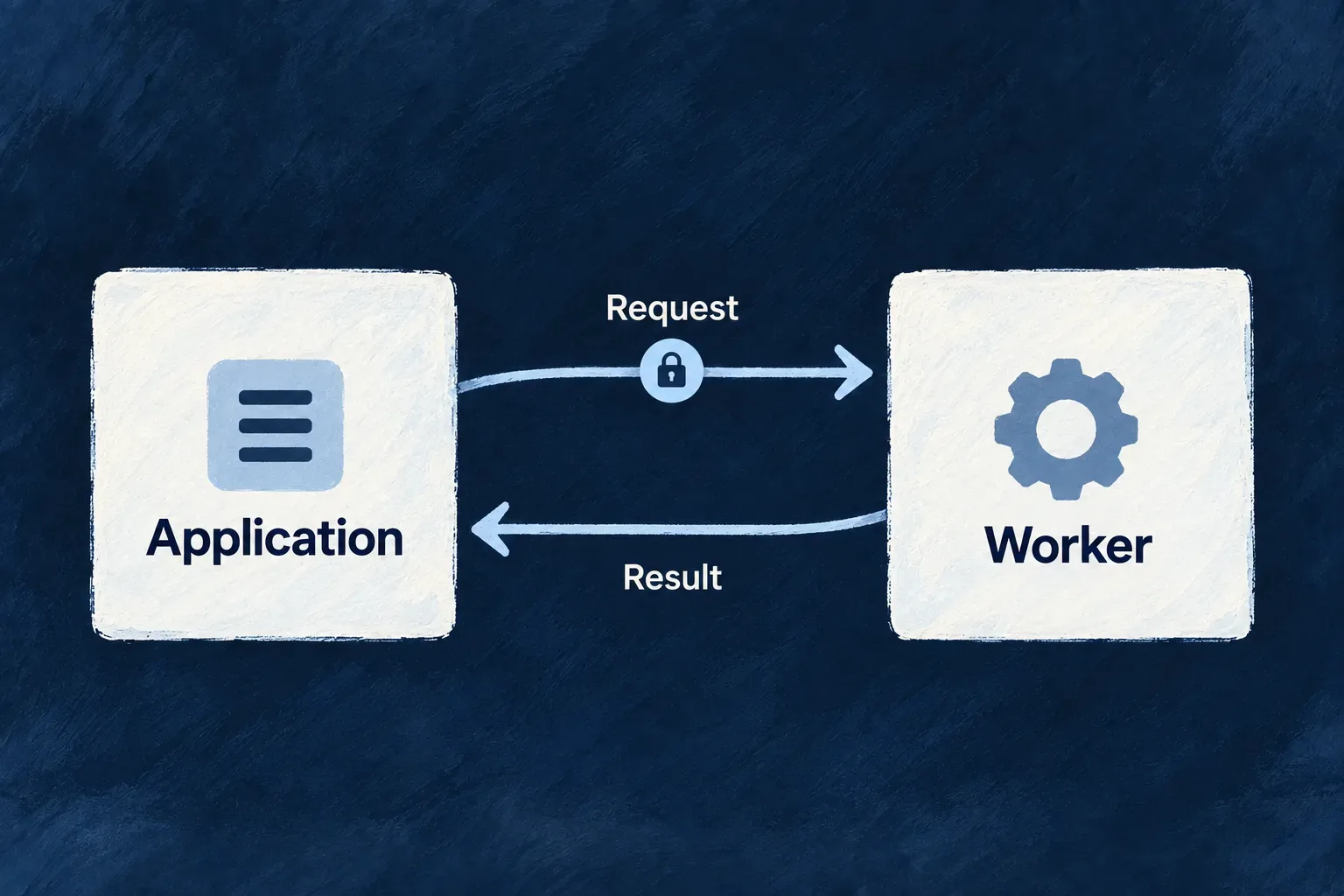
Move specialist processing into a service with its own runtime and resource allocation. The application sends the necessary input, receives the result and retains control of access to its business data.

Wildo connects the backend and worker through an authenticated HTTP contract. Use the Node worker runtime or implement that contract in another language when the work needs different libraries or a separate execution environment.

Example: Calculate a workload projection

The backend reads the tasks it is authorized to access and sends only the fields needed for a workload calculation. A separate worker computes the projection and returns it without receiving the application’s database credentials.

Two equal cards labelled Application and Worker connected with two directional arrows: outward Request, returning Result.
For engineers
Declare the worker’s runtime and HTTP contract

A worker is registered in the application’s workers configuration with a package path. Its own wildo.worker.config.ts defines runtime, health paths and resource requests. This selected configuration comes from Wonder Todos’ Rust worker; identity and isolation settings are omitted here.

import { defineWorkerConfig } from '@wildo-ai/platform-config-lib';

export default defineWorkerConfig({
  version: 1,
  name: 'my-rust-worker',
  runtime: {
    type: 'docker',
    language: 'rust',
  },
  http: {
    port: 8080,
    healthPath: '/healthz',
    readyPath: '/readyz',
  },
  auth: 'wildo-jwt',
  resources: {
    cpu: '1000m',
    memory: '1Gi',
  },
});

The worker image must implement those endpoints and use compatible isolation settings. The Node runtime supplies bootstrap and verification; another language implements the same authentication and probe contract. Deployment projects the worker address into the backend environment as WILDO_WORKER_<NAME>_URL.

Read authorized data before dispatch

Wonder Todos’ plan_workload operation demonstrates the boundary. Its service handler first reads tasks through the service registry using a sub-call execution context. It then sends the computation fields to myNodeWorker at /tasks/workload-projection.

This selected body of the actual overrideAll handler keeps the checked client factory, authorized sub-call read and response normalization together. id, executionContext and utils are handler arguments; the application’s Tasks and Todos_PlanWorkload types describe the input records and result. WORKER_NAME is myNodeWorker; WORKLOAD_PROJECTION_PATH is /tasks/workload-projection. Only comments are omitted.

const workerFactory = utils.workerClientFactory;
if (!workerFactory) {
  throw utils.errorBuilder.buildError(ErrorType.CONFIGURATION, executionContext, {
    customMessageReference: ErrorCustomMessageReference.CONFIGURATION,
    context: {
      message:
        'plan_workload requires WorkerRemoteClientFactory — the projection runs in the declared worker, '
        + 'and this backend deliberately does not carry a second copy of that reduction.',
      workerName: WORKER_NAME,
    },
  });
}

const listed = await utils.servicesRegistry.list<Tasks>(
  TasksManager_ResourceType.TASKS,
  await utils.executionContextCreator.createForSubCall(
    executionContext,
    TasksManager_ResourceType.TASKS,
    CoreResourceOperation.LIST,
  ),
  { todoId: id },
);
const tasks: Tasks[] = Array.isArray(listed) ? listed : (listed?.data ?? []);

utils.logger.info('Dispatching workload projection to the application worker', {
  workerName: WORKER_NAME,
  todoId: id,
  taskCount: tasks.length,
});

const response = await workerFactory.client(WORKER_NAME).post(WORKLOAD_PROJECTION_PATH, {
  tasks: tasks.map((task) => ({
    id: task._id,
    status: task.status,
    priority: task.priority,
    assignedToUserId: task.assignedToUserId,
    estimatedMinutes: task.estimatedMinutes,
    actualMinutes: task.actualMinutes,
  })),
}) as unknown as Todos_PlanWorkload | { data?: Todos_PlanWorkload };

const projection = (response as { data?: Todos_PlanWorkload })?.data ?? response as Todos_PlanWorkload;
return projection as never;

The input leaves out titles and descriptions because the calculation does not need them. The backend owns tenant confinement and data selection; the worker owns validation and computation. A failed dispatch must remain distinguishable from a legitimate empty result.

Connect Node startup to the receiving route

The matching Node entry uses setupSaasWorkerInjection, readWorkerBootstrapEnv, readWorkerHttpSurfaceEnv and defineWorkerInit from @wildo-ai/saas-workers-node-lib. The example below selects its startup and route body; imports, environment-file loading, logging and process-level error handlers are omitted.

Before this block, the real entry loads .env and .wildo-providers.env. Its local loadProviderRuntime() imports the generated wildo-provider-runtime.generated.js, checks that it exports a nodeWorkers artifact and fails explicitly if missing. Run wildo config sync to generate that worker-scoped artifact and projected environment; do not replace it with an invented empty topology. UNASSIGNED_BUCKET is the application constant 'unassigned'.

const container = setupSaasWorkerInjection();
const bootstrapEnv = readWorkerBootstrapEnv();
const httpSurface = readWorkerHttpSurfaceEnv();
const providerRuntime = await loadProviderRuntime();
const startWorkerApplicationService = container.get(
  SAAS_WORKERS_NODE_SERVICE_TYPES.StartWorkerApplicationService,
) as StartWorkerApplicationBackendService;

const config = defineWorkerInit({
  workerName: 'myNodeWorker',
  serviceKind: BackgroundRuntimeType.WORKER,
  http: httpSurface,
  appsManagerBootstrapUrl: bootstrapEnv.appsManagerUrl,
  providerRuntime,
  
  registerRoutes: (router) => {
    router.post('/tasks/workload-projection', (req, res) => {
      const body = req.body as { tasks?: unknown } | undefined;
      const tasks = Array.isArray(body?.tasks) ? body.tasks : [];

      const byStatus: Record<string, number> = {};
      const byPriority: Record<string, number> = {};
      const remainingMinutesByAssignee: Record<string, number> = {};
      const overRunningTaskIds: string[] = [];
      let totalEstimatedMinutes = 0;
      let totalActualMinutes = 0;

      for (const entry of tasks) {
        const task = entry as {
          id?: unknown;
          status?: unknown;
          priority?: unknown;
          assignedToUserId?: unknown;
          estimatedMinutes?: unknown;
          actualMinutes?: unknown;
        };

        const status = typeof task.status === 'string' ? task.status : 'unknown';
        const priority = typeof task.priority === 'string' ? task.priority : 'unknown';
        byStatus[status] = (byStatus[status] ?? 0) + 1;
        byPriority[priority] = (byPriority[priority] ?? 0) + 1;

        const estimated = typeof task.estimatedMinutes === 'number' ? task.estimatedMinutes : 0;
        const actual = typeof task.actualMinutes === 'number' ? task.actualMinutes : 0;
        totalEstimatedMinutes += estimated;
        totalActualMinutes += actual;

        const remaining = Math.max(estimated - actual, 0);
        const assignee = typeof task.assignedToUserId === 'string' && task.assignedToUserId.length > 0
          ? task.assignedToUserId
          : UNASSIGNED_BUCKET;
        remainingMinutesByAssignee[assignee] = (remainingMinutesByAssignee[assignee] ?? 0) + remaining;

        if (estimated > 0 && actual > estimated && typeof task.id === 'string') {
          overRunningTaskIds.push(task.id);
        }
      }

      res.json({
        taskCount: tasks.length,
        byStatus,
        byPriority,
        remainingMinutesByAssignee,
        overRunningTaskIds: overRunningTaskIds.sort(),
        totalEstimatedMinutes,
        totalActualMinutes,
      });
    });
  },
});

await startWorkerApplicationService.initialize({
  config,
  applicationId: bootstrapEnv.applicationId,
  platformApplicationPrimarySecret: bootstrapEnv.platformApplicationPrimarySecret,
});

registerRoutes attaches the calculation; initialize starts the authenticated runtime with the application bootstrap identity. The receiver defaults absent task arrays to an empty list and absent numeric fields to zero; those are this example’s normalization choices, not general schema validation supplied automatically by the worker runtime.

For example, a task estimated at 60 minutes with 20 already spent contributes 40 remaining minutes to its assignee. A task with a positive estimate and a string ID enters the overrun list when its actual time exceeds that estimate; it contributes zero remaining minutes. The returned counts, sums and sorted IDs are computed by the worker rather than echoed from the request. The backend then returns that projection under its operation response contract.

Understand authentication and readiness

WorkerRemoteClientFactoryBackendService caches a client per worker name. Missing deployment URLs fail explicitly. The client signs an APPLICATION_WORKER_REQUEST token containing application and worker identity; initialization requires the backend’s application configuration to be ready.

The Node worker fetches trusted public keys from the platform and refreshes them. Its verifier checks the signed token against the worker-request algorithm, issuer and audience, and can accept still-valid rotation keys. Probe routes are public; business routes pass through verification. Handlers can inspect verified claims for any additional route-specific authorization.

ConcernResponsible side
Selecting application recordsBackend service and its execution context
Supplying only necessary inputCalling operation
Signing and verifying the service requestBackend client and worker runtime
Validating the payload and producing the resultWorker handler
CPU, memory, image and probe contractWorker configuration and deployment

The HTTP client does not poll the worker’s authored readiness path before each call; its network failure handling applies when the worker is unavailable. Deployment health checks and application error handling must cover that case.

Keep worker and queue responsibilities distinct

A declared worker does not consume application queue messages. Queue consumers normally run in the backend process; a worker handles HTTP requests and does not receive database, cache or broker access by default. A queued operation may call a worker, but those are two explicit steps.

Wonder Todos now includes a real workload-projection caller and its Node worker in the local development stack. Its backend-to-worker end-to-end test is a useful reference for exercising dispatch, authentication and the returned result. Adding a worker declaration still requires a working image, handler and deployment configuration for that worker.

Give a background service a defined reach Mechanism

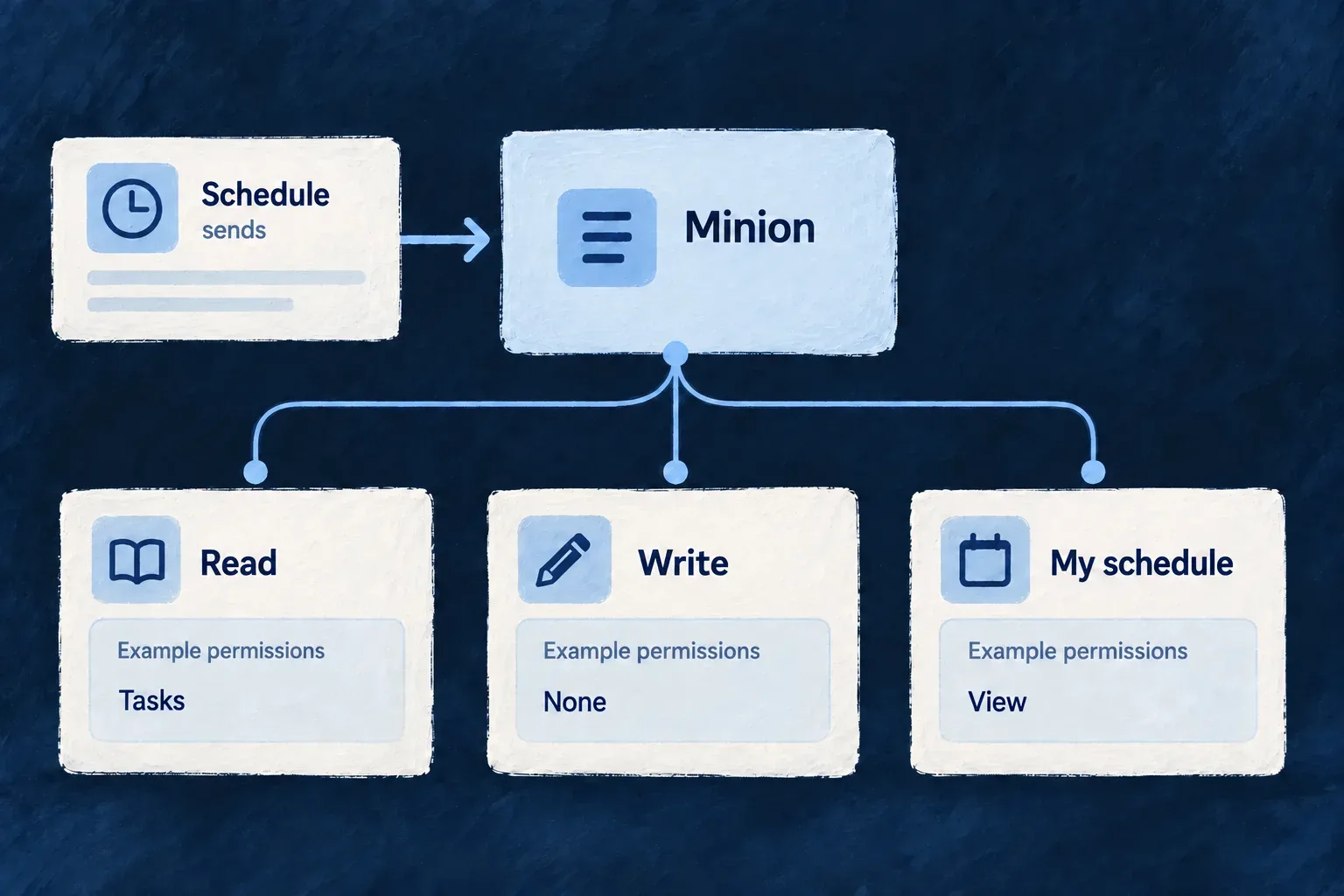
Some background work deserves its own process. A minion runs beside the application with an explicitly declared set of resources it may read or write. Choose an always-up service or work triggered by a schedule.

Platform access is separate: permission to inspect its own schedule does not grant access to application records, or to another minion’s schedule. These declarations make a background service’s intended reach visible before reading its implementation.

Example: Read task information on a schedule without changing it

A reporting minion may read tasks but has no write permission. Its tick can inspect the permitted records and its own recent scheduled runs. Reaching an undeclared resource or attempting a write through the supplied services is refused.

Example minion permissions: read tasks, no writes, and view its own schedule; scheduled triggers reach its separate process.
For engineers

This selected entry comes from Wonder Todos’ wildo.saas.config.ts. The key marketingScrapper is the runtime identity used by its initialization; the package path identifies the separate process.

marketingScrapper: {
  path: './minions/marketing-scrapper',
  resourceAccess: {
    read: ['todos'],
    write: [],
  },
  platformAccess: {
    scopes: [MinionPlatformAccessScope.OWN_CRON_RECORDS],
  },
},

Read and write are independent allow-lists. Startup rejects unknown resource identifiers and substitutes a scoped services registry before accepting ticks. Its proxy recognizes allowed service methods and refuses unrecognized access rather than exposing a newly added method by default.

OWN_CRON_RECORDS permits the attested runtime’s own schedule and run history. The platform derives that identity from the attestation; the caller does not supply another minion’s identifier to widen the query.

Choose how the process receives work
ModeSchedule declarationExecution contract
cronRequiredThe platform sends signed ticks to this minion’s dedicated queue. Its registered onTick handler performs the work.
always-upOmittedThe runtime starts without a recurring platform schedule. Mode selection does not itself call onTick or install a repeating work loop.

Both modes bootstrap the headless backend and subscribe to the dedicated tick queue. Under normal operation, an always-up minion receives no scheduler ticks. Its continuously running work needs its own implementation and lifecycle; selecting the mode alone is not an implementation of that work.

The configuration rejects a cron minion without a schedule and an always-up minion with one. The following example uses cron mode.

Give the scheduled process its cadence

The package’s wildo.minion.config.ts declares this selected configuration fragment:

runtime: {
  type: 'docker',
  language: 'typescript',
},
mode: 'cron',
schedule: '0 */6 * * *',
resources: {
  cpu: '500m',
  memory: '512Mi',
},

That describes a six-hour cadence. Config synchronization and generated runtime configuration connect the authored package to deployment. Its entry point loads the application and provider configuration, then initializes through defineMinionInit with the matching runtime key and handler. A package declaration alone is not a running subscriber.

Use the scoped doors handed to the tick

This is a selected, shortened portion of the application’s actual handler in minion-init.ts. The full file builds and projects the backend initialization graph before passing this handler to defineMinionInit; its logging is omitted here.

onTick: async (token, { systemAccess, minionName, ownSchedule }) => {
  const todos = await systemAccess.listAsSystem<{ _id: string }>(
    TasksManager_ResourceType.TODOS,
    {},
  );

  const ownJobs = await ownSchedule.read();
},

The first call crosses organization boundaries only through the system-access contract. It still needs the minion’s resource allow-list and the target resource’s declared system-read policy. The MINION runtime profile also requires accountable access: inability to record the required system-access audit causes refusal. An allow-list is therefore one layer, not blanket database authority.

The second call exercises the independent platform permission. Removing OWN_CRON_RECORDS can leave the task read permitted while refusing the schedule read. That difference is useful when a process needs business data but no control-plane visibility.

Plan for delayed and overlapping ticks
BoundaryRuntime behaviorApplication responsibility
Queue setupThis minion declares its dedicated queue; the scheduler checks it exists before publishingRestore the runtime and its broker access when the queue is absent
Token freshnessSigned ticks have a five-minute lifetime, with the verifier’s clock tolerance; expired instructions are refusedRequest fresh work after recovery rather than replaying an expired token
Handler completionSuccess acknowledges the tick; verification or handler failure rejects it without requeueInspect the business effect and explicitly recover incomplete work
OverlapThe consumer awaits each handler but does not supply a per-business-operation lockCoordinate competing work and make repeatable effects safe

reinstantiation.policy governs replacement during deployment. In Kubernetes, kill_previous selects Recreate and let_run selects RollingUpdate; neither is a per-tick mutex or a promise to cancel a previous handler. The minion handler owns overlap and backpressure.

A later cron occurrence carries a fresh signed tick. It does not replay every missed occurrence or prove that an earlier partial effect was repaired. The explicit no-requeue failure rule also does not exclude redelivery after a broker or connection interruption. Use the resulting records or artifacts to decide what needs recovery before triggering work again.

Keep the execution lane distinct

The minion starts the backend lifecycle headlessly and subscribes to its own tick queue. Incoming scheduler tokens must identify this minion. It deliberately does not consume the application’s shared job queues, so adding a minion does not add queue-worker capacity.

The provided registry and system-access doors enforce the declared reach. They are not an operating-system sandbox for arbitrary code, independent database clients or external network calls. Keep the handler on the supplied access paths and grant only the resources and platform capability its job needs.

Maintain data and history

See what each data setup run changed Mechanism

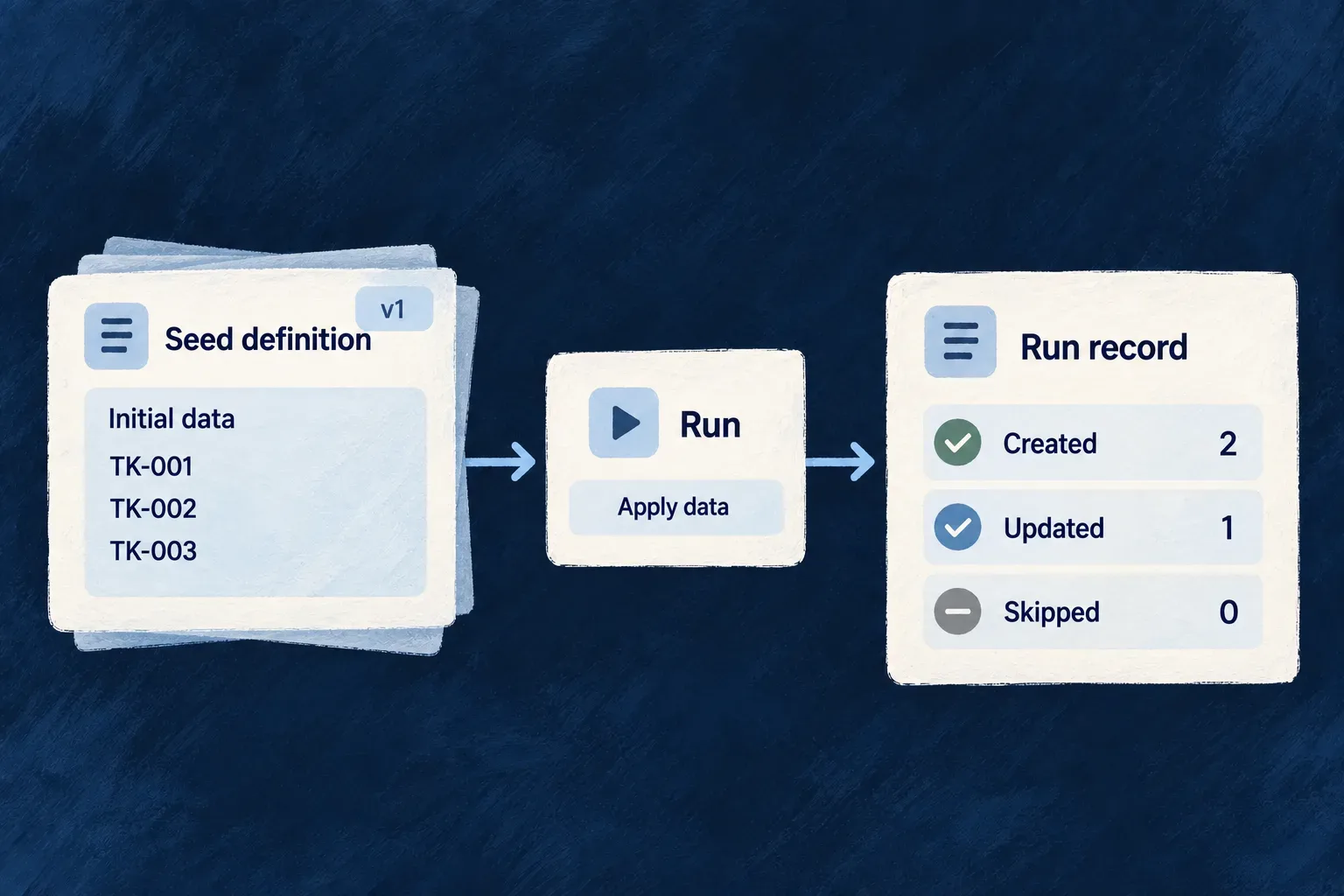
Applying declared data should leave an understandable result. Wildo records the seed, target scope, version and outcome, with counters showing what the pass created, updated, upgraded or skipped.

Scheduled reruns keep eligible data sets current. Operators can inspect the latest outcome for a seed, version and target scope before requesting a deliberate rerun. Cleanup preserves the version evidence later passes rely on.

Example: Check defaults after an application change

An application updates the version of its managed reference data. The run record shows which organization received the change and how many entries were upgraded or skipped. The operator reads that outcome before deciding whether to rerun a failed scope.

A Seed definition document feeds a Run card and then a Run record document with three simple rows Created, Updated, Skipped.
For engineers

A run is identified by seed, scope, related record and seed version. The dispatcher opens or acquires the run slot before applying entries and records terminal status and counters afterward. Repeated triggers can reuse or skip an existing slot; the ledger is not a promise of a new history row for every attempted call. When a slot is reused, its counters and failure report are reset for the new pass. Read it as the latest recorded outcome for that seed/version/scope, not an immutable log of attempts.

InformationWhat it answers
Seed key and versionWhich authored definition was applied?
Scope and related recordWhich application, organization, user or custom target was affected?
Trigger originWas this lifecycle, initialization, scheduled or manual work?
Status and countersDid it finish, partially apply or fail, and which kinds of changes occurred?
Choose the second-pass behavior before rerunning
ModeWhat another pass can do
ADDITIVEInsert missing keys and reapply the declared payload to existing matches; it does not prune orphans
UPGRADEApply versioned migrations and managed fields while preserving other fields
SYNCReconcile the declared set and apply the explicit orphan policy
LAZYReuse a completed per-scope result; an explicit force rerun clears its completed run markers

ADDITIVE does not mean existing rows are immutable. Wonder Todos’ registered webhook seeds use it to reapply local listener configuration. Choose UPGRADE when non-managed user edits must survive. These webhook seeds are lifecycle-triggered, not evidence that every seed runs periodically.

Check whether the seed supports a manual rerun
Authored seedManual eligibility
ADDITIVE, UPGRADE or SYNC with static entries[]The declared entries can be applied to the requested scope
Those modes with computed entry({ triggeringRow })Rejected: a manual request cannot supply the lifecycle row the callback expects
LAZYUses its own resolver contract with triggeringRow: null; completed results can be reused

For example, Wonder Todos’ organization webhook seed is ADDITIVE but computes its entry from the newly created organization. It demonstrates lifecycle seeding, not manual-rerun eligibility. Use its lifecycle trigger, or deliberately author a static entry set suitable for manual application; do not substitute its key into the command below.

Inspect, then rerun one explicit scope

The operator endpoints are mounted beneath /internal/admin/data-seeding. This command example uses a placeholder origin, seed and organization; select an eligible static seed from your registered inventory and use its declared scope. The placeholder below assumes an organization-scoped static seed; it is not the lifecycle webhook seed.

curl "$APP_ORIGIN/internal/admin/data-seeding/seeds" \
  -H "X-Admin-Secret: $APPLICATION_ADMIN_SECRET"

curl -X POST "$APP_ORIGIN/internal/admin/data-seeding/rerun" \
  -H "X-Admin-Secret: $APPLICATION_ADMIN_SECRET" \
  -H "Content-Type: application/json" \
  -d '{"seedKeys":["catalog:reference-data"],
       "scope":{"kind":"organization","relatedId":"org-example"},
       "force":false}'

seedKeys selects one or more registered definitions for the same explicit scope. Every selected seed must declare that scope kind; custom scopes must also match the related resource type. A mixed-scope request is rejected as a whole before dispatch, so split it by declared scope. GET /internal/admin/data-seeding/runs provides the run ledger. The secret is compared by the administrative controller; an unset secret disables these endpoints with 503, while a missing or invalid header produces 401. Keep it in operator tooling, never browser code.

force: true applies only when every selected seed is LAZY: it deletes completed run markers before trying again. Including any non-LAZY seed rejects the whole request; the flag is not silently ignored. Use force: false for the static non-LAZY example above.

Distinguish a partial application from an aborted request
Observed resultWhat happenedWhat to inspect next
Returned run with PARTIALSome entry operations failed inside the pass; later requested seeds can still runThe run’s entriesFailed, mode-specific counters and failureReport
Manual request throws a pass-level errorThat seed could not finish its pass; subsequent requested seeds are not dispatchedThe failed seed’s ledger information and the outcomes of earlier seeds before retrying
seedsSkippedFromCache increasesA LAZY result was reused or its run slot was already claimedThe existing run; a skipped result does not mean new data was applied

For example, if an ADDITIVE pass fails on one entry and the next requested seed completes, the request can return reports for both: the first is PARTIAL, the second COMPLETED. A successful HTTP response is therefore not proof that every entry succeeded. Read each run’s status and counters, then use its failure report to identify the entries needing attention.

A thrown pass-level error follows a different path: the manual request stops at that seed. Earlier changes are not rolled back as one transaction. In contrast, scheduled reruns contain per-seed failures and continue to other eligible work.

Separate each seed’s cadence from the evaluation tick

A seed opts into periodic work with schedule.cron and an iteration strategy appropriate to its scope. LAZY cannot also declare a schedule. The application’s dataSeeding.scheduledRerunCronSchedule controls the engine evaluation tick, which defaults to every minute.

Current evaluation uses UTC and the window between the previous engine tick and now. A due seed runs once per selected scope in that window; it does not replay every individual occurrence inside it. A coarser tick therefore coalesces more frequent seed schedules. The selected iteration strategy determines whether the pass targets a global scope, applications, organizations, users or a registered custom resolver’s results.

The scheduled path contains per-seed and per-scope failures so other eligible work can continue. It does not provide a durable replay queue for every missed clock occurrence; use an explicit rerun when recovery requires one.

Retain the evidence that prevents unnecessary work

Cleanup considers terminal runs older than the configured retention window and preserves the maximum seed version for each seed/scope group. Running rows are excluded, and the dispatcher owns interrupted-run recovery. This protects the version evidence needed to recognize prior work while pruning older history; it is separate from deleting the seeded business records.

Keep a separate copy of your audit history Mechanism

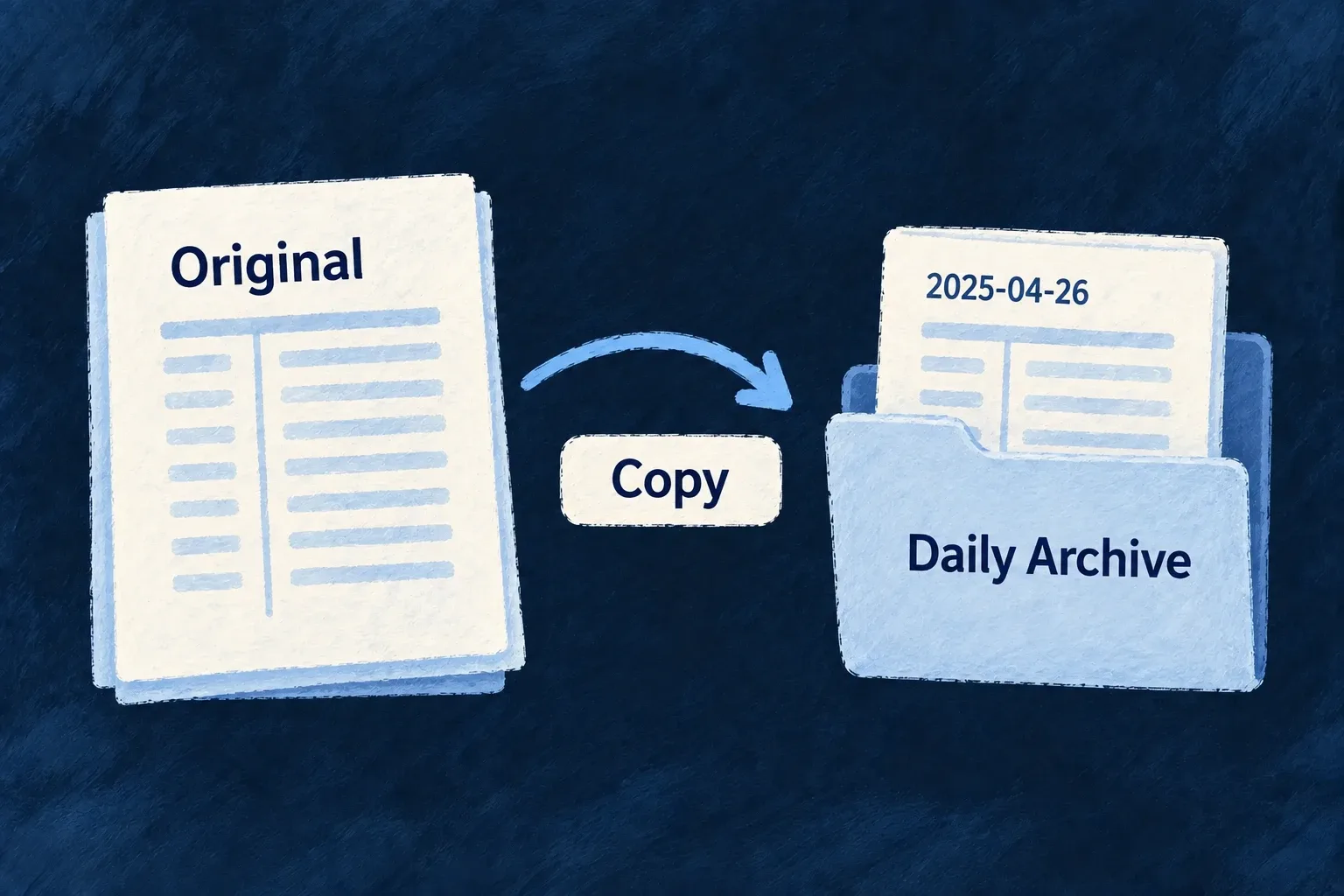
Wildo can copy older audit records into dated JSON artifacts in object storage. Your operational trail remains available, while a separate archive supports longer-term review and controlled handover.

Archiving copies the records. It does not delete the originals.

Example: Keep a separate historical copy

An operator archives events older than three months. A reviewer receives the daily files for a selected period while administrators continue querying the original events through the application.

A dated archive receives a copy of the audit history while the original remains.
For engineers

The shared auditTrail configuration declares archiveAfterDays. This illustrative fragment opts into copying events older than 90 days; keep it in the authored application configuration, not a generated environment file.

auditTrail: {
  archiveAfterDays: 90,
},

Configure a reachable file-storage provider and run the application’s batch scheduling path. The registered audit-logs-archive job checks the current horizon on each execution. With no horizon, it performs no archive work and leaves the primary trail intact.

Recover missed days without a separate checkpoint

The batch writes a deterministic artifact per UTC day. It rewrites recent archivable windows and probes older windows for missing artifacts, so retrying the same period does not create a second archive identity. Successful artifact presence is the progress record.

For a first archival run over existing history, the batch input supplies explicit overrides:

Selected source from audit-logs-archive.batch.backend.service.ts:

export const AuditLogsArchiveBatchInputSchema = z.object({
  /** One-shot archival horizon override (days). Falls back to app config. */
  archiveAfterDaysOverride: z.number().int().min(1).max(2555).optional(),
  /** One-shot look-back width override (days) — for cold-start backfills. */
  lookbackDaysOverride: z.number().int().min(1).max(MAX_LOOKBACK_DAYS).optional(),
  /**
   * One-shot width override (days) for the missing-artifact probe sweep that runs BEYOND the
   * look-back. `0` disables the sweep for this run (pure look-back behaviour).
   */
  backfillProbeDaysOverride: z.number().int().min(0).max(MAX_LOOKBACK_DAYS).optional(),
}).strict();

This is the AuditLogsArchiveBatchInputSchema; use its lookbackDaysOverride when dispatching a wider historical run. Inspect error, windowsArchived, recordsArchived and truncatedWindows in the batch result, then check the corresponding storage artifacts. A complete archive interval needs zero truncated windows and the expected dates; artifact presence alone does not prove that every record was copied. A bounded scheduled look-back is recovery for missed runs, not an unlimited historical scan.

Follow one run from input to artifact

This illustrative operator scenario keeps the configured 90-day horizon and scans just the most recent fully archivable UTC day. It disables the older missing-artifact sweep for this invocation.

The following is a backend invocation fragment, not a public endpoint. batchExecutor is the initialized BatchesCronjobsExecutor_BackendService with the engine archive batch registered. Run it only from trusted operator-controlled backend code: the executor creates the batch’s internal context, and this archive is application-wide.

const result = await batchExecutor.executeCustomBatch('audit-logs-archive', {
  lookbackDaysOverride: 1,
  backfillProbeDaysOverride: 0,
});

Ordinary scheduled execution uses the registered batch and its configured defaults. The direct executor call above returns the batch result; a scheduler’s accepted-publication response does not return or prove that result.

Suppose the invocation begins at noon UTC on September 12, 2026, and the selected day contains two eligible records. These are illustrative result values, not an observed production run:

{
  "tickAt": "2026-09-12T12:00:00.000Z",
  "enabled": true,
  "archiveAfterDays": 90,
  "horizonAt": "2026-06-14T12:00:00.000Z",
  "storageConfigured": true,
  "lookbackDays": 1,
  "backfillProbeDays": 0,
  "windowsBackfilled": 0,
  "windowsScanned": 1,
  "windowsArchived": 1,
  "recordsArchived": 2,
  "truncatedWindows": 0,
  "error": null,
  "durationMs": 25
}

The horizon’s own day is not fully eligible, so this run selects June 13. The logical destination is the application-scoped audit-archive folder with the deterministic filename audit-archive-2026-06-13.json; the configured provider determines the physical storage path. A repeated write uses that same daily identity.

The artifact carries the following metadata. This shortened illustration omits the records array, which contains the two audit records in the actual artifact:

{
  "schemaVersion": 1,
  "kind": "audit-log-archive",
  "applicationId": "example-application",
  "dayWindowUtc": "2026-06-13",
  "windowStart": "2026-06-13T00:00:00.000Z",
  "windowEnd": "2026-06-14T00:00:00.000Z",
  "archivedAt": "2026-09-12T12:00:00.000Z",
  "recordCount": 2,
  "truncated": false
}

Check the application, window, record count and truncation flag against the intended run. An unrelated increase in storage object count is not evidence that this archive was written correctly.

Interpret an outcome before retrying
OutcomeResult signalsMeaning and next step
Disabledenabled: false, error: nullNo horizon was configured or supplied; no archive work runs
Storage absentenabled: true, storageConfigured: false, error: nullArchival was requested but skipped; configure a suitable provider before rerunning
Empty dayA window was scanned but produced no artifactNo records were selected for that day; a missing file can be legitimate
WrittenwindowsArchived and recordsArchived increaseInspect the corresponding artifact and its provenance; counts include rewritten daily artifacts
TruncatedtruncatedWindows > 0, artifact truncated: trueThe daily record cap was reached; that artifact is incomplete even if error is null
Errorerror contains a messageEarlier writes may remain; inspect partial counters and existing artifacts before deciding what to recover

The batch prefers configured Wildo-managed storage, then local-directory storage. A null error alone does not establish a write: disabled and unconfigured runs deliberately return non-error summaries. Failures during scanning or upload return the progress accumulated before the error rather than resetting it to zero.

Bound the historical interval deliberately

Only complete UTC days before the horizon’s day are selected. By default, each run rewrites the newest two eligible days and probes the preceding 90 days for missing artifacts. Existing probe-band artifacts are skipped; empty days intentionally produce no artifact.

The look-back and older probe span are capped together at 2,555 days. Increasing the look-back widens this horizon-relative interval; it is not an arbitrary start-date/end-date export API. A truncated artifact remains incomplete even when a later probe sees that its file exists. Review both coverage and truncation before treating an interval as complete.

Keep archive and retention decisions separate

The audit resource exposes no update or delete operation. Storage lifecycle, access to archived artifacts and the intended retention period remain operator decisions. This copy mechanism does not shrink the database or promise a backup of the rest of the application.

Choose the right audience for the artifact

The archive batch collects application-wide rows and explicitly bypasses contextual organization filtering. Its output is an operator artifact, not a customer-scoped download. For customer handover, use the bounded organization export and inspect its truncation result; do not hand over a raw application archive. Archival copies do not prune the primary rows.

Background work belongs to the product it serves.

Wildo connects delivery, scheduling and separate runtimes to the application that owns the work.

Your application supplies the behavior, authority and business outcome. Shared infrastructure gives that behavior a place and a time to run.

Building a B2B product or an internal tool?

Wildo is not self-service yet. Tell us what you have in mind and we will say plainly whether it fits, and what happens next.