
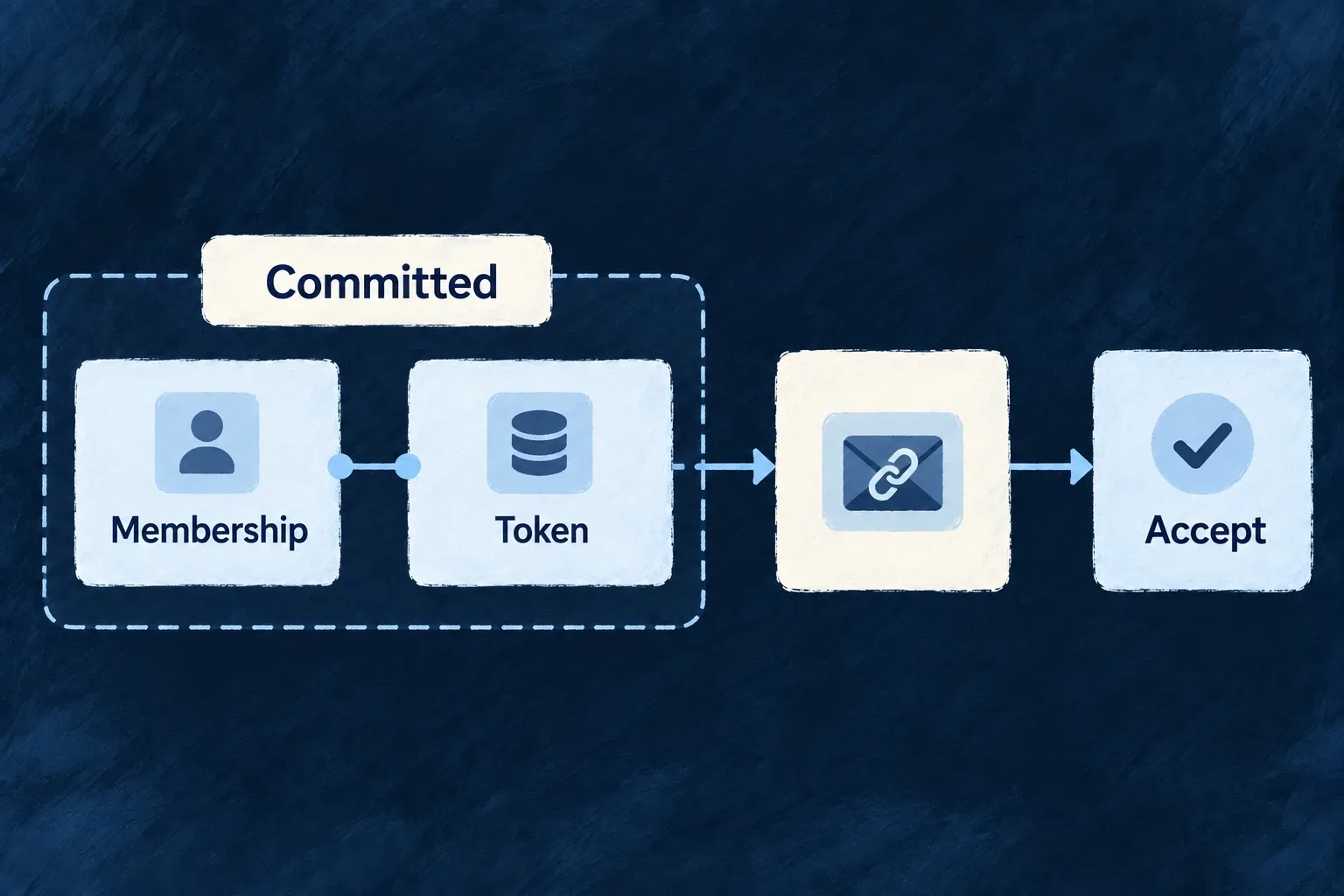
Keep action links tied to committed work
When an operation issues an acceptance or recovery link, Wildo can create its token in the same transaction as the record change. The email then uses that token to point at the declared action.
The link represents committed work, while sending remains a separate consequence.
Example — Create an invitation with its acceptance link
A pending membership and its single-use invitation token are committed together. The email uses the resulting link; a resend replaces the earlier invitation token.
For engineers
Declare the token on the operation variant
The organization-member creation variant contains this token configuration:
Selected from organization-members.shared.resources-config.schemas.ts; surrounding module configuration is omitted.
          tokenGeneration: {
            tokenType: CoreConsumableTokenTypes.ORGANIZATION_MEMBER_INVITATION,
            consumptionMode: ConsumableToken_ConsumptionMode.SINGLE_USE,
            expiresIn: { value: 7, unit: DurationUnit.DAYS },
            relatedIdField: '_id',
            emailLinkPath: '/invitation',
            // Mint the accept token for real invites only — never for an ACTIVE direct-add.
            condition: isPendingOrganizationMemberInvitation,
          },
tokenGeneration makes the resource operation transactional. relatedIdField ties the token to the created membership and emailLinkPath selects the acceptance path. The matching notification reads userEmail and uses the same invitation-state condition. The dispatcher derives acceptUrl from the committed token rather than asking the template to mint one.
Complete the consumer side
The application must provide the matching template and acceptance route. A missing template for a token-backed producer is a fatal startup validation error. The resource and token mutation share the transaction; template lookup is a separate setup check. The acceptance action still checks token validity and the relevant business state; the existence of a link in an email is not authority on its own.
Follow the invitation into its actual template
The organization-member CREATE notification uses USER_SELF as its template identity and recipientEmailField: 'userEmail' as its destination. The resolved reference is email.organizationMembers.create.user-self. Wonder Todos registers the renderer and locale labels from:
backend-api/src/engine/email/resources/organizationMembers/
  create.user-self/
    template.tsx
    labels.en.ts
The engine email module scans resources and contributes the resulting emailTemplateDefinitions map through the backend module registry. This is the same registration path used by workspace lifecycle emails; keep one registry, with a renderer for every declared reference.
Inside the existing invitation template’s body, the dispatcher-supplied context provides acceptUrl. This selected JSX branch shows what the real renderer does with it; the surrounding body has already resolved acceptUrl, dashboardUrl, brand, labels and appName:
{acceptUrl ? (
  <PrimaryButton href={acceptUrl} brand={brand} style={{ marginTop: '24px' }}>
    {labels.buttonAcceptInvitation}
  </PrimaryButton>
) : dashboardUrl ? (
  <PrimaryButton href={dashboardUrl} brand={brand} style={{ marginTop: '24px' }}>
    {labels.buttonAcceptInvitation}
  </PrimaryButton>
) : (
  <BodyText brand={brand} style={{ marginTop: '24px' }}>
    {interpolateEmailLabel(labels.fallbackSignInAccept, { appName })}
  </BodyText>
)}
Here acceptUrl comes from context.additionalContext, not a token produced by the React component. The dashboard/sign-in branches are fallback presentation; they do not mint an invitation token or replace a working acceptance link.
Finish at the registered acceptance route
The standard router registers /invitation. AuthPage_Invitation reads the token query parameter and supplies it to Auth_Invitation. That consumer calls getInvitationInfo(token) to discover the invitation and permitted joining methods, then uses the invitation-specific acceptance flow. The password path passes invitationToken to acceptInvitation; other supported methods keep their own acceptance behavior and authentication checks.
The visible chain is therefore membership creation → committed token → additionalContext.acceptUrl → the template’s button → /invitation?token=… → invitation validation and acceptance. Inspect the rendered button URL as well as the record/token result. Retain the standard route when using this producer; replacing the frontend requires implementing that consumer contract, not merely drawing an invitation form.
Recover through the named operation
The invitation resend variant revokes existing tokens for the related membership and creates a new one. A delayed earlier email can therefore carry an unusable link. Conversely, a process can stop after commit but before provider submission, leaving valid work without a delivered message. The administrator’s resend operation is the explicit recovery path; the token transaction is not an exactly-once email outbox.