
Follow the customer’s subscription
Keep the selected plan, add-ons, trial dates and cancellation state together. Wildo connects customer actions with the provider and updates local subscription records as provider events arrive.
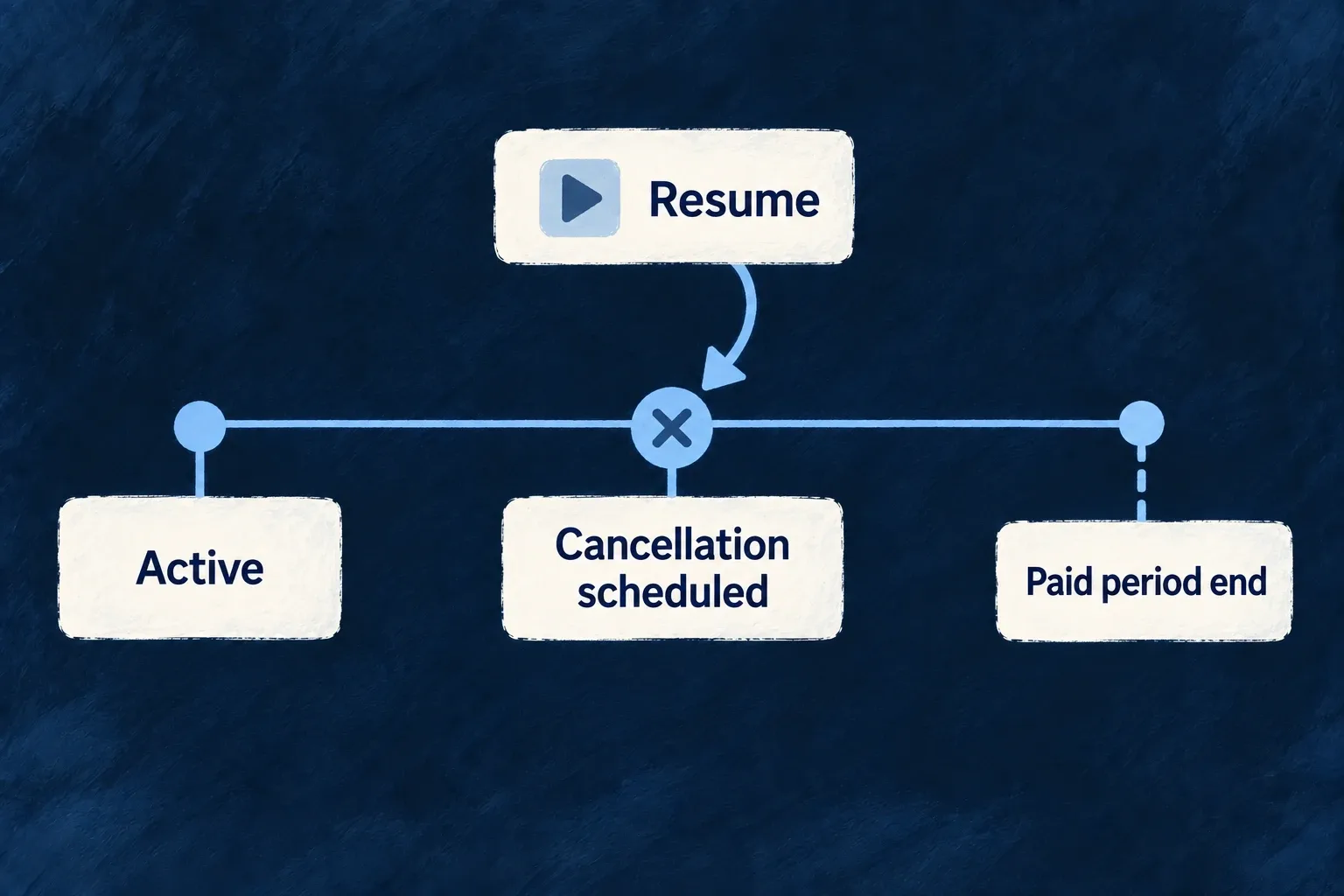
Example — Cancel at the end of the paid period
A customer requests cancellation while retaining the current paid period. Before it ends, a permitted resume action can remove the pending cancellation.
For engineers
Use the scoped subscription operations, not a generic update of status or items. This complete teaching hook exposes the five actions independently. Mount its consumer under the normal resource registry and BillingProvider, passing the active organization, its billing account ID and subscription ID. Resolve the account from available useBilling().billingAccount state before mounting the consumer. Backend authorization still decides whether this person may mutate that subscription.
import { useState } from 'react';
import { useBilling, useResourceRegistry } from '@wildo-ai/saas-frontend-lib';
import {
  BillingSubscription_Operations, CoreResourceType, DataMode, ResourceOperationVariantType,
  BillingSubscription_CancelRequestDto, BillingSubscription_ChangePlanRequestDto,
  BillingSubscription_AddAddonRequestDto, BillingSubscription_RemoveAddonRequestDto,
  type BillingSubscriptionBase,
} from '@wildo-ai/saas-models';

type SubscriptionResult = Pick<BillingSubscriptionBase,
  '_id' | 'status' | 'cancelAtPeriodEnd' | 'currentPeriodEnd'>;

export function useOrganizationSubscription(organizationId: string, organizationBillingAccountId: string, organizationSubscriptionId: string) {
  const { doOperation } = useResourceRegistry();
  const billing = useBilling();
  const [busy, setBusy] = useState(false);
  const [failed, setFailed] = useState(false);
  const [result, setResult] = useState<SubscriptionResult | null>(null);
  async function run(operationIdentifier: BillingSubscription_Operations, request: () => Record<string, unknown>) {
    setBusy(true); setFailed(false); setResult(null);
    try {
      const updated = await doOperation<SubscriptionResult>({
        resourceIdentifier: CoreResourceType.ORGANIZATION_SUBSCRIPTIONS,
        operationIdentifier,
        variantType: ResourceOperationVariantType.API_CALL,
        isOperationDefault: true,
      }, {
        contextualParameters: { organizationId, organizationBillingAccountId, organizationSubscriptionId },
        requestData: request(),
        dataMode: DataMode.RAW,
      });
      setResult(updated);
      billing.refetch();
    } catch { setFailed(true); }
    finally { setBusy(false); }
  }
  return {
    busy, failed, result,
    cancel: () => run(BillingSubscription_Operations.CANCEL,
      () => BillingSubscription_CancelRequestDto.parse({ cancelImmediately: false })),
    resume: () => run(BillingSubscription_Operations.RESUME, () => ({})),
    changePlan: (newProductKey: string, newPriceId: string) => run(BillingSubscription_Operations.CHANGE_PLAN,
      () => BillingSubscription_ChangePlanRequestDto.parse({ newProductKey, newPriceId })),
    addAddon: (addonProductKey: string, priceId: string) => run(BillingSubscription_Operations.ADD_ADDON,
      () => BillingSubscription_AddAddonRequestDto.parse({ addonProductKey, priceId })),
    removeAddon: (addonProductKey: string) => run(BillingSubscription_Operations.REMOVE_ADDON,
      () => BillingSubscription_RemoveAddonRequestDto.parse({ addonProductKey })),
  };
}

export function CancelAtRenewal({ organizationId, billingAccountId, subscriptionId }: { organizationId: string; billingAccountId: string; subscriptionId: string }) {
  const action = useOrganizationSubscription(organizationId, billingAccountId, subscriptionId);
  return <section>
    <button disabled={action.busy} onClick={action.cancel}>Cancel at renewal</button>
    {action.failed && <p role="alert">Cancellation failed. Check the current subscription before trying again.</p>}
    {action.result && <p>{action.result.cancelAtPeriodEnd
      ? 'Cancellation is scheduled at period end.' : 'Subscription updated.'}</p>}
  </section>;
}
The result type is a projection of public fields used by this screen, not the complete backend record. Mount the example with a key derived from organization, billing account and subscription IDs to reset local feedback when the active customer changes. Only show actions after the subscription slice is available. Customer-facing labels here are illustrative; the application supplies translated wording and its confirmation interaction.
The example requests period-end cancellation explicitly. An omitted timing uses product/application policy. An immediate request forbidden by the product is refused, not silently changed to period end. The result reports the updated subscription; it does not assert that every asynchronous entitlement consumer has already refreshed.
Choose one action and inspect its result
| Action | Input from the screen | Result to check |
|---|---|---|
| Cancel | Explicit timing, optionally a reason | cancelAtPeriodEnd for a scheduled cancellation, or terminal status for immediate cancellation |
| Resume | No business payload; existing subscription in context | Pending cancellation is cleared; calling resume without a pending cancellation is refused |
| Change plan | Selected product key and one of that product’s local price IDs | Updated subscription and refreshed current plan |
| Add add-on | Add-on product key and its local price ID | Refreshed subscription items include the add-on |
| Remove add-on | Existing add-on product key | Refreshed items retain the other products |
These are alternatives initiated by separate user decisions, not a sequence to run together. The request schemas validate each payload. Resolve selected products and their own prices through the billing context before calling changePlan or addAddon; provider price_… identifiers are not the local price IDs expected here. For personal subscriptions use USER_SUBSCRIPTIONS and { userId, userBillingAccountId, userSubscriptionId }.
Let provider events complete the picture
Webhook handling reconciles status and billing-period bounds. The billing context refetches on relevant scoped events. The browser returning from checkout is not evidence that the subscription has become active.
Plan change validates the new product and price, preserves the intended plan/add-on distinction and sends proration to the provider. A declared period-end plan-change timing is not a subscription schedule in the current Stripe adapter. Use the policy guide when designing changes; cancellation timing and plan-change scheduling are different contracts.
Remove an add-on without changing the other items
For example, removing extra storage should leave the plan and a seats add-on intact. Invoke REMOVE_ADDON with the storage product’s addonProductKey. The handler requires an add-on product (a plan key is refused), resolves it even if retired, locates its subscription entries and requires their recorded provider item IDs. A missing ID refuses the operation before provider mutation; it never guesses from the position of an item.
After those checks, the handler sends explicit deletions and returns the surviving local items:
const provider = getBillingProvider();
await provider.updateSubscription(subscription.providerSubscriptionId, {
  removedProviderSubscriptionItemIds,
});

return { items: remainingItems };
The Stripe adapter translates those IDs into items: [{ id, deleted: true }]. Unmentioned items remain unchanged at the provider. Only after that call succeeds does the resource operation persist the remaining local entries. This is a provider update, not a request to replace the entire remote item list.
Keep existing subscription item identities
Plan changes preserve the known provider item ID. Changing a plan or adding an add-on requires every existing item to have its provider item ID recorded; otherwise the operation refuses before contacting the provider. This prevents an existing line from being mistaken for a new purchase.
A new line carries a backend-generated correlation key. The provider returns its created item ID under that key, and the operation records it immediately with the local line. Consecutive changes therefore keep targeting the same provider items without waiting for a webhook. Missing identities in older records still require an explicit repair; routine status reconciliation does not repair item identities. Neither price nor array position is used to guess an ID.