
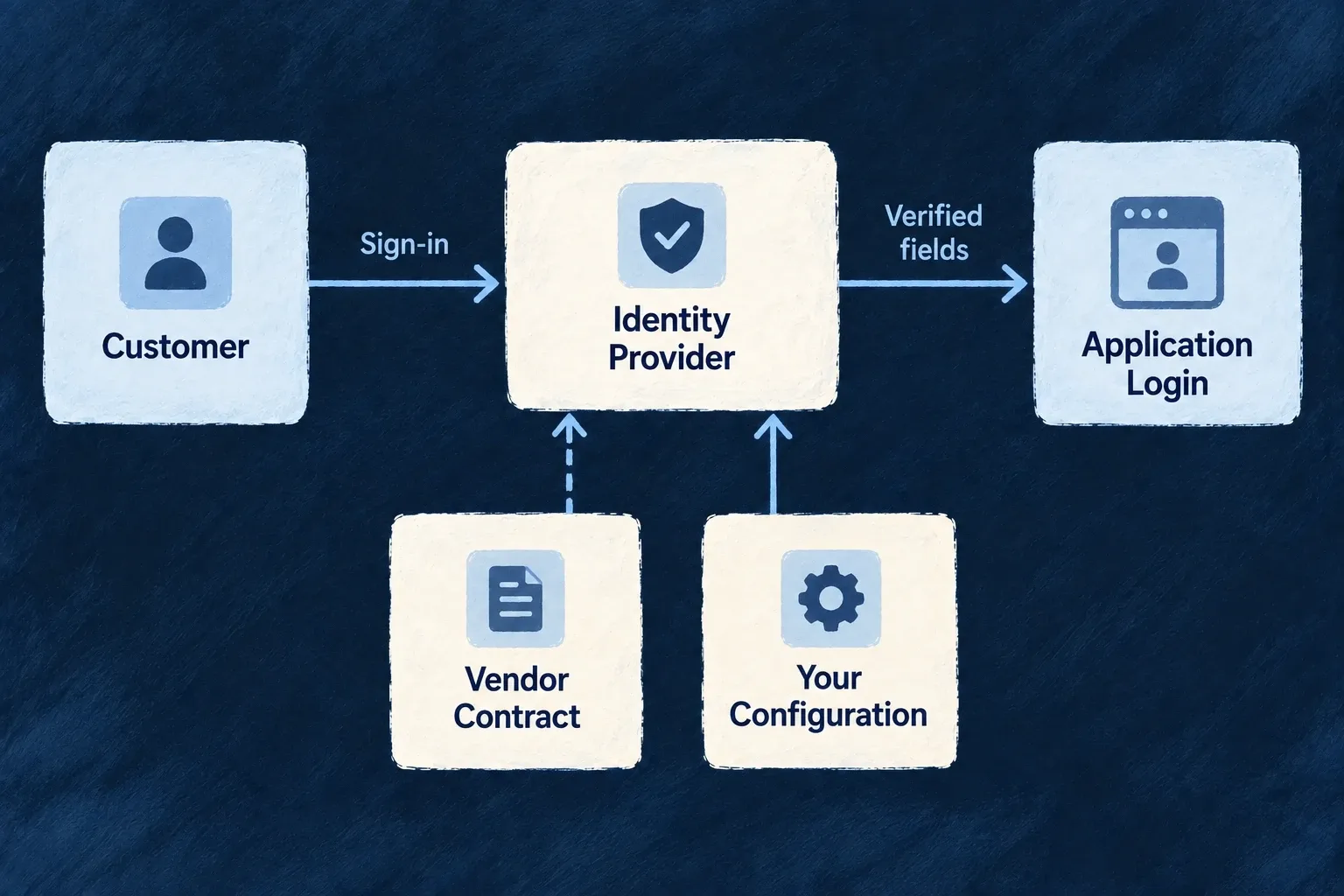
Describe each sign-in provider once
Sign-in vendors differ in endpoints, requested scopes and identity fields. Provider contracts describe those differences so the authentication flow can use them without scattering vendor-specific branches through the application.
Configure the application’s sign-in options or a customer’s identity connection separately. A provider module makes the integration available; it does not enable login by itself.
Example — Connect a familiar sign-in identity
A configured provider exchanges its authorization response and maps the returned identity into the application’s user fields. The application still decides which sign-in methods and user types are allowed.
For engineers
Google’s backend module declares its OAuth/OIDC transport shape:
Selected from google.backend.module.ts; surrounding declarations and imports are omitted.
kind: ProviderProtocolRuntimeKind.OAUTH2_SSO,
authorizationEndpoint: "https://accounts.google.com/o/oauth2/v2/auth",
tokenEndpoint: "https://oauth2.googleapis.com/token",
userInfoEndpoint: "https://www.googleapis.com/oauth2/v2/userinfo",
jwksUri: "https://www.googleapis.com/oauth2/v3/certs",
issuer: "https://accounts.google.com",
scopes: [
  "openid",
  "email",
  "profile"
],
clientIdPublicConfigKey: "GOOGLE_OAUTH2_CLIENT_ID",
clientSecretRef: "GOOGLE_OAUTH2_CLIENT_SECRET",
supportsPkce: true,
supportsOidc: true,
tokenEndpointAuthMethod: "client_secret_post",
The contract also maps the vendor profile into identifier, email, name and verified-email fields. It describes protocol behavior; the application supplies its client ID and secret through provider configuration and secret resolution.
Configure the actual login path
This illustrative Google setup supplies two separate backend configuration sections. Merge them into the application’s existing configuration; retain its other auth settings and providers. googleClientId is the client ID issued for your application. Import OAuth2_Purpose and ExternalProvider_ExchangeProtocol_Kind from @wildo-ai/external-connectors-models.
const socialLogin = {
  auth: {
    socialOAuth2Providers: {
      google: {
        provider: 'google',
        enabled: true,
        purpose: OAuth2_Purpose.USER_SSO,
      },
    },
  },
  providerConfigurations: {
    google: {
      [ExternalProvider_ExchangeProtocol_Kind.SSO_OAUTH2]: {
        clientId: googleClientId,
      },
    },
  },
};
socialOAuth2Providers admits the provider for login. providerConfigurations.google.sso_oauth2 supplies the application account’s client ID. The Google contract resolves its secret from GOOGLE_OAUTH2_CLIENT_SECRET; set that through the deployment’s server secret material, never in the browser-facing configuration. Both the client ID and baseline secret are required before any scope-level credential override is applied.
In wildo.saas.config.ts, declare the provider inside providers.scopes.backend.providers (merge with the existing runtime entries):
google: {
  providerCapabilities: ['SSO_OAUTH2'],
  protocols: ['SSO_OAUTH2'],
},
Run wildo config sync to synchronize the provider artifacts. This engine-shipped provider needs no extra vendor package. The backend provider catalogue explains runtime registration. A provider installed in another runtime is not thereby enabled on the login backend. The browser’s provider contribution supplies public identity/display data; it cannot replace the backend account setup.
Allow the method for the intended people
In the intended userTypes[ref].auth policy, add the method while preserving the existing policy:
auth: {
  authMethodsEnabled: {
    ...existingAuthMethods,
    [AuthMethod.EXTERNAL_OAUTH2]: true,
  },
  // Keep the user type’s existing registration, MFA and other policies.
},
Import AuthMethod from @wildo-ai/saas-models. This fragment illustrates the method change, not a complete user-type definition. New-account creation is a separate decision: if public social registration is intended, the target user type’s registration.mode must be RegistrationMode.OPEN and registration.allowedMethods must include AuthMethod.EXTERNAL_OAUTH2 (RegistrationMode is also exported by @wildo-ai/saas-models). The initiating frontend must map to that same user type through frontendServices[serviceName].usersManagement, with auth: true for sign-in and register: true for new-account creation. An unrelated user type with open registration cannot authorize this flow. Enabling login alone does not grant open registration or bypass verified-email linking rules.
Wonder Todos shows the corresponding frontend-to-user-type mapping in its backend configuration. Adapt the service and user-type references to your application; use register: false when only existing accounts should sign in. This mapping alone does not enable social login.
frontendServices: {
  'wonder-todos-app': {
    usersManagement: {
      member: { register: true, auth: true, isDefault: true },
      admin: { register: false, auth: true },
    },
  },
},
Register the callback that this deployment exposes
The resolver constructs the redirect URI from runtime.endPoints.main_backend_api.publicUrl followed by /api/v1/auth/oauth2/callback/google. Register that exact URI with the vendor. The origin is the public backend address, not the frontend’s address. Missing public URL, client ID or secret stops connection resolution before a redirect is usable.
Use the standard authentication flow to start login and consume its state/callback. Do not create an account from a profile supplied directly by the browser. The resolver example proves configuration assembly; a successful external sign-in still requires the vendor account, callback registration and the application’s account policy to agree.
Enterprise OIDC can use an application-scoped connection for the application’s sign-in or an organization-scoped connection for a customer’s sign-in. Each keeps its own configuration and access policy. SAML sign-in is served by the authentication subsystem, not by pretending the reserved provider-side SAML capability is a shipped vendor module.
Use the same vendor reference consistently across the configured surfaces. The authentication subsystem resolves sign-in contracts directly; these capabilities do not require inventing an engine service-selection slot.
Decide how to handle missing provider assurance
Social sign-in and enterprise delegation have different trust contracts. Provider definitions record the evidence supported by Google, Microsoft, GitHub and Apple, together with prerequisites and documentation. Account-level two-factor enrollment is not proof of MFA in the current login.
Set userTypes.<type>.auth.mfaPolicy.externalAssuranceEnforcement in backend configuration using ExternalAssuranceEnforcement from @wildo-ai/saas-models. The default records a warning when required social MFA cannot be established; STRICT refuses session issuance. Organization policy can tighten this setting. Invalid tokens and failed explicit authentication-context demands remain refusals in either mode.
Enterprise OIDC connections delegate MFA enforcement to the customer’s identity provider. Application terms should explain that responsibility and Wildo’s retained validation and access checks. Provider brand alone does not establish enterprise trust.