
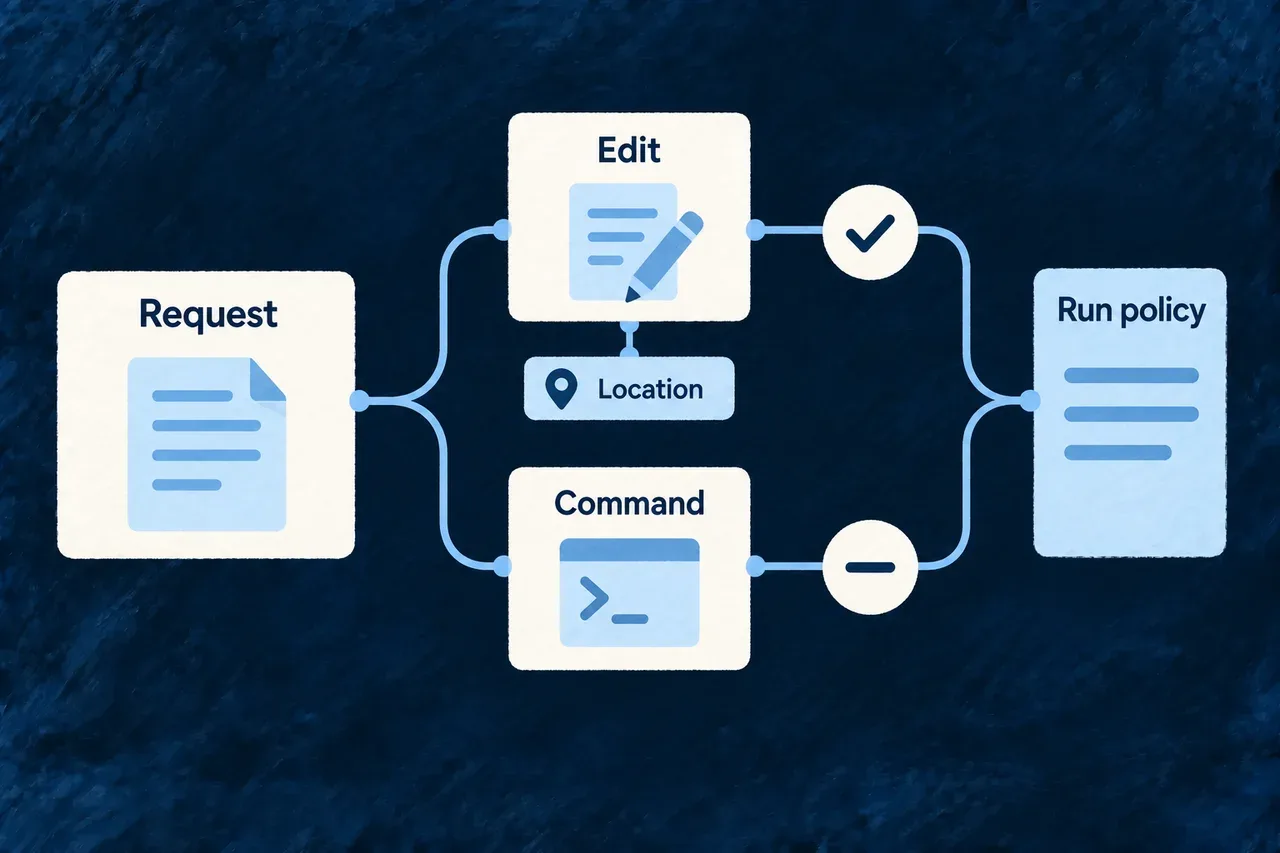
Choose what a run may approve
An agent’s permission mode should not be the only explanation of what it may do. Wildo gives a run an explicit policy and uses it to answer the agent’s permission requests.
You choose the kinds of work the run can approve. The task’s declared locations provide a separate check, and the run records the decisions made along the way.
Example — Allow file edits without approving commands
A focused change needs edits to declared source files. A reads-and-edits policy can approve those requests while refusing shell execution. A task that needs to run commands requires a different, deliberate choice.
For engineers
Set the ceiling in the ACP execution profile referenced by the coding-agent binding. This is a selected configuration fragment; the profile also needs the provider, runner, authentication and environment settings described in coding-agent setup.
executionProfiles: {
  'reviewed-edits-acp': {
    // Other required execution-profile settings belong here.
    permissionCeiling: AgentClientProtocol_PermissionCeiling.AUTO_ACCEPT_READS_AND_EDITS,
  },
},
AgentClientProtocol_PermissionCeiling is exported by @wildo-ai/external-connectors-models. The agent binding must name this profile. After changing application configuration, run wildo config sync and verify the companion is using the updated profile before dispatch.
Match the policy to the work
| Ceiling | Requests the client can approve |
|---|---|
PROMPT_ALWAYS | None in this unattended runner; it denies rather than opening an interactive prompt. |
AUTO_ACCEPT_READS | Declared read, search, fetch and think operations. |
AUTO_ACCEPT_EDITS | Declared edit, delete and move operations. |
AUTO_ACCEPT_READS_AND_EDITS | Both of those sets. |
UNRESTRICTED | All tool kinds, including execution and unclassified requests. |
These are tool-kind policies. Reads and edits are different sets, not successive levels of the same permission. An invocation override retains only operations admitted by both policies. Requesting reads from an edit-only profile therefore grants neither reads nor edits; it cannot turn the override into new access. Leaving the override absent retains the profile’s policy.
Follow an individual decision
The runner applies the ceiling first, then the task’s location predicate, then selects an acceptable one-time approval. The following selected source shows the separate scope and approval steps after the ceiling has passed:
if (options.isPermittedLocation && locations.some((path) => !options.isPermittedLocation!(path))) {
  record(false, ACPPermissionDecisionReason.LOCATION_OUT_OF_SCOPE);
  return { allowed: false };
}

const once = rawOptions.find((entry) => isRecord(entry) && entry.kind === 'allow_once');
if (isRecord(once) && typeof once.optionId === 'string') {
  record(true, ACPPermissionDecisionReason.ALLOWED_ONCE);
  return { allowed: true, optionId: once.optionId };
}
record(false, ACPPermissionDecisionReason.NO_SELECTABLE_OPTION);
return { allowed: false };
The runner does not select an allow_always option that could change later decisions. Its bounded decision record includes the declared tool kind, locations, offered options and result. Direct client filesystem writes also check the edit ceiling and the location predicate, even if the agent sends no permission request first. Read-only policies do not advertise client write support; attempts to use it are still refused and recorded.
Check whether the provider can participate
The provider contract declares whether the agent raises permission requests before mutation. Dispatch checks that declaration and the composed environment. A restrictive ceiling is refused when those guards cannot fire; a conditionally escalating provider needs its configuration pointer present in the child environment.
UNRESTRICTED deliberately permits that broader execution. It does not create a filesystem sandbox. An agent performing its own I/O without callbacks, or an allowed shell command declaring no locations, does not receive a per-file scope check from these permission decisions. Inspect the resulting changes and run warnings as well as the configured policy.
The host-side admission probe tests refusal against an actual filesystem result. Use the supported arguments shown by the installed CLI before evaluating a new adapter or configuration:
wildo acp probe --help
A provider declaration tells dispatch how to proceed; a probe checks the behavior behind it. Re-evaluate that behavior when the adapter or its host configuration changes.