
Work with Dynamics 365 records in your application
Dynamics 365 Customer Engagement keeps its data in Microsoft Dataverse, and that is what an application connects to. The application declares the environment once and reaches it as a registered Microsoft Entra application, never as one of its own users.
Read in place: a screen asks Dataverse when it opens. Copy kept current: a pipeline copies chosen columns and, on tables with change tracking, reads only the rows that changed or were deleted since its last pass. On other tables it can read the rows modified since the last pass.
Write back: a resource can create, change and delete Dataverse rows. Every row carries a version tag, and an update is sent with the tag the person was looking at, so Dataverse itself refuses a change made over someone else’s newer edit instead of silently overwriting it.
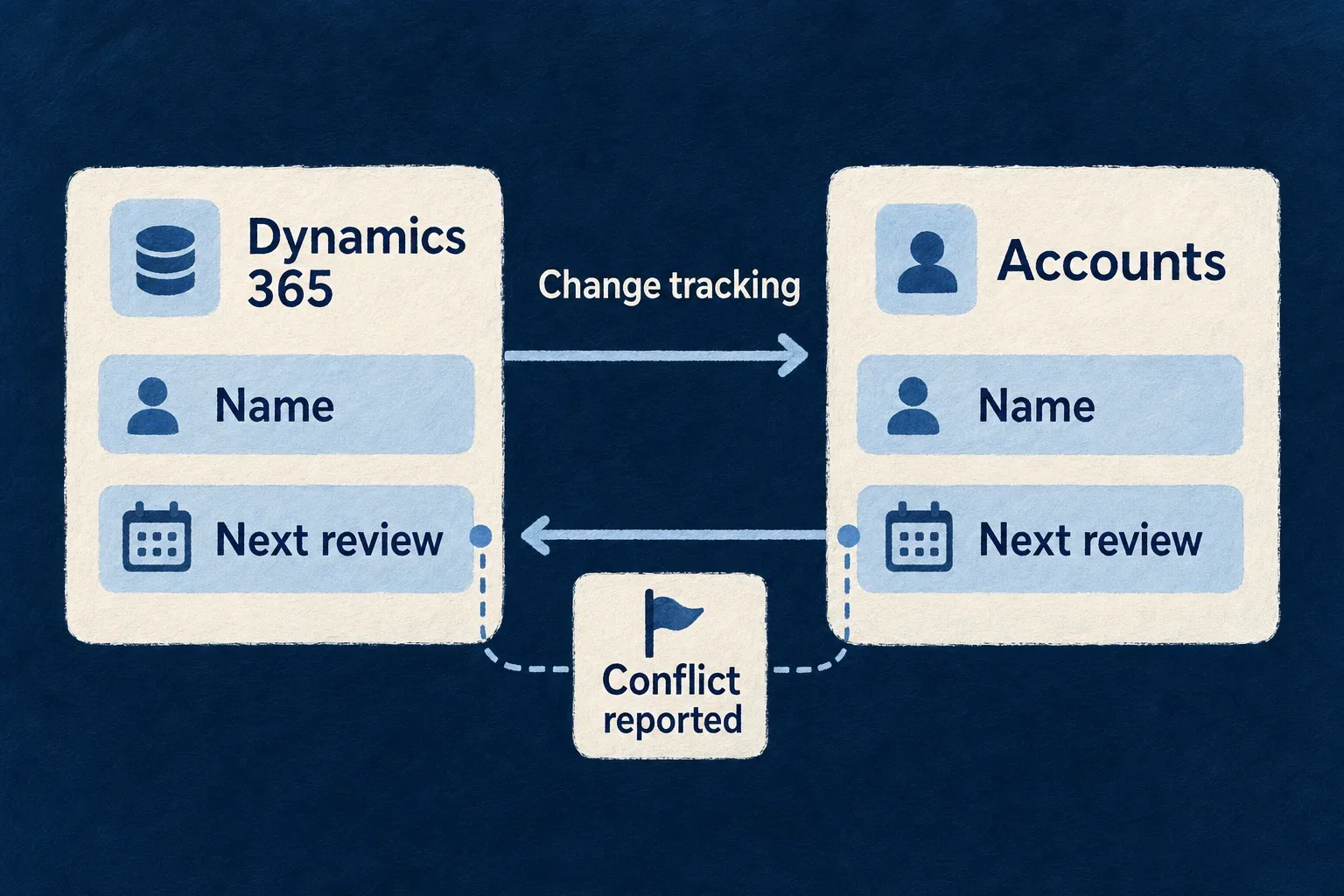
Two-way: because rows carry that tag, a single pipeline can keep a table edited both in Dataverse and in the application in step. Each field is declared as owned by one side or shared, and a field changed on both sides is resolved by the declared policy or reported for a person to decide.
Example — Account plans next to the CRM
An account-planning tool copies Dynamics 365 accounts every few minutes through change tracking. Planners edit the account’s next review date in the tool, and that field is sent to Dataverse; the account’s name stays Dataverse’s. If a salesperson changes the review date in Dynamics at the same time, the conflict is reported rather than settled by whichever write landed last.
For engineers
The vendor id is microsoft-dataverse, the name the Web API itself uses. An instance naming microsoft-dynamics-365 or microsoft-dynamics-crm is refused at startup with a message pointing at microsoft-dataverse, so one product never ends up with two descriptions. A design example:
systemsOfRecord: {
  crm: {
    vendor: 'microsoft-dataverse',
    dialect: HttpApiTransportDialect.ODATA,
    credential: { kind: SystemOfRecordCredentialKind.OAUTH2_CLIENT_CREDENTIALS_CERTIFICATE },
  },
},
The facet offers a client secret (OAUTH2_CLIENT_CREDENTIALS_SECRET) or a certificate (OAUTH2_CLIENT_CREDENTIALS_CERTIFICATE), so the instance names one. baseUrl is the environment’s versioned Web API root (https://<org>.crm<region>.dynamics.com/api/data/v9.2), not the organization URL. Under the certificate kind the environment supplies clientId, tokenUrl and the public certificatePem, from which the engine derives the thumbprint it puts in the assertion header, and the secret privateKeyPem.
Paging by continuation
The Dataverse Web API does not accept $skip, which is why it has a facet of its own rather than the generic OData one: an offset-paged list would serve its first page and be refused on the second. The engine follows @odata.nextLink, asks for a page size with Prefer: odata.maxpagesize, and appends the key to $orderby so that no row falls between pages. Reaching page N of a live list costs N requests and stops at a bound; a deep collection wants a filter.
Copy only what changed
The declaration below is taken from the engine’s incremental integration test, which runs it against the OData double on MongoDB and PostgreSQL. The destination schema and registration are omitted.
const accountsDeclaration = (incremental?: Record<string, unknown>): ExternalDataPipelineDeclaration => ExternalDataPipelineDeclarationSchema.parse({
  binding: {
    dialect: HttpApiTransportDialect.ODATA, system: 'dataverse', entityRef: 'accounts',
    keyFields: [{ localField: 'id', remoteField: 'accountid', codec: HttpApiKeyComponentCodec.STRING }],
    subjectRights: { posture: SystemOfRecordSubjectRightsPosture.NO_SUBJECT_DATA },
  },
  remoteKeyLocalField: 'remoteKey', population: ExternalDataDestinationPopulation.CLOSED, orphanPolicy: ExternalDataOrphanPolicy.DELETE,
  maxRowsPerRun: 100,
  ...(incremental === undefined ? {} : { scheduleCron: '*/5 * * * *', incremental }),
  mapping: [{ kind: ExternalDataMappingEntryKind.REMOTE_FIELD, remoteField: 'name', localField: 'name', required: true }],
});
const deltaDeclaration = () => accountsDeclaration({ mode: ExternalDataIncrementalExtractionMode.ODATA_DELTA_LINK, fullPassCron: '0 3 * * *' });
With ODATA_DELTA_LINK, each pass reads exactly the rows changed and removed since the last, applies the orphan policy to the removed keys only, and keeps the new delta link. Change tracking is enabled per table in Dataverse, and a pipeline on a table without it is refused at its first delta read, naming the cause. When Dataverse has expired the tracking position, the pass falls back to a full read and its run history says so. ODATA_MODIFIED_AT reads from the previous pass’s largest modifiedon with ge, so rows sharing an instant are re-read rather than skipped. A full pass still runs on fullPassCron. The test’s subject-rights posture describes its fixture; Dataverse accounts and contacts can hold personal data, so a real binding keeps the default posture, under which Dataverse answers for its own records.
Write with the row’s tag
A binding maps the row’s tag onto a local field and checks it on update. These two lines are condensed from the engine’s OData write test, whose binding maps the tag beside two business fields:
fieldMappings: [{ localField: 'rowVersion', remoteField: '@odata.etag' }],
writeConcurrency: { mode: HttpApiWriteConcurrencyMode.VERSION_CHECKED, versionField: 'rowVersion' },
The engine compares the caller’s version with the row it reads first, then sends PATCH with If-Match set to that same tag, so the check is atomic: a change landing in between is refused by Dataverse with 412, sent once and not retried. A row served without a tag is refused by name under VERSION_CHECKED. Under LAST_WRITER_WINS an update still carries If-Match: *, because Dataverse would otherwise re-create a row deleted in the meantime.