
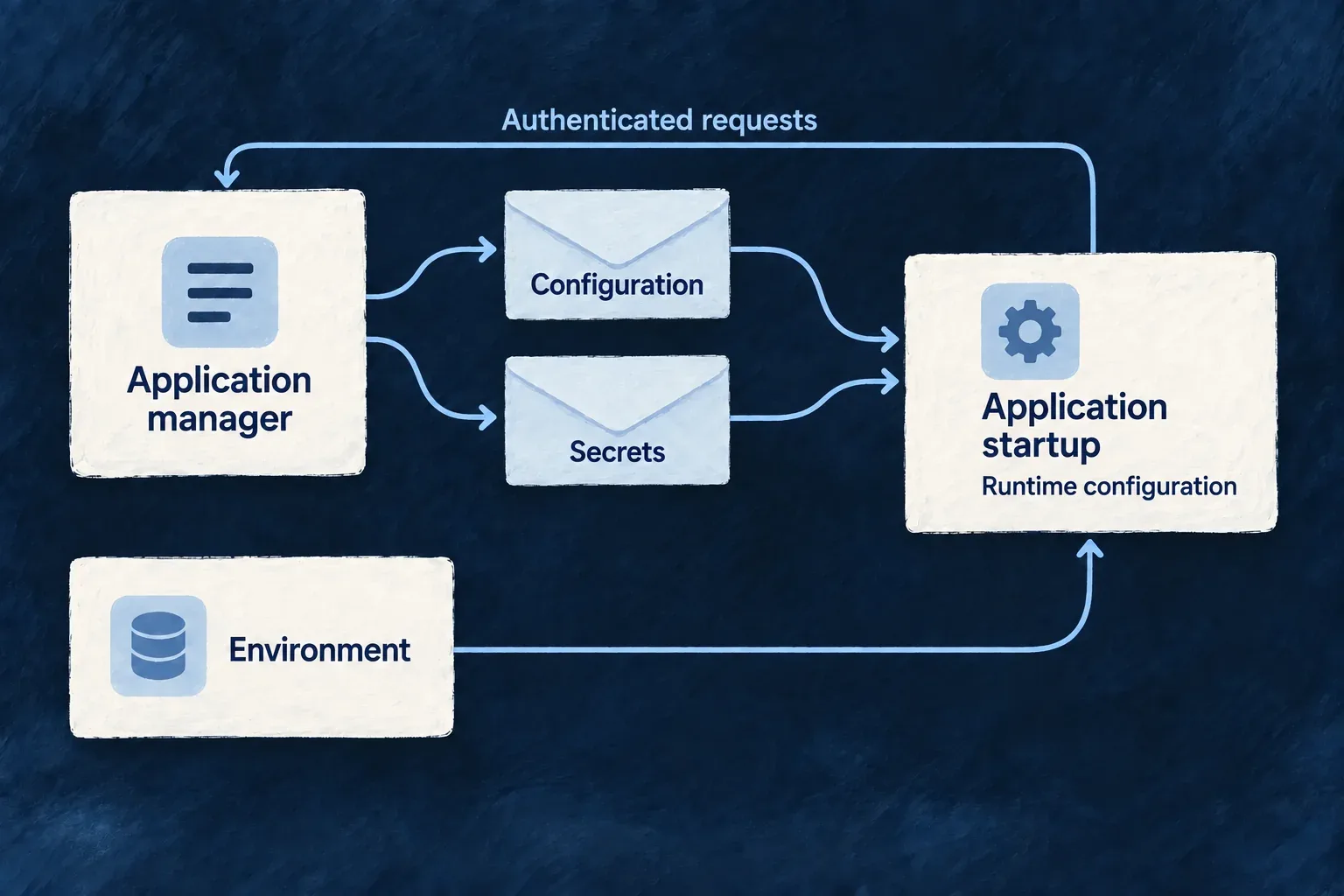
Give each application its own startup configuration
Each application resolves configuration for its own identity. Wildo combines environment connections with platform-managed metadata and credentials, then applies the application’s authored behavior.
Operators can update managed settings without rebuilding the application image. Running processes pick them up on their next start.
Example — Change an application's managed settings
An operator updates a registered application’s managed token policy. Its next startup receives that policy through the application manager. Another application’s configuration remains separately identified, and processes already running do not receive an automatic live update.
For engineers
| Source | Holds | Consumed when |
|---|---|---|
| Runtime environment | Application/service identity, platform URL and backing-service connections | Process startup |
| Platform metadata | Application identity, declared runtimes/providers/capabilities, public keys and token policy | Bootstrap fetch |
| Platform secret response | Credential material allowed for the calling identity | Separate authenticated fetch |
| Application source | Application-specific behavior and configuration | Configuration resolution |
Generate runtime files from the authored application and environment inputs. Do not maintain a second hand-written copy of platform metadata in each process. Bootstrap still requires environment material: the application has to know who it is, where the manager is and how to authenticate before it can ask for anything.
Author behavior in its owning file
| Authoring surface | What to declare | What stays elsewhere |
|---|---|---|
wildo.saas.config.ts | Application identity, services, modules, capabilities and providers | Runtime credentials and resolved database endpoints |
backend-api/src/saas-config.backend.ts | User-type authentication policy, passkey relying party, email sender, frontend login exposure and storage ceilings | Platform-managed JWT, runtime and database branches |
| Selected infrastructure environment | Operating environment and backing-service connections | Application-specific authentication policy |
For example, these selected fields from Wonder CRM’s backend-authored configuration describe its local passkey identity. The surrounding authentication settings remain required:
auth: {
  passkeyConfig: {
    rpName: 'Wonder CRM',
    rpId: 'localhost',
    maxPasskeysPerUser: 10,
  },
},
Use the deployed application’s real relying-party domain outside local development. The final configuration requires the user-type auth posture, passkey configuration and email.from; unresolved placeholders are rejected at startup. For a login request naming both a frontend service and user type, a missing or disabled frontendServices.<service>.usersManagement.<userType>.auth entry causes refusal. That check is scoped to requests carrying both values, not a claim that every authentication route behaves identically.
The backend configuration merger rejects changes to protected platform/runtime fields and validates the resolved configuration. These are enforced ownership boundaries, not simply file-organizing conventions. See passkey configuration for the authentication contract.
Authenticate the bootstrap before assembling configuration
This selected implementation from app-configuration-loader.backend.service.ts shows the application’s identity on the request and the separate data sources. Comments are omitted; these are loader internals, not application setup code to copy into a backend.
this.applicationEnvConfig = this.loadPlatformEnvironmentConfig();
this.serviceName = this.applicationEnvConfig.SERVICE_NAME;

this.axiosInstance = axios.create({
  baseURL: this.applicationEnvConfig.PLATFORM_APPS_MANAGER_URL,
  timeout: APPS_MANAGER_REQUEST_TIMEOUT_MS,
  headers: {
    [WildoHeaderKeys.CONTENT_TYPE]: 'application/json',
    [WildoHeaderKeys.SERVICE_ID]: this.serviceName,
    [WildoHeaderKeys.PLATFORM_SECRET]:
      this.applicationEnvConfig.PLATFORM_APPLICATION_PRIMARY_SECRET,
    [WildoHeaderKeys.APPLICATION_ID]:
      this.applicationEnvConfig.APPLICATION_ID,
  },
});

const appConfig = this.buildConfigFromEnv();

const appSecrets = await this.loadPlatformManagedSecrets();

const { appSlug } =
  await this.fetchAndMergeBootstrapConfigMetadata(appConfig);
Identity headers select and authenticate the caller; they are not a requested application switch. The bootstrap secret is credential material, never a value to paste into public examples. The timeout bounds each request.
The loader fetches reduced bootstrap metadata, not the entire application configuration. It validates responses against the managed contracts before merging their fields. Backing-service connection settings remain environment-owned. Application behavior is resolved from its authored source, while operator-owned service-auth token lifetimes retain their authority at signing.
Keep application-managed and platform-managed material separate
The stored configuration uses appManaged and platformManaged branches. Materialization combines the appropriate branches for the consumer rather than persisting a complete process-specific runtime object. The application-facing channel rejects attempts to mutate protected platform-managed secret branches.
Configuration and secrets travel through separate authenticated responses. A process cannot bootstrap simply because an HTTP response returned 200: required identity and key metadata must also parse correctly. Development retries are bounded; they accommodate startup ordering but do not establish a usable configuration when the final request still fails.
Derive different access from the same registration
| Runtime | Backing-service access derived from its declaration |
|---|---|
| Application backend | The application’s provisioned set |
| Minion | Its declared access; absent resourceAccess excludes data capabilities |
| Worker | No backing-service capabilities through this runtime-access resolver |
A present empty resourceAccess object differs from an absent declaration: it enters the minion data-capability branch. That topology allowance is not an unrestricted resource grant. Resource operations and credential minting still apply their own declaration checks.
Secret delivery removes shared principal identity lists. For non-backend callers it strips provider-derived credential paths before overlaying only that principal’s minted section, including when the section is absent. The backend exception is based on principal kind. One prepared registration therefore does not mean every process receives the same credentials. See per-runtime credentials.
Choose the bootstrap exchange the runtime needs
| Exchange | Caller and purpose | Result |
|---|---|---|
| Worker bootstrap | Authenticated request for a worker declared on the application | Worker metadata and public verification keys, including rotation material; not a signing private key |
| Storage session | Verified application/runtime caller within its allowed application or subresource scope | Short-lived, prefix-confined storage credentials; root storage credentials remain with the manager |
| Platform attestation | A minion principal with recognized stored platformAccess scopes, naming an allowed platform audience | A signed identity and scope statement limited to that audience; workers cannot request minion authority |
These exchanges are separate from ordinary configuration and secret loading. A worker does not need every exchange merely because they share a manager. Follow scoped storage sessions and per-runtime credentials for the detailed boundaries.
Publish token policy before restarting
For an existing local application, author both token lifetimes in its selected wildo.infra.local.config.ts. The values below are an example policy, not a recommendation for every application:
// Within the selected infrastructure configuration:
serviceAuth: {
  accessTokenExpirationMinutes: 22,
  refreshTokenExpirationDays: 9,
},
From that application’s workspace, refresh the selected environment snapshot, then register it:
wildo config sync --env local --domain config
wildo local init --register-only
The config sync step reloads the authored infrastructure file into config.json; registration-only reads that snapshot. Config sync also refreshes related deployment artifacts and can prepare or register application targets. Registration sends serviceAuth to the application manager. After finding or creating the application’s managed record, initialization reconciles those two JWT lifetimes even when no other configuration changed. This policy reconciliation preserves the other stored settings and does not require broad initialization override. Registration can also reconcile other supplied declarations; it is not a token-policy-only command.
| Step | What to verify |
|---|---|
| Author | The selected infrastructure environment contains the intended serviceAuth values |
| Register | Initialization completes for the intended application; its stored platformManaged.jwt contains both values |
| Start the affected runtime | Bootstrap retrieves the policy into jwt.accessTokenExpirationMinutes and jwt.refreshTokenExpirationDays |
Omitting the entire serviceAuth block preserves an existing policy during ordinary registration. A present block applies schema defaults to omitted members, so author both values when you intend a complete explicit policy. First registration uses defaults when no policy is supplied. Broad override retains its wider reset behavior and is unnecessary for this change.
Already-running processes keep their current snapshot. Restart or redeploy the affected runtime through its normal lifecycle after the registration succeeds. This does not migrate data, restart services automatically, or retroactively change the expiration claim of tokens already issued.