
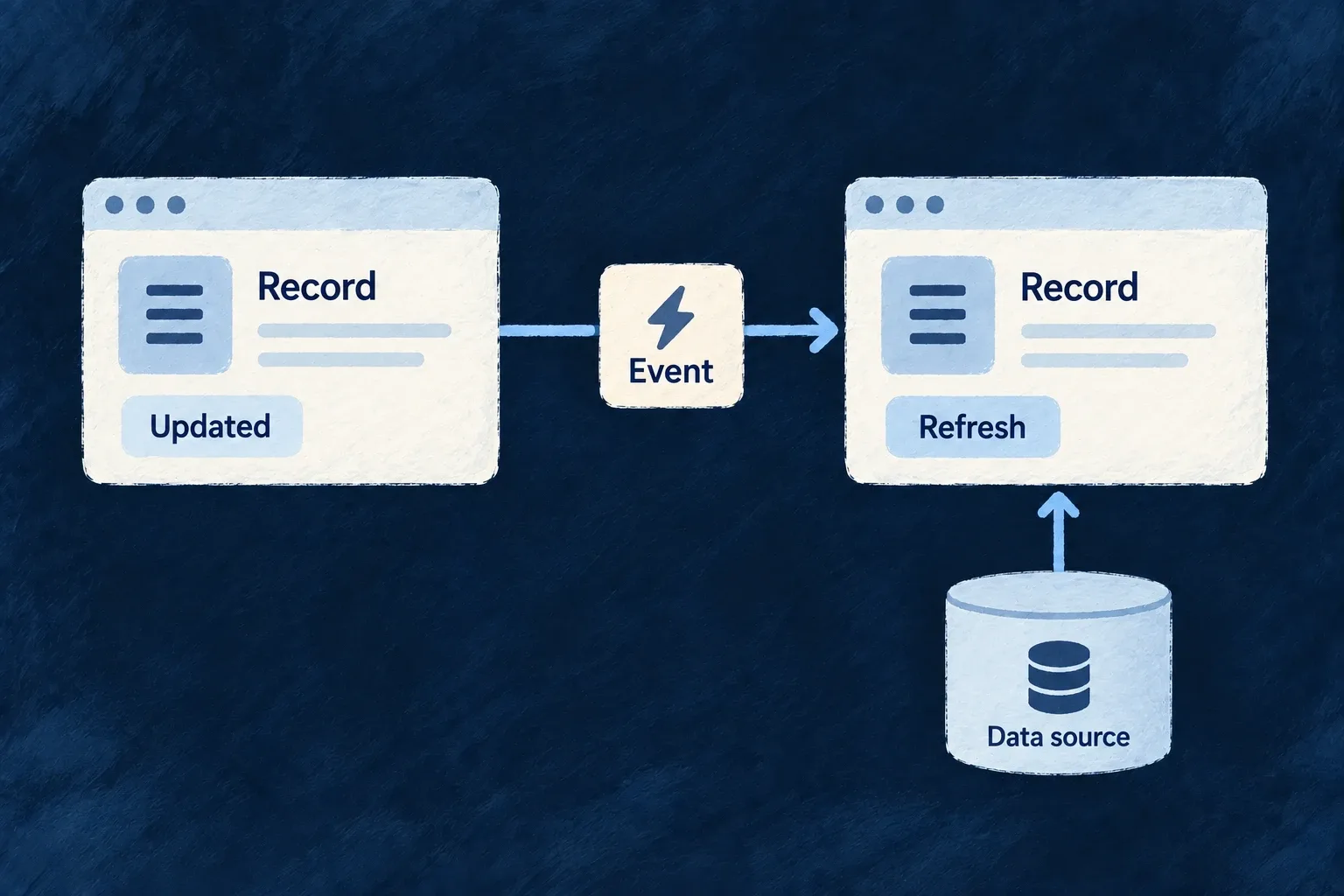
Keep open views aware of changes
When records change, Wildo can notify connected views so they refresh the affected information. Shared live-update handling connects backend operations with lists and record screens.
A change notification is separate from a message shown to a person.
Example — See a colleague’s update
One person changes a record. Another person’s subscribed view receives the update signal and refreshes its data through the normal application path.
For engineers
Use the standard live-update consumers
The backend websocket service and notification dispatcher publish resource events to their applicable rooms. The frontend shell installs WebSocketEventBridge; resource-manager consumers also use their dedicated bridge for synchronization and authoritative refetch decisions.
The general bridge maps an update into refresh context:
Selected from WebSocketEventBridge.tsx; surrounding module configuration is omitted.
    const unsubUpdated = on<WS_ResourceUpdatedPayload>(
      CoreWebSocketEvent.RESOURCE_UPDATED,
      (payload) => {
        // RESOURCE_UPDATED always triggers generic refresh fan-out here so
        // non-RMM consumers still invalidate list/read surfaces. Resource-room
        // sync replay and authoritative refetch decisions remain owned by
        // RMMWebSocketBridge.
        emitRefreshPayloads({
          resourceType: payload.resourceType,
          resourceIds: payload.deliveryTarget === WebSocketResourceDeliveryTarget.SCOPE_ROOM_NOTIFICATION
            ? payload.affectedIds ?? []
            : [payload.resourceId],
          contextResourceIdentifiers: payload.contextResourceIdentifiers ?? {},
          shouldEmitReadRefresh: payload.deliveryTarget === WebSocketResourceDeliveryTarget.SCOPE_ROOM_NOTIFICATION
            ? (payload.affectedIds?.length ?? 0) > 0
            : Boolean(payload.resourceId),
        });
      }
    );
The delivery target determines whether the payload identifies affected IDs in a scope room or one resource. Context identifiers accompany the refresh so a consumer can address the right view. A custom data screen needs to consume the shared refresh events or resource-manager contract; merely opening a socket is not enough.
Subscribe a custom list and release its listener
For a custom list outside ResourceMutationManager (RMM) ownership, invalidate the list’s own authorized query when its matching refresh event arrives. This complete illustrative hook uses the public event bus. Its caller supplies the active operation context and a stable, synchronous cache-invalidation callback:
import { useEffect } from 'react';
import {
  FrontendEvents,
  useEventBus,
  type FrontendEventPayloads,
} from '@wildo-ai/saas-frontend-lib';

type RefreshContext = FrontendEventPayloads[FrontendEvents.RESOURCE_REFRESH];

export function useCustomListRefresh(
  context: RefreshContext,
  invalidate: () => void,
) {
  const { on } = useEventBus();
  useEffect(() => {
    const off = on(FrontendEvents.RESOURCE_REFRESH, invalidate, (event) => {
      const sameOperation = event.resourceType === context.resourceType
        && event.operationIdentifier === context.operationIdentifier
        && event.variantType === context.variantType
        && event.variantKey === context.variantKey
        && !!event.isBulkOperation === !!context.isBulkOperation
        && !!event.isOperationDefault === !!context.isOperationDefault;
      const expected = context.contextResourceIdentifiers;
      const actual = event.contextResourceIdentifiers;
      return sameOperation
        && Object.keys(expected).length === Object.keys(actual).length
        && Object.entries(expected).every(([key, value]) => actual[key] === value);
    });
    return off;
  }, [on, context, invalidate]);
}
Use the normalized context of the active list, including its organization/parent identifiers; do not match only the resource name across workspaces. Call this hook unconditionally in the mounted custom list under the normal event-bus provider. Its callback marks that list query stale, and the query’s existing reader, loading and error handling fetch the authorized result. Context changes release the old listener; unmount releases the current one.
This consumer does not create a socket room subscription. The standard shell/socket services must already be connected and subscribed to the applicable authorized scope. A custom resource-room subscription needs its corresponding join and leave lifecycle as well. For RMM-managed screens, retain RMMWebSocketBridge and its synchronization/refetch rules instead of installing a second state owner.
Check with two connected views in the same scope: an update should invalidate the matching custom query, a different scope should not, and leaving the view should release its listener. Personal message preferences do not disable this data-refresh contract.
Keep the backend authoritative
A frame signals that data changed; the normal read path still supplies the authorized data. Do not treat a notification payload as permission to reveal every field or assume it replaces a complete refetch. Deletion, updates and active editing have distinct event meanings.
Verify the view’s subscription and refresh behavior for its actual scope. The transport does not establish that every custom screen will refresh without being connected to these consumers.