
Send each person the right language
Keep one email layout with separate language files. Wildo resolves recipient language and available labels, then falls back through configured alternatives when an exact locale is unavailable.
Example — Use French for a Canadian recipient
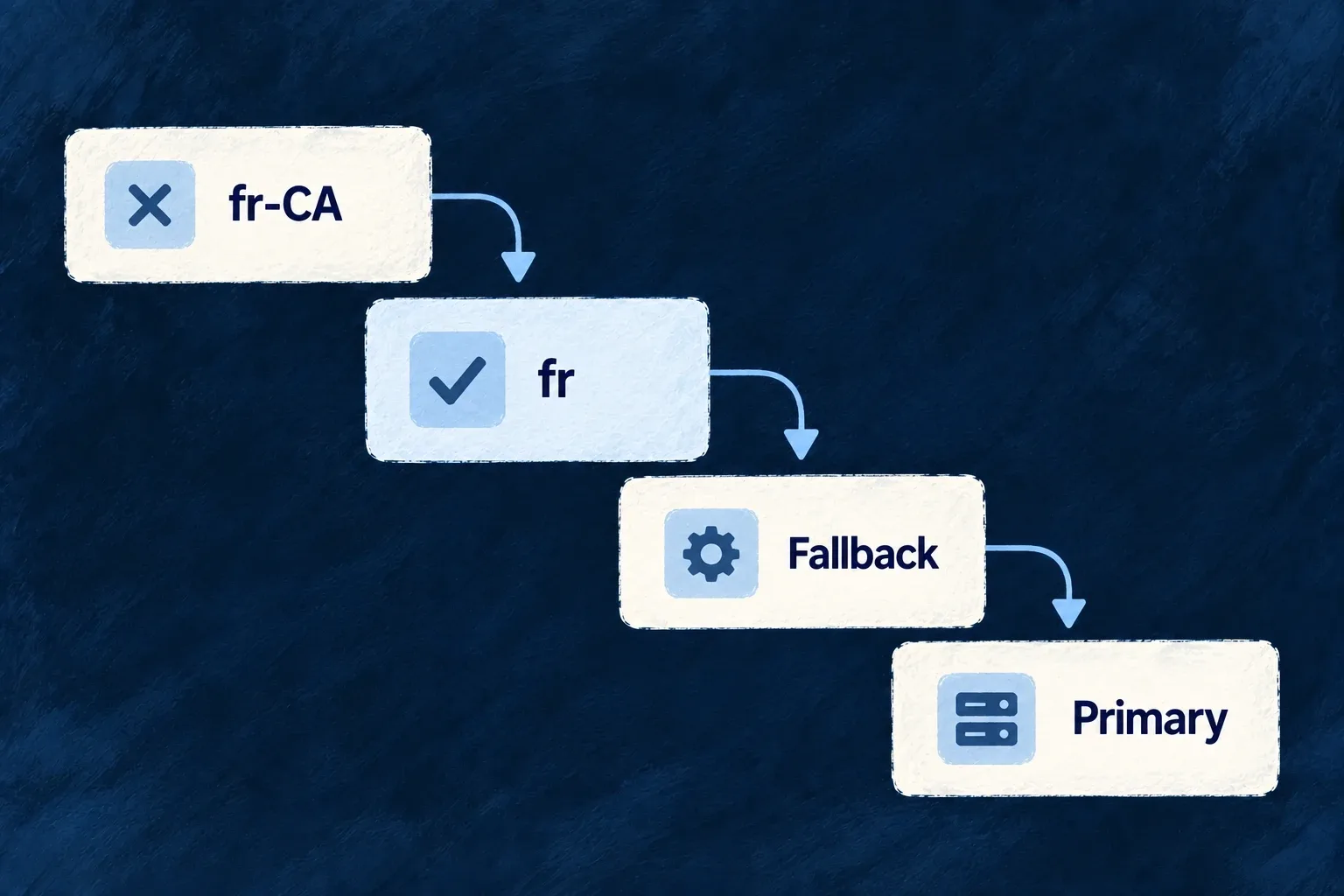
A recipient requests French Canadian. When that exact label file is absent, the registry can use the available French labels before moving to configured fallback languages.
For engineers
Pair the layout with locale labels
Author labels.<locale>.ts beside template.tsx and export the typed labels. Register the compiled template and labels through emailTemplateDefinitions. Keep the subject, button and body wording in labels so they follow the same locale decision.
The current registry builds this fallback order:
Selected from email-template-registry.backend.service.ts; surrounding module configuration is omitted.
    const candidates = [locale];
    const baseLanguage = locale.includes('-') ? locale.split('-')[0] : null;
    if (baseLanguage && baseLanguage !== locale) {
      candidates.push(baseLanguage);
    }
    if (fallbackLocale && !candidates.includes(fallbackLocale)) {
      candidates.push(fallbackLocale);
    }
    if (!candidates.includes(primaryLocale)) {
      candidates.push(primaryLocale);
    }
It tries the requested locale, its base language, the configured fallback locale and finally the primary locale, without duplicates. If no entry resolves, it reports the missing template rather than silently loading a database copy.
Resolve the recipient, not the person causing the event
The operation dispatcher reads each recipient’s language preferences and passes the selected locale to the sender. A customer receiving a notification should not inherit an administrator’s interface language. Direct email-by-address notifications have no user preference record and use application defaults.
The companion translation workflow writes additional label files. Review meaning and placeholders after translation, then preview the actual template in the target locale. Translation does not create the business trigger or change the message’s recipient policy.
Use registration diagnostics before a fallback hides a gap
When the template registry initializes, it checks required system references in the configured primary language. For enabled secondary languages, it checks every registered reference, including resource-operation templates. A base-language file counts: labels.fr.ts covers a request for fr-CA. Falling all the way back to the primary language does not count as translated coverage.
| Diagnostic | Author action |
|---|---|
| Missing system reference in the primary locale | Add that template/label entry and check backend registration |
| Some references uncovered in an enabled locale | Use the named references to add or translate their label files |
| Entire catalogue uncovered in an enabled locale | Add language coverage across the template directories |
For the French-Canadian example, author labels.fr.ts beside the existing template with the same exported label keys. Regenerate/compile the application’s email files through its normal development workflow, inspect the next registry-initialization diagnostics, then preview that template with fr-CA. Confirm the subject, button and body use French and that placeholders still interpolate correctly.
These diagnostics report missing coverage; they do not block every send or create translations. A working primary-language fallback can keep delivery possible while still leaving the recipient with the wrong language.