
Reshape imported values without writing code
A pipeline copies ERP fields into the application’s own records, and the value the application needs is not always the value the ERP holds. A status code must become one of the application’s own statuses, a display name must be built from two fields, an amount must be converted at an agreed rate. These are declared beside the mapping, not written as code.
Besides copying a field, filling a constant and turning an ERP link into a real local link, a mapping can declare four expressions: a code map, a concatenation, arithmetic (multiply, add, round) and a choice made on one field’s value. Each names the ERP fields it reads and the local field it writes. Nothing runs that the declaration does not show, so every derived value can be reviewed in one place.
The declaration is checked when the application starts. An expression pointed at the wrong kind of field, a status that no longer exists, or a result that could be empty where the field does not allow it stops the start, naming the entry, instead of failing on every record of every run. The fields an expression reads are requested from the ERP like any mapped field, so a field the ERP does not have fails the run loudly rather than leaving every record empty.
A record whose value cannot be derived, such as a status code nobody mapped, is rejected on its own and reported, and its previous version stays. Changing an expression makes the next pass re-read every record, so the new rule reaches records that did not change in the ERP.
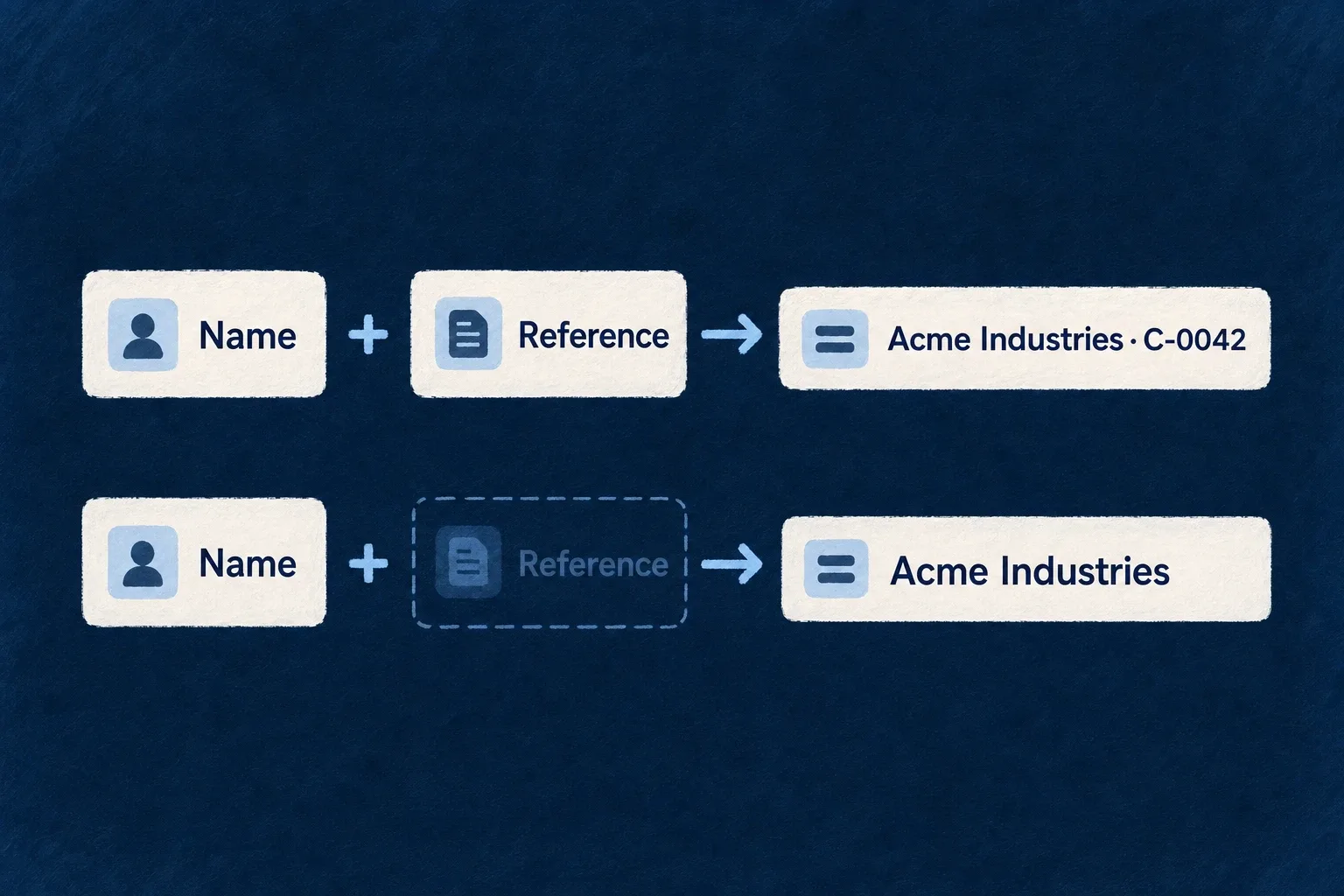
Example — Show a client's name with its finance reference
Wonder Todos declares a pipeline that copies client accounts from Odoo. Two clients can share a trading name and are told apart only by the reference finance files them under, so the name people see is the client’s name followed by that reference, for example “Acme Industries · C-0042”. A client with no reference shows its name alone, never with a trailing separator.
For engineers
The following is the mapping of Wonder Todos’ externalCustomers pipeline, with comments omitted. The enums come from @wildo-ai/saas-models/external-data.
mapping: [
  {
    kind: ExternalDataMappingEntryKind.CONCATENATION,
    localField: 'name',
    parts: [
      { kind: ExternalDataConcatenationPartKind.REMOTE_FIELD, remoteField: 'name' },
      { kind: ExternalDataConcatenationPartKind.REMOTE_FIELD, remoteField: 'ref' },
    ],
    separator: ' · ',
  },
  { kind: ExternalDataMappingEntryKind.REMOTE_FIELD, remoteField: 'email', localField: 'email' },
],
A concatenation needs at least two parts, at least one of them an ERP field, and writes a string. A part whose value is absent or empty, including Odoo’s false, is dropped with its separator. When no ERP part has a value the result is absent and lands as null, or rejects the record when the entry declares required: true.
The other expressions
The engine’s integration test declares an arithmetic conversion and a conditional label like this (excerpt):
{ kind: ExternalDataMappingEntryKind.ARITHMETIC, remoteField: 'amount', localField: 'amountEur', factor: 0.92, decimalPlaces: 2 },
{ kind: ExternalDataMappingEntryKind.CONDITIONAL, remoteField: 'is_company', localField: 'kindLabel',
  cases: [{ equals: true, then: { kind: ExternalDataConditionalOutcomeKind.CONSTANT, constant: 'Company' } }],
  // As the factory resolves it for a string target on an Odoo source.
  otherwise: { kind: ExternalDataConditionalOutcomeKind.REMOTE_FIELD, remoteField: 'function', coercion: ExternalDataFieldCoercion.ODOO_FALSE_AS_NULL } },
A code map, shown here as a design example with an application enum InvoiceStatus, maps every known code and states what an unknown one does:
{
  kind: ExternalDataMappingEntryKind.ENUM_MAP,
  remoteField: 'state',
  localField: 'status',
  values: [
    { remoteValue: 'draft', localValue: InvoiceStatus.DRAFT },
    { remoteValue: 'posted', localValue: InvoiceStatus.POSTED },
  ],
  unmapped: { policy: ExternalDataUnmappedValuePolicy.USE_DEFAULT, localValue: InvoiceStatus.OTHER },
},
| Kind | Writes | Notable rules |
|---|---|---|
ENUM_MAP | a member of a local enum | each code mapped once; an unknown code rejects the record unless unmapped declares USE_DEFAULT |
CONCATENATION | a string | absent parts dropped with their separator; literals alone are refused |
ARITHMETIC | a number | remote × factor + offset, optional decimalPlaces; a factor of 0, or a copy with no change, is refused; an integer field requires decimalPlaces: 0 |
CONDITIONAL | the field’s type | cases compared exactly, first match wins, otherwise required; an outcome is a constant or another ERP field |
REMOTE_REFERENCE | a local foreign key | resolved after the load, so order and self-references do not matter |
An open function slot (transform: (row) => value) is refused: every entry is strict, and an unknown key fails the parse rather than being silently dropped.
Turn an ERP link into a local link
A REMOTE_REFERENCE entry reads an Odoo many-to-one or an OData navigation key and writes the local id of the target’s own copy: another pipeline destination, or a read-through resource, on the same system of record. Resolution runs after the load, so a child read before its parent, and a record pointing at itself, both resolve. A target that is not loaded yet leaves the field empty and the reference pending, retried at the end of every later run (LEAVE_PENDING, the default), or rejects the record (REJECT_ROW).
Which pipelines can use them
Expressions derive a local value from ERP values and have no inverse. An inbound pipeline loads them, a two-way pipeline loads them as fields only the ERP owns, and an outbound pipeline cannot send them.