
Connect messages to business actions
Declare who should hear about an action and how they should hear it alongside the action itself. Wildo resolves recipients and dispatches the configured notification after the operation.
An on-screen confirmation, a live message to colleagues and an email can serve different people without duplicating the business action.
Example — Tell the creator and assignee
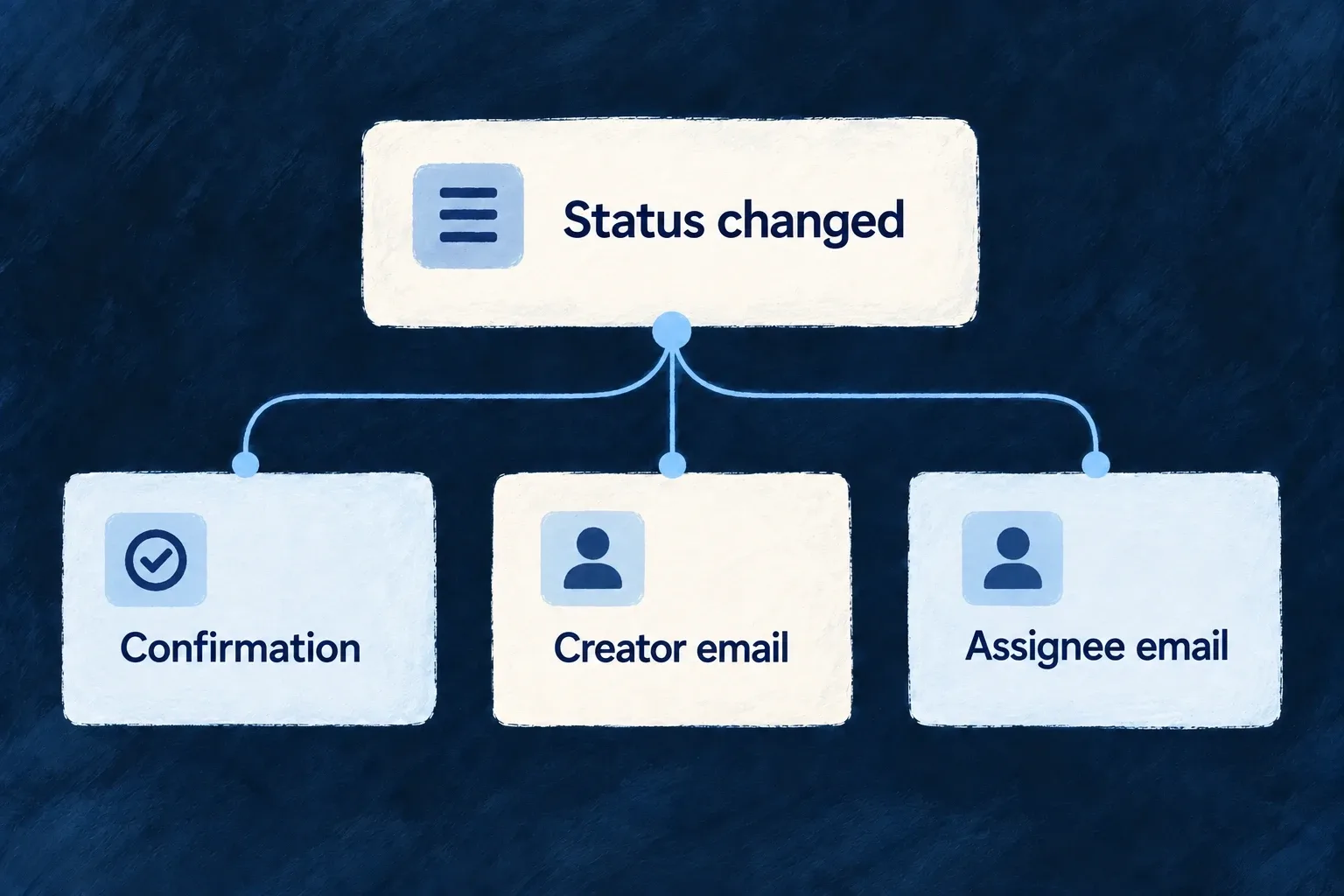
When a task changes status, its creator and assignee receive their own email notification while the person making the change sees a confirmation.
For engineers
Put recipient intent on the operation
userNotifications belongs to the resource operation configuration. Targets can name the initiator, organization users or a selected user list. Wonder Todos’ change-status operation contains these two distinct custom email targets:
Selected from todos.resources-config.ts; surrounding module configuration is omitted.
        {
          target: CoreUserNotificationTarget.USERS_CUSTOM,
          channel: CoreUserNotificationChannel.EMAIL,
          customNotificationRef: 'notify-creator', // Required: distinguishes from 'notify-assignee'
          userIdsSelector: ({ currentObject, objectContext, initiatorIds }) => {
            return [ currentObject.createdByUserId ];
          }
        },
        {
          target: CoreUserNotificationTarget.USERS_CUSTOM,
          channel: CoreUserNotificationChannel.EMAIL,
          customNotificationRef: 'notify-assignee', // Required: distinguishes from 'notify-creator'
          userIdsSelector: ({ currentObject, objectContext, initiatorIds }) => {
            return currentObject.assignedToUserId ? [ currentObject.assignedToUserId ] : [];
          }
        }
The selector returns recipient user IDs from operation context. Distinct customNotificationRef values disambiguate repeated targets and their template references. Register templates matching those references; declaring an email target without its content is not a complete setup.
Give each declaration its registered content
The factory generates notification identities; the email resolver combines resource, operation, optional variant, target and custom reference. For the existing todos / change_status operation, these are the actual references:
| Declaration | Template reference |
|---|---|
| Creator, default variant | email.todos.change_status.users-custom_notify-creator |
| Assignee, default variant | email.todos.change_status.users-custom_notify-assignee |
Creator, admin variant | email.todos.change_status.admin.users-custom_notify-creator |
Assignee, admin variant | email.todos.change_status.admin.users-custom_notify-assignee |
The default creator template lives at backend-api/src/modules/tasks-manager/emails/resources/todos/change_status.users-custom_notify-creator/template.tsx, with its labels.en.ts alongside it. The other references have matching directories. Keep operation identifiers such as change_status intact; a URL spelling is not a template identity.
This is the complete existing scanner in emails/module-email-template-definitions.ts:
import {
  scanEmailTemplateDirectory,
  type EmailTemplateDefinition,
  type EmailTemplateDefinitionsMap,
} from '@wildo-ai/saas-backend-lib';

const moduleEmailTemplates = await scanEmailTemplateDirectory<EmailTemplateDefinition>({
  importMetaUrl: import.meta.url,
  subdir: 'resources',
  keyFromPath: (rel) => {
    const dotted = rel.replace(/\//g, '.');
    return `email.${dotted}`;
  },
});

export const moduleEmailTemplateDefinitions =
  moduleEmailTemplates satisfies EmailTemplateDefinitionsMap;
The module’s emails/index.ts exposes the map as emailTemplateDefinitions; its backend module contributes that property to the existing module registry. The normal compiler publishes the template and label JavaScript before startup scans them. Add files to that owning module rather than creating another global registry. Provider selection supplies the complementary sender and deployment setup.
On a successful status change, the selectors resolve the creator and current assignee from the committed task. An unassigned task produces no assignee recipient. Each email uses its own resolved reference and recipient locale. Inspect the rendered message and sender outcome; an email declaration is not itself proof of provider delivery.
Follow the configured channel
The factory preserves the declarations and the operation pipeline invokes the notification dispatcher. Email uses the template registry and provider, websocket messages reach connected clients, and FRONT_END_SUCCESS is handled by the frontend. Recipient policy and optional conditions are evaluated by the dispatcher.
Treat notifications as consequences of the business action, not as its authorization decision. A failed message is logged without turning a completed action into a rollback. For links that authorize later work, use the token-backed operation contract rather than constructing an unrelated token inside a template.