
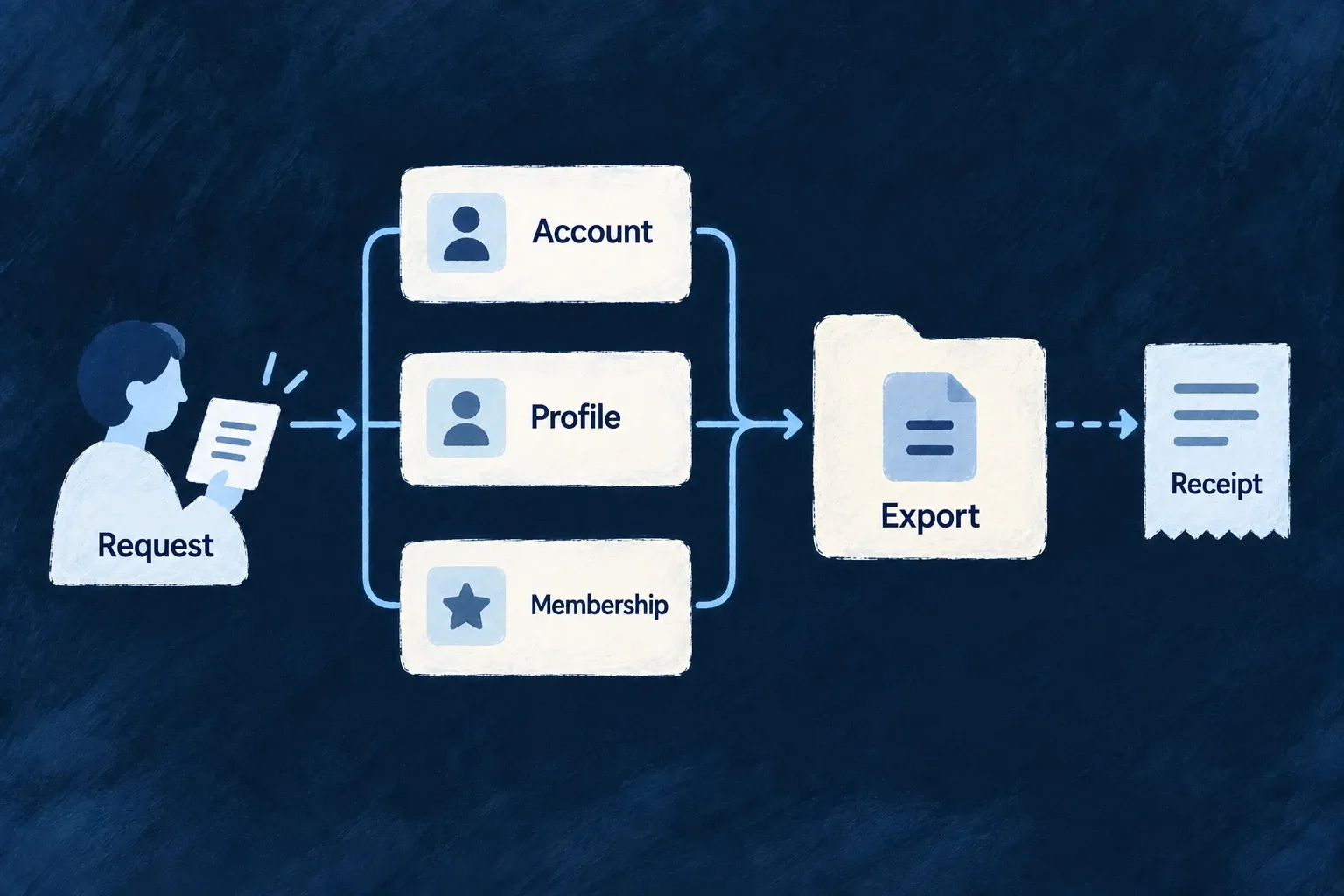
Answer a person’s data request across your application
A person’s information can span an account, a profile, memberships and records created about them. Wildo follows the declared relationships to assemble a data bundle instead of leaving the application to remember each table.
Access and portability are separate requests. The chosen purpose controls the selection, and a report explains what was included or withheld.
Example — Respond to an account holder
An account holder requests their information. The application verifies the request, asks Wildo for an access bundle and delivers it through a protected channel. A portability request uses the narrower purpose against the same resource model.
For engineers
The backend SystemAccessService.exportSubjectAsSystem takes explicit subject IDs and a SubjectExportPurpose. Use it from the application’s verified request workflow; receiving, authorizing and delivering the request remain application responsibilities.
Every participating resource needs an explicit systemAccessPolicy.exportSubject decision. The subject also needs system READ. The following actual Wonder Todos declaration makes draft notes exportable and gives their fields a default provenance; surrounding operation declarations are omitted:
Source: draft-notes.resources-config.ts (selected excerpt).
    resourceIdentifier: TasksManager_ResourceType.DRAFT_NOTES,
    resourceFieldIdentifier: TasksManager_ResourceFieldIdentifier[TasksManager_ResourceType.DRAFT_NOTES],
    resourceRelationships: resourcesRelationships,
    isSystemResource: false,
    isAnonymizable: true,
    transpositionPolicy: ResourceTranspositionPolicy.ADD,
    // assurance-control: WILDO.PRIVACY.SUBJECT_DATA_EXPORT — authenticated draft notes are subject-owned data and must be available to the fail-closed export sweep.
    systemAccessPolicy: { exportSubject: ResourceSystemAccessMode.ALLOWED },
    portabilityPolicy: { defaultProvenance: DataPortabilityProvenance.SUBJECT_PROVIDED },
Call exportSubjectAsSystem(resourceType, subjectIds, purpose, options) with ACCESS_ART_15 or PORTABILITY_ART_20. Supply the appropriate scopeContext where the resource is scoped. The result separates slices, which contain personal data, from report, which describes the selection. Keep the values out of ordinary logs.
Before collecting rows, the orchestrator checks participating-resource declarations and, for portability, field provenance. An absent export decision refuses collection rather than silently omitting that resource. An explicit FORBIDDEN child is excluded with an explanation; forbidding the subject itself refuses the bundle. Backend-only and write-only fields are withheld and named in the report.
The internal scan supports resources without a public LIST operation while still applying retention hiding. Export is not the retained-data review door: an already-erased hidden row stays hidden. Review the report before delivery and implement any controller-reviewed disclosure outside this automated selection deliberately.
Select relationships before selecting fields
The orchestrator examines the subject’s declared neighboring relationships, using the original subject IDs. This is not an unrestricted recursive walk through everything reachable from a record.
| Relationship to the subject | Access selection | Portability selection |
|---|---|---|
| Dependent rows owned by the subject | Included before resource/field policy checks | Included before provenance filtering |
| Non-owned rows whose foreign key points to the subject | Included as records concerning the subject | Excluded as non-subject-provided rows |
| Non-owned rows that do not point to the subject | Excluded | Excluded |
| Disabled relationship | Excluded | Excluded |
For example, a dependent note and an independently owned record referring to its author have different selection contracts even if both contain the same user ID. Relationship semantics decide the edge; resource permission and field provenance then decide what may be disclosed.
The actual Wonder Todos user-to-draft-note declaration demonstrates the owned case. Selected source from tasks-manager.relationships.ts, with comments omitted:
createResourcesRelationship(
  CoreResourceType.USERS, TasksManager_ResourceType.DRAFT_NOTES,
  ResourceRelationshipCardinality.ONE, ResourceRelationshipCardinality.MANY,
  {
    nature: RelationshipNature.COMPOSITION,
    isPrimaryScope: true,
    foreignKeyField: 'userId',
    parentResourceRequirement: ResourceParentResourceRequirement.OPTIONAL,
    accessScopeStrategy: ResourceRelationshipAccessScopeStrategy.REQUIRES_CONTEXT,
    childOperations: { lifecycle: { onParentDelete: { enabled: true, mode: ChildLifecycleMode.IMMEDIATE } } },
    contextPolicy: {},
  }
),
COMPOSITION resolves to dependent ownership. Export includes that edge before its resource/field policies; the parent-delete declaration separately governs erasure and does not determine portability field provenance.
Usage excerpt inside the application’s verified request handler, with its resolved service, subject type, IDs and scope:
const bundle = await systemAccessService.exportSubjectAsSystem(
  subjectResourceType,
  verifiedSubjectIds,
  SubjectExportPurpose.ACCESS_ART_15,
  { scopeContext },
);

const selectionReport = bundle.report;
const personalDataSlices = bundle.slices;
Inspect the report’s exclusions before protected delivery of the slices. An empty slice alone does not explain whether there were no matching rows, an excluded relationship or a withheld field. Do not write personal-data slices to application logs.